

Your YouTube impressions click-through rate (CTR) is one of the most powerful metrics you can track. It’s simply the percentage of people who see your video thumbnail (that’s an impression) and are compelled enough to click on it.
Think of it as the first handshake with a potential viewer. A good one tells the algorithm your content is worth showing to more people.
What YouTube Impressions Click-Through Rate Really Means
Let’s use an analogy. Imagine your video thumbnail is a digital billboard on a super busy highway. Every single car that drives by and lays eyes on it counts as one impression.
Now, when a driver is so intrigued by your billboard that they actually pull over to check it out? That's a click. Your YouTube CTR is just the percentage of drivers who decided to stop.
This single number is that first, critical connection between your video and a new viewer. A high CTR tells the YouTube algorithm, "Hey, people who see this video want to watch it." This signal is gold, encouraging YouTube to show your video to an even wider audience and creating a snowball effect of growth.
On the flip side, a low CTR signals that your packaging—your title and thumbnail—just isn't hitting the mark. No matter how incredible the video content is, a low CTR will limit its reach from the get-go.
The Basic Formula for CTR
Calculating your CTR is refreshingly simple. Here's the formula:
CTR = (Total Clicks / Total Impressions) x 100
So, if your video thumbnail racks up 10,000 impressions and gets 500 clicks, your CTR is a solid 5%. This little number instantly tells you how well your title and thumbnail are working together.
Of course, CTR is just one piece of the puzzle. Understanding the full range of video performance metrics gives you a much clearer picture of your channel's overall health.
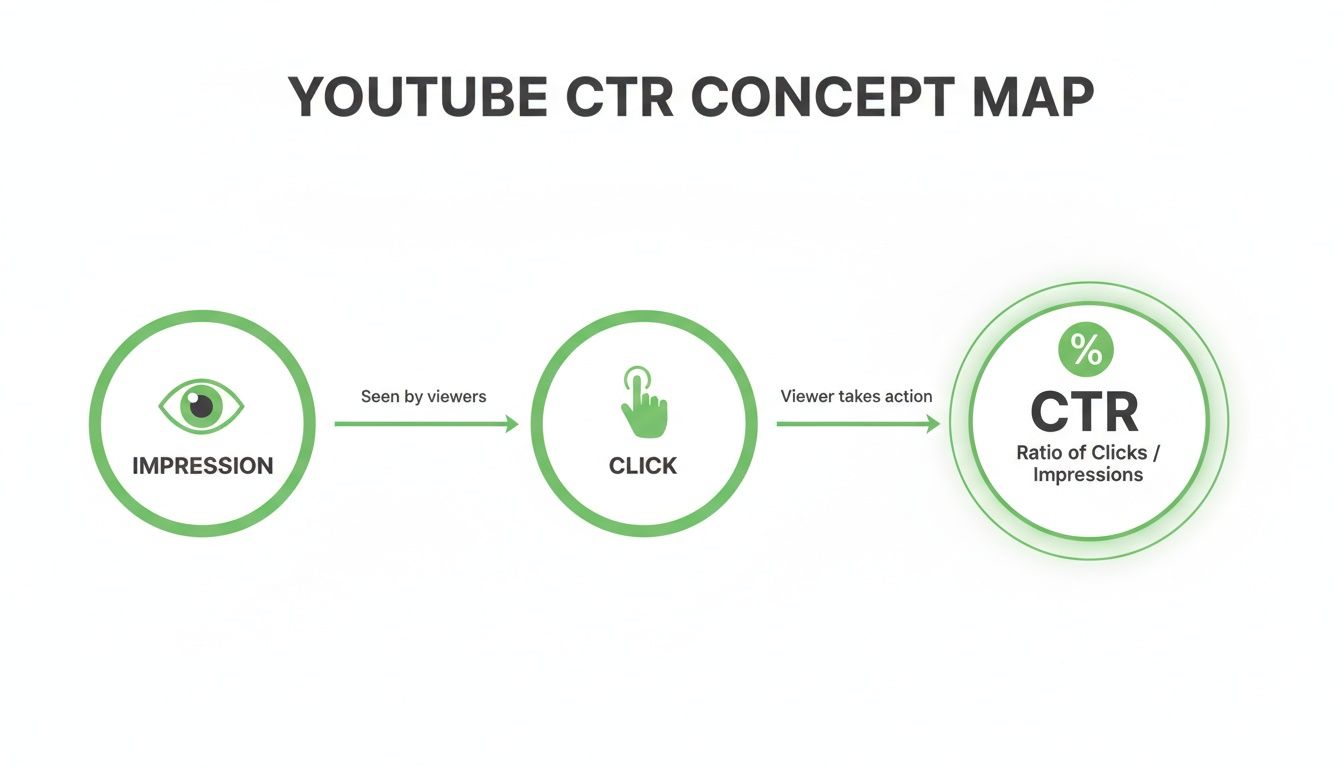
This visual breaks it down perfectly, showing how CTR acts as the essential bridge between getting seen and getting watched.
To help you get a quick handle on these concepts, here's a simple table summarizing the key metrics and what to aim for.
Key YouTube CTR Metrics At a Glance
| Metric | Definition | What is a Good Rate? |
|---|---|---|
| Impressions | The number of times your video thumbnail is shown to users on YouTube. | Not a rate-based metric. The higher, the better, as it indicates reach. |
| Clicks | The number of times users click on your thumbnail to watch the video after seeing an impression. | Not a rate-based metric. This is the raw number of viewers you've attracted. |
| Click-Through Rate (CTR) | The percentage of impressions that resulted in a click. (Clicks ÷ Impressions) x 100. | 2% to 10% is the typical range. A healthy sweet spot is 4% to 6%. |
This table serves as a great cheat sheet, but remember that "good" can vary wildly depending on your niche, audience, and the type of content you create.
What Is a Good CTR on YouTube?
So, what's the magic number you should be aiming for?
Across the board, most channels see an average CTR somewhere between 2% and 10%. Landing in the 4-6% range is generally considered a healthy, solid performance. To really get a feel for these numbers, it helps to understand the fundamentals of the YouTube platform itself.
Don't underestimate what a "modest" CTR can do at scale. For example, a channel that gets 2.2 million impressions with a 2.3% CTR still pulls in over 50,000 views from those impressions alone. That's the power of the algorithm working for you.
A high CTR is your direct line of communication to the YouTube algorithm. It’s you telling the system, "Hey, people who see this video want to watch it," which is the most powerful signal you can send for promotion.
At the end of the day, your CTR isn't just a number to brag about. It’s the engine that powers your video’s initial discovery and the gateway metric that opens the door for all the others, from views to watch time.
Why Your CTR Is the Engine for Channel Growth

It’s one thing to know what a YouTube impressions click-through rate is. It’s another thing entirely to really grasp its power to make or break your channel.
Put simply, CTR isn’t just another metric on your dashboard. It’s the single most direct and powerful conversation you have with the YouTube algorithm.
Think about it from YouTube's perspective. Their number one goal is to keep people on the platform for as long as humanly possible. When your video scores a high CTR, you're sending a loud, clear message to the algorithm: "Hey, when you show this to people, they click it." It's the strongest signal of relevance and appeal you can possibly send.
A strong signal like that kicks off a self-reinforcing cycle. A high CTR proves your video is a good bet, so the algorithm starts showing it to more people. That means more impressions. If your CTR holds up, the cycle picks up speed, leading to an explosion of views.
The Algorithmic Feedback Loop in Action
This isn't some abstract theory; it's the fundamental way videos get discovered on YouTube. A high CTR is the trigger for this feedback loop, which is why two very similar videos can have wildly different results.
Here’s how that loop works:
- Initial Push: YouTube shows your new video to a small, trusted audience (usually subscribers).
- CTR Test: It watches closely. Do they click? Or do they scroll right past?
- Expansion or Stagnation: If the CTR is high, YouTube expands the audience, showing it to more "viewers like these." If it's low, the promotion grinds to a halt.
- Repeat: This process repeats, with each successful test pushing your video out to a wider and wider circle of potential viewers.
A low CTR breaks this chain before it even gets a chance to start. Your video content could be the most amazing thing ever created, but if the packaging—your thumbnail and title—fails to earn that initial click, the algorithm just assumes nobody's interested and stops showing it around.
Your CTR is the gatekeeper to your video's potential. It doesn't just measure clicks; it determines how many opportunities to get clicks your video will receive in the future.
A Tale of Two Videos
To see why this is so critical, let’s imagine two creators, Alex and Ben. They both post a video about "Beginner Drone Photography Tips."
Ben creates a video with a bland title and a blurry, uninspired thumbnail. YouTube shows it to 1,000 of his subscribers. Only 20 people click, giving him a dismal 2% CTR. The algorithm sees this weak response and pulls the plug on promotion. The video flatlines, stuck with just a handful of views.
Alex, on the other hand, spends time crafting a killer title: "5 Drone Shots You Can Master in 10 Minutes." His thumbnail is bright, clear, and teases an incredible but achievable result. YouTube shows his video to the same initial 1,000 people. This time, 80 people click—an 8% CTR.
That's a strong signal. The algorithm takes note and pushes Alex's video out to 10,000 more viewers in their "suggested videos" feeds. Even if his CTR dips to 6% with this broader audience, that’s another 600 views.
This powerful cycle continues. Now confident in the video's appeal, the algorithm promotes it even more widely, pushing it toward viral territory. Alex’s video skyrockets, while Ben’s is left in the dust. The only meaningful difference was their initial click-through rate.
This shows that your YouTube impressions click-through rate isn't just a passive statistic—it's the active fuel for your channel's growth engine.
How to Find and Understand Your CTR Data
Knowing your YouTube impressions click-through rate is a great starting point, but that number is pretty useless without context. To actually improve it, you need to put on your detective hat. Your main tool for this investigation is YouTube Studio, where all the critical clues about your audience's behavior are waiting to be found.
First things first, you need to know where to look. Getting to the right screen is the first step in uncovering the real story behind your clicks.
Locating Your Core CTR Metrics
Finding your CTR data is simple once you know the path. Everything you need is tucked away in the analytics section, either for your whole channel or for a specific video.
- Open YouTube Studio: Log in to your YouTube account and head over to YouTube Studio.
- Select 'Analytics': On the left-hand menu, click on the "Analytics" tab.
- Go to the 'Reach' Tab: At the top of the Analytics page, you'll see a few tabs like Overview, Content, and Audience. Click on "Reach."
This "Reach" tab is basically mission control for understanding how viewers find your stuff. It’s where you’ll find your impressions, traffic sources, and that all-important impressions click-through rate.
Here's what the main funnel visualization looks like inside the 'Reach' tab.
This visual is so powerful because it lays out the entire viewer journey, from an impression being shown all the way to the watch time it generated. Your CTR is right there in the middle, acting as a key conversion point.
It’s really important to know the difference between the two CTRs you'll see here: your overall channel CTR and the CTR for individual videos. While the channel average is a nice health check, the real, actionable insights come from digging into specific videos. A single viral hit can throw off your channel average, but analyzing an underperforming video tells you exactly what needs fixing. For a deeper dive, check out our complete guide on how YouTube analytics explained can completely change your content strategy.
Decoding the Traffic Source Report
Here’s a secret: not all impressions are created equal. Understanding where your views are coming from is the key to unlocking massive growth, because your CTR will change dramatically depending on how a viewer is shown your thumbnail.
Inside that same "Reach" tab, scroll down to the "Traffic source types" card. This report breaks down your impressions and CTR by where they came from.
- Browse Features: This is traffic from the YouTube homepage, subscription feed, and other browsing surfaces. CTR here is often lower because viewers are just casually scrolling, not actively looking for something specific.
- Suggested Videos: These are impressions you get when your video pops up next to or after another video. This is a massive discovery engine, and a strong CTR here means your content is super relevant to what people are already watching.
- YouTube Search: This is traffic from people who found you by typing keywords into the search bar. This source often has the highest CTR because the viewer has a clear goal, and your video is the answer they're looking for.
A common mistake is to judge your entire channel by a single CTR number. A 3% CTR from Browse Features might actually be fantastic, while a 3% CTR from YouTube Search could signal a major disconnect between your title, thumbnail, and what people are actually searching for.
For example, one channel audit showed that 444,000 search impressions generated a 5.6% CTR, which was way higher than the channel's overall average of 2.3%. This just goes to show how much performance can swing based on the source. You can discover more insights about these YouTube video statistics and trends to see how different traffic sources typically behave.
Analyzing the 'Impressions and How They Led to Watch Time' Funnel
This funnel, sitting right at the top of the 'Reach' tab, is arguably the most powerful tool you have for diagnosing CTR problems. It visualizes the entire journey, from a viewer seeing your thumbnail to them actually spending time watching your content.
By breaking down the process into clear steps, it lets you see exactly where you're losing people.
When you start comparing this funnel across different videos, you'll spot patterns. Does one video have a ton of impressions but a tiny CTR? That’s a clear signal your thumbnail and title just aren't cutting it. Does another have a great CTR but terrible watch time? That means your content didn't deliver on the promise your packaging made. Mastering this report is what turns you from a creator who just uploads videos into a strategist who truly understands their audience.
Proven Strategies to Increase Your YouTube CTR

Alright, you've got a handle on the data. Now for the fun part: taking action. Improving your YouTube impressions click through rate isn't about throwing spaghetti at the wall to see what sticks. It's about systematically optimizing the two most powerful pieces of your video's packaging—the thumbnail and the title.
Think of them as a team. Together, they make a promise to a potential viewer, and a compelling promise is what earns you the click. Let's move past the generic advice and dig into the specific, psychology-backed tactics you can use right now to see a real jump in your numbers.
Master the Art of the Click-Worthy Thumbnail
Your thumbnail is, without a doubt, the single biggest lever you can pull to influence your CTR. In a sea of endless scrolling, your thumbnail is a tiny visual billboard fighting for attention. You have less than a second to make someone stop.
A great thumbnail doesn't just show what's in the video; it tells a story, sparks an emotion, and sets a clear expectation. Simply grabbing a random frame from your video is a massive missed opportunity. Your thumbnail should be a custom-designed piece of marketing, and here’s how to do it right.
- Create Powerful Visual Contrast: Your thumbnail has to pop against YouTube's interface, which is mostly white, gray, and red. Use bright, bold, and complementary colors to make sure your image stands out, whether it's being viewed on a 65-inch TV or a 5-inch phone screen.
- Feature Expressive Human Faces: Our brains are hardwired to notice and connect with other faces, especially ones showing strong emotion. A thumbnail featuring a face showing genuine surprise, joy, or deep concentration is infinitely more engaging than a static shot of a product or landscape.
- Keep It Simple and Clear: A cluttered thumbnail is an ignored thumbnail. Focus on one central object or person. If you use text, keep it to 3-5 words max, and make sure it's big, bold, and easy to read. Your design has to be instantly understandable even when it's shrunk down to a tiny size in a mobile feed.
For a much deeper dive into designing visuals that get clicks, check out our comprehensive guide on YouTube thumbnail best practices.
Craft Titles That Spark Curiosity and Drive Clicks
If the thumbnail is the hook, the title is the line that reels them in. The thumbnail grabs their initial visual attention, but the title provides the context and creates the intellectual or emotional reason they must click. A great title makes a viewer think, "I need to find out what happens next."
Avoid bland, descriptive titles at all costs. "My Vacation to Italy" is forgettable. "Why I'll Never Go Back to Rome" creates an immediate "information gap"—a sense of curiosity that the viewer feels compelled to fill by watching your video.
Your title and thumbnail must work in perfect harmony. The thumbnail creates the visual intrigue, and the title provides the compelling reason to click. When they align, your CTR will soar.
To make this crystal clear, here’s a practical checklist comparing weak and strong approaches for both thumbnails and titles. Use this as your guide.
Thumbnail and Title Optimization Checklist
This table breaks down the common mistakes that lead to a low CTR and shows you how to fix them with a stronger, more strategic approach.
| Element | Weak Approach (Low CTR) | Strong Approach (High CTR) |
|---|---|---|
| Thumbnail Image | A blurry, dark, or random screenshot from the video. | A bright, high-contrast, custom-designed graphic with a clear focal point. |
| Use of Faces | No face, or a neutral, unexpressive face. | A close-up of a person showing a strong, relevant emotion (e.g., shock, joy). |
| Thumbnail Text | No text, or text that is too small to read and repeats the title. | 3-5 bold, easy-to-read words that add intrigue or context (e.g., "It Worked!"). |
| Title Clarity | Vague and unspecific, like "Gardening Tips." | Specific and outcome-focused, like "5 Mistakes Killing Your Tomato Plants." |
| Title Emotion | Dry and factual. | Uses powerful, emotional, or curious language to create a hook. |
| Title Formatting | A long string of text in sentence case. | Uses numbers, brackets, and title case to improve scannability (e.g., "[Beginner's Guide]"). |
By following the "Strong Approach" column, you're not just making prettier packaging; you're speaking the language of the YouTube viewer and giving them a better reason to choose your video over someone else's.
Optimize Your Metadata for Relevant Impressions
While thumbnails and titles are the stars of the show for CTR, your video's description and tags are the crucial supporting cast. Think of them as the instructions you're giving the YouTube algorithm. By optimizing your metadata, you help YouTube understand exactly what your video is about and, more importantly, who it's for.
This helps get your video in front of a more relevant audience. When your video is shown to people who are genuinely interested in your topic, they are far more likely to click. A great YouTube impressions click through rate is often just a side effect of getting your content in front of the right eyeballs.
- Write a Keyword-Rich Description: The first 2-3 sentences of your description are the most important. They appear in search results and right below your video. Pack them with your main keywords and clearly state the video's topic and the value it provides.
- Use Specific and Broad Tags: Use a healthy mix. Broad tags (like "video editing") tell YouTube the general category, while specific, long-tail tags (like "how to color grade in DaVinci Resolve") help you target niche searches with high intent.
This applies to short-form content, too. Understanding the nuances of optimizing your YouTube Shorts thumbnails can make a huge difference, as the battle for attention is even more intense in the Shorts feed.
When you start systematically applying these strategies—designing compelling thumbnails, writing irresistible titles, and fine-tuning your metadata—you take control of your CTR. You stop hoping for clicks and start earning them with a repeatable, data-driven process.
Advanced Tactics and Common CTR Mistakes to Avoid

Alright, you've nailed the basics of a solid title and a good-looking thumbnail. Now it's time to shift from educated guesses to data-driven decisions. This is the move that separates the good creators from the truly great ones. It means you’re not just hoping something works; you’re actively testing your ideas and steering clear of the common traps that quietly tank your youtube impressions click through rate.
One of the most powerful moves you can make is to start A/B testing your thumbnails. Instead of uploading a thumbnail and crossing your fingers, you can get concrete proof of what your audience actually wants to click.
Tools like TubeBuddy are perfect for this. They let you run tests by showing different thumbnail versions to different segments of your audience. After a little while, the tool spits out hard data on which one earned the higher CTR. This completely removes the guesswork and helps you build a playbook of design rules that are proven to work for your channel.
The Critical First 24 Hours
The first day a video is live is make-or-break time. During this initial window, the YouTube algorithm is watching every signal like a hawk to decide if your video is worth showing to more people. And a strong initial CTR is one of the most powerful signals it looks for.
If you launch a video and see its CTR is trailing way below your channel average within the first few hours, don’t just sit on your hands—act. Sometimes, a quick thumbnail swap or a title tweak is all it takes to completely change its trajectory. This isn't panicking; it's a strategic move to give your content the best shot at success.
Clickbait gets the click but loses the viewer. Curiosity gets the click and keeps the viewer. The difference lies in delivering on the promise your thumbnail and title make. Trust is a long-term metric that a single deceptive video can permanently damage.
The Fine Line Between Curiosity and Clickbait
So many creators stumble here by pushing too far into clickbait. It's a tempting trap. But there's a huge difference between genuine curiosity and outright clickbait. Clickbait uses over-the-top sensationalism or misleading info to trick someone into clicking, while curiosity creates a compelling "information gap" that's directly related to what's in the video.
For example, a title like "YOU WON'T BELIEVE THIS SHOCKING SECRET!" is pure clickbait. A much better, curiosity-driven version would be, "This One Setting Changed My Entire Workflow." The first is vague and melodramatic; the second makes a specific, intriguing promise that the video can actually deliver on. Breaking viewer trust with clickbait leads to terrible watch time, which tells the algorithm your video isn't satisfying—ultimately doing more harm than a low CTR ever could.
Common CTR Mistakes You Must Avoid
Even seasoned creators fall into bad habits that can quietly suppress their click-through rates. Just being aware of these common mistakes is the first step to fixing them and finally unlocking more views from the impressions you're already getting.
Here are some of the most frequent errors I see that drag down video performance:
- Inconsistent Visual Branding: Your thumbnails need a recognizable style. When a loyal subscriber scrolls through their feed, they should know it's one of your videos at a glance. Without consistent branding, your content just blends in with the noise.
- Overly Vague Titles: Titles like "My Thoughts on the New Update" or "A Fun Day Out" are CTR killers. They give viewers zero reason to click because they don't communicate any value or spark any curiosity. Always shoot for titles that are specific and promise an outcome.
- Ignoring Competitor Analysis: Seriously, one of the best ways to learn is to see what's already working in your niche. Make it a habit to analyze the thumbnails and titles of top-performing videos from your competitors. Don't copy them, but look for patterns. What colors do they use? What emotional hooks are they tapping into?
- Designing for Desktop Only: The vast majority of YouTube views happen on mobile. A thumbnail that looks amazing on a 27-inch monitor can easily become a cluttered, unreadable mess on a tiny phone screen. Always design with a "mobile-first" mindset: use large text, bold visuals, and a clear focal point.
By steering clear of these pitfalls and adopting a more analytical approach, you can systematically improve your youtube impressions click through rate. It’s all about making small, consistent tweaks that add up to significant channel growth over time.
Frequently Asked Questions About YouTube CTR
As you get your hands dirty optimizing your channel, you're going to bump into some common questions about that all-important YouTube impressions click-through rate. Let's tackle some of the most frequent head-scratchers creators face to clear things up and get you back to growing your channel.
What Is a Good YouTube Impressions Click-Through Rate?
Everyone wants to know the "magic number," but the truth is, it varies. Generally speaking, a CTR somewhere between 2% and 10% is considered the normal range for most channels. A really solid, healthy target to shoot for is that 4% to 6% sweet spot.
But context is everything. Your CTR is going to swing based on your niche and, more importantly, where the viewer is coming from.
- YouTube Search: This traffic source almost always has a higher CTR. People are actively looking for something specific, so they're primed to click.
- Browse Features (Home Page): This is where you'll usually see a lower CTR. Viewers are in discovery mode, casually scrolling, so your thumbnail has to work extra hard to grab their attention.
Instead of getting hung up on a universal number, your real goal should be to consistently improve your own channel's average CTR over time. That's the metric that truly matters.
Why Are My Impressions High but My Views Are Low?
Ah, the classic CTR problem. Seeing high impressions is actually a good thing—it means the YouTube algorithm trusts your content and is showing it to a ton of potential viewers. The algorithm is giving you a shot!
The low view count, however, tells you that your video's "packaging" isn't sealing the deal. Your thumbnail and title combination simply isn't compelling enough to turn that exposure into an actual click. It's a direct signal from the audience that it's time to head back to the drawing board and rethink your thumbnail and title.
A high impression count is an opportunity, not a guarantee. It means the algorithm is giving you a chance to succeed. A low CTR on those impressions means your video's first impression—its thumbnail and title—is falling short.
How Long Does It Take to See an Improvement in My CTR?
You can see changes happen surprisingly fast. If you swap out a thumbnail or tweak a title on a brand-new video within the first 24 to 48 hours, you can often see a shift in its performance almost immediately in your analytics.
For your channel's overall average CTR, it's more of a long game. Seeing that number climb is a gradual process that comes from consistently nailing your thumbnails and titles on every new video. Over several weeks, you'll start to see a clear upward trend. A/B testing can help you find what works much faster.
Does a High CTR Guarantee My Video Will Go Viral?
Not on its own, no. A high CTR is absolutely essential, but it’s only half of the equation for going viral. The other, equally critical piece of the puzzle is audience retention.
Think of it like a one-two punch:
- High CTR: Your thumbnail and title made a great promise and earned the click. You got them in the door.
- High Audience Retention: Your video content actually delivered on that promise and kept them watching. You made them want to stay.
If you get the click but everyone leaves in the first 30 seconds, you're sending a massive red flag to the algorithm. The real formula for explosive growth is a high CTR plus high audience retention. Your packaging gets their attention, but your content earns their time.
Optimizing thumbnails and titles is step one, but crafting SEO-friendly chapters is another powerful lever for boosting discovery and retention. With TimeSkip, you can generate perfectly optimized video chapters in seconds, not hours. Our AI-powered Chrome extension creates timestamps that help your videos rank higher, keep viewers locked in longer, and ultimately drive more growth for your channel.
Get started for free and see the difference TimeSkip can make.
