

A true youtube watchtime increaser isn't some secret hack or a single trick. It’s a complete framework, one built on understanding what makes viewers tick. The real goal is to create videos so valuable and well-structured that people simply want to keep watching. When that happens, you're sending a powerful signal to the YouTube algorithm: "Hey, this channel is worth showing to more people."
Why Watch Time Is the Ultimate YouTube Currency
Let’s be real for a second—views are just a vanity metric if nobody sticks around to watch. The bedrock of true YouTube success is watch time. This is the core signal that tells the algorithm your content is actually good. Measured in total minutes and hours, watch time carries far more weight for channel growth than subscriber counts or raw view totals.
When viewers spend more time on your videos, YouTube notices. Big time. It sees this as a sign of high-quality, satisfying content. The reward? The algorithm starts recommending your videos to new audiences, pushing them onto the homepage, and ranking them higher in search. This kicks off an incredible feedback loop: more watch time leads to more exposure, which generates even more watch time.
The Shift from Clicks to Commitment
In the early days of YouTube, the game was all about getting the click. Clickbait was king. But today, the game has completely changed. It's all about holding attention. A video with 10,000 views but an average watch time of one minute is practically invisible to the algorithm compared to a video with 5,000 views and a six-minute average.
This guide breaks down the strategies that actually move the needle on watch time. We’re focusing on a sustainable approach to keep your viewers hooked. We'll get into:
- How to structure your videos for maximum engagement, from the opening hook to the final CTA.
- Ways to use smart tools that enhance the viewing experience and make your content easier to navigate.
- The right way to read your analytics to find weak spots and double down on what’s working.
Think of this as a complete framework, not just a list of tricks. We're building a channel that people genuinely want to watch. This is the path to more visibility, more revenue, and a loyal community that actually cares about your content.
At the end of the day, mastering your watch time is about respecting your audience's time. By delivering consistent value and a smooth viewing experience, you build the trust needed for long-term success. Forget about the temporary high from a clickbait title; sustained attention is the real currency on YouTube.
How to Craft Videos That Viewers Can’t Click Away From
The battle for your viewer's attention is won or lost in the first 10-15 seconds. If you don’t give them a compelling reason to stick around, they're gone. Just like that. A solid video structure isn't just a nice-to-have; it's the most reliable way you can build up your watch time.
So, please, forget the generic, "Hey guys, welcome back to my channel." Instead, hit them with a powerful hook right out of the gate. Frame a problem, tease a shocking outcome, or flash a jaw-dropping final result on screen. This is what's known as an "open loop," and it creates a powerful sense of curiosity that people feel an almost physical need to satisfy.
For instance, a cooking channel could kick things off with a glorious shot of the finished, mouth-watering dish before even showing the first ingredient. A tech reviewer might open with a bold, controversial statement like, "This is the one fatal flaw that makes me question this entire product." Hooks like these make a promise and give viewers a crystal-clear reason to stay invested.
Master Your Video's Pacing
Okay, so you've hooked them. Great. Now you have to keep that momentum going. Pacing is the rhythm and flow of your video, and it's absolutely essential for holding someone's interest. A long, monotonous, single-shot video is a surefire recipe for a massive viewer drop-off. You’ve got to keep things feeling dynamic.
Think of your video's pacing like a story, with its own natural highs and lows. You can control this flow by:
- Using B-roll: Cut away to different footage that shows what you're talking about. This adds visual context and is a welcome break from a simple talking head.
- Adding On-Screen Graphics: Simple text callouts, bullet points, or animations can emphasize key information, helping viewers digest what you're saying and refocusing their attention.
- Shifting Your Tone: Let your voice do some of the work. Get genuinely excited when you hit a key point, or slow down and speak more deliberately when explaining something complex.
This is even more critical when you realize that over 70% of all YouTube watch time now happens on a phone. That means your video is constantly competing with a flood of notifications and other distractions. Dynamic pacing isn't just a good idea—it's non-negotiable.
The goal here isn't just flashy editing for the sake of it. Every cut, every graphic, and every change in your tone should serve one purpose: to pull the viewer deeper into your story.
Structure Your Video for Retention
A well-structured video is a journey. It starts with a strong promise (the hook), delivers on that promise with genuinely valuable content, and finishes with a satisfying conclusion. Your script is the blueprint for this entire journey.
If you want to dive deeper, we have a complete guide on how to write a script for a YouTube video that will help you map this out from start to finish.
Think about the middle of your video—that notorious spot where viewer retention graphs often take a nosedive. This is the perfect time to introduce a "pattern interrupt." Do something completely unexpected that resets your viewer's attention clock. It could be a quick joke, a sudden change of location, or a truly surprising statistic. By breaking the expected flow, you jolt the viewer out of passive watching and keep them engaged.
Ultimately, making a video that people can't click away from boils down to being intentional. Plan your hook, manage your pacing, and structure your content to deliver continuous value. Once you get these elements right, your watch time will naturally follow.
Use Smart Chapters to Boost SEO and Viewer Experience
Most creators see YouTube chapters as just a handy navigation tool, but that's only scratching the surface. In reality, they're a powerful, and often completely overlooked, way to give your video's SEO a serious kick.
Think of each chapter you create as its own mini-video. By loading up your timestamps with relevant keywords, you're basically telling Google and YouTube to index your content for dozens of different, specific search terms. This turns a single video into multiple doorways for new viewers to find you. It's a total game-changer for discoverability.
Imagine someone searching for a super-specific solution to a problem. Instead of clicking on a competitor's 20-minute video, they find your video with a chapter link that takes them to the exact 30-second segment they need. That’s the magic of smart, strategic chaptering.
This whole idea ties back to the core pillars of viewer retention we've been talking about—hooking them in, keeping the pace right, and using engaging graphics.
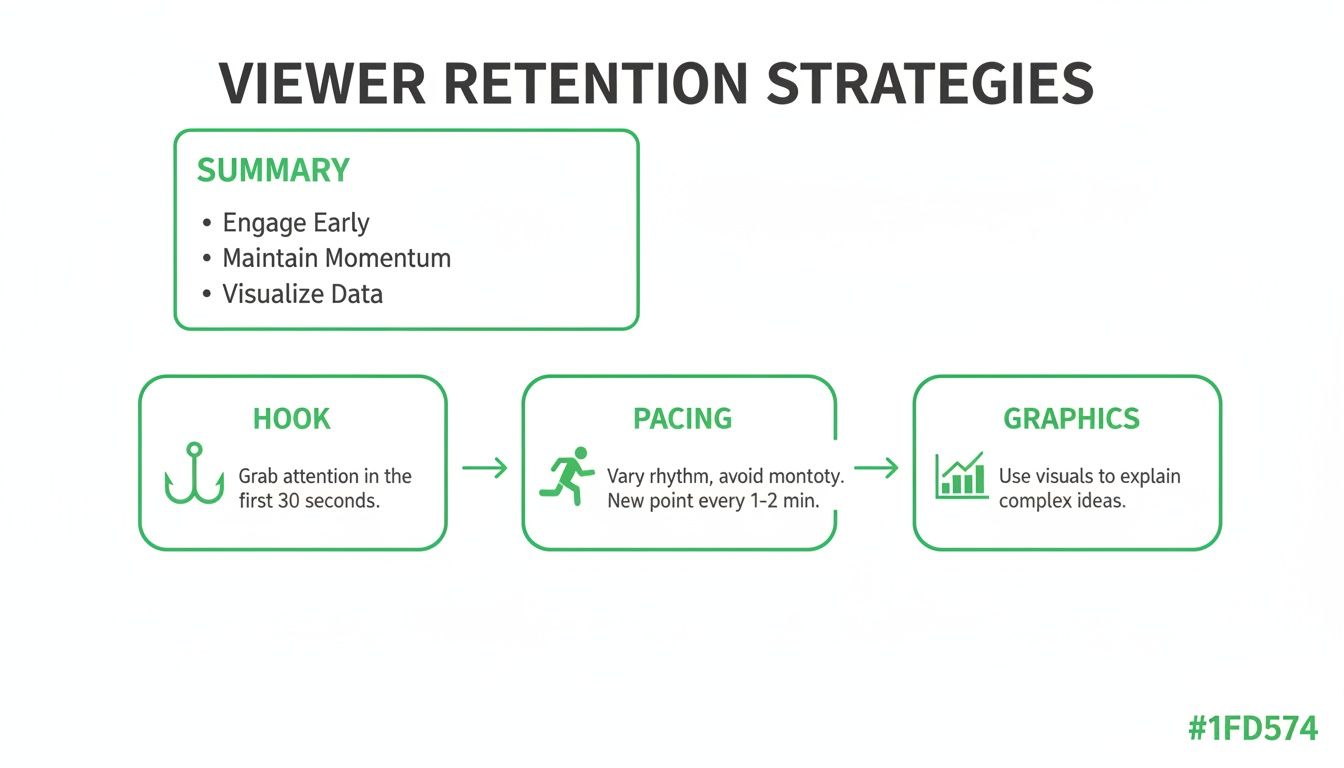
Each of these elements builds on the last to keep viewers glued to the screen, which is exactly what you need to drive up that watch time.
Ditch the Manual Work and Automate Your SEO Workflow
Let's be honest: creating chapters by hand is a drag, especially for longer videos. You have to scrub through your entire video, pinpoint the exact moments for each new section, and then try to come up with SEO-friendly titles for every single one.
This is where a dedicated youtube watchtime increaser tool like TimeSkip becomes an absolute lifesaver.
TimeSkip uses AI to analyze your video and automatically generate optimized chapter titles for you. Not only does this save you hours of tedious work, but it also uncovers valuable long-tail keywords you probably would have missed on your own. It turns a chore into a simple, one-click process.
Here's why an automated approach just makes sense:
- It's Way Faster: Get dozens of timestamps in seconds, not hours.
- Smarter SEO: Uncover and target specific, high-intent keywords for every part of your video.
- A Better Viewer Experience: Give viewers a clear table of contents so they can instantly find what they're looking for.
When you make your content more accessible and searchable, you're directly boosting viewer satisfaction. A viewer who can immediately solve their problem is far more likely to have a positive experience, stick around, and watch more of your stuff.
To see the difference clearly, let’s compare the manual grind with an automated workflow.
Manual Chaptering vs Automated TimeSkip Chapters
| Feature | Manual Chaptering | Automated with TimeSkip |
|---|---|---|
| Time Investment | Hours per video, especially for long content. | Seconds. Generates chapters in under a minute. |
| SEO Quality | Relies on your own keyword research and intuition. | AI-driven analysis uncovers long-tail keywords you'd miss. |
| Workflow | Watch, pause, type, repeat. A tedious and repetitive task. | One-click generation. Copy and paste. Done. |
| Viewer Experience | Good, if you put in the time to make titles helpful. | Optimized for scannability and relevance, improving navigation. |
While manual chaptering is better than nothing, using a tool like TimeSkip is just a smarter way to work. You get better SEO results in a fraction of the time.
Think of Chapters as Micro-Content
Start looking at your long-form videos as a collection of smaller, bite-sized pieces of content. Each chapter can stand on its own as the answer to a specific question. This modular approach is perfect for today's viewers, who are usually searching for quick, direct solutions.
For a deeper dive into making your videos more user-friendly, check out this guide on How to Add Chapters to YouTube Video and Boost Watch Time. It offers some great perspectives on getting the most out of this feature.
By using smart chapters, you’re not just organizing your video—you're fundamentally changing how people discover and consume it. You're opening up more doors for viewers to find you and giving them a much better reason to stay. To get more tactical on this, you can explore our detailed article on how chapter markers can boost viewer retention. It's a crucial step in turning casual viewers into a truly engaged audience.
Turn Your Analytics into an Action Plan
Let's be real: data is just a bunch of noise until you know what it's telling you. Your Audience Retention graph inside YouTube Analytics is easily the most powerful tool you have for getting inside your viewers' heads. It’s a direct, unfiltered roadmap showing you exactly where your videos pop and, more importantly, where they flop.
Don't just glance at the average percentage and call it a day. It’s time to start treating this graph like a story. Every peak, valley, and plateau is a clue telling you something important. A sharp drop-off isn't a failure—it's a specific moment where you lost your audience's interest. Your job is to play detective and figure out why.
Decode the Dips and Spikes
Start by hunting for the most significant dips in your retention graph. Scrub to that exact timestamp in your video and ask yourself some tough questions. Did you go off on a long, rambling tangent? Did the audio suddenly get terrible? Maybe you jumped into a complex topic without giving enough context.
On the flip side, look for the spikes and those beautiful, high plateaus. These are your goldmines. A spike, where people are actually rewinding to watch a part again, tells you that a specific joke, tip, or explanation was incredibly valuable. A high, flat line shows you’ve successfully locked in your audience's attention.
Your goal is to create a feedback loop. Analyze the dips to learn what to stop doing, and dissect the peaks to figure out what you need to do more of in every future video. This is how you get systematically better.
This whole process is the core of any real youtube watchtime increaser strategy. It takes you from guessing what works to knowing what works, all based on your own audience's data. Our complete guide on how to master YouTube analytics can help you dig even deeper into these numbers.
Put Practical Fixes in Place
Once you've diagnosed the problem spots, you can start applying targeted solutions. You don't always have to re-edit or re-upload the video; the real win is learning from these moments for your next video.
Here are a few actionable fixes for common retention killers:
- For Boring Segments: Inject a "pattern interrupt." This could be a sudden change in camera angle, a quick graphical overlay, or even an unexpected sound effect. Anything that breaks the monotony can reset a viewer's wandering attention.
- For Confusing Explanations: Use simple text overlays or bullet points on screen to clarify key information. A simple visual aid can make a complex point way easier to digest, stopping viewers from getting frustrated and clicking away.
- For Slow Intros: Your data will show you exactly how many people you lose in the first 30 seconds. If that number is painfully high, you know your hooks aren't strong enough. Get straight to the good stuff and front-load the value.
By consistently digging into your retention data and turning those insights into a concrete plan, you stop making content blindly. Every new video becomes an informed experiment, progressively better than the last, building a solid foundation for real, sustainable channel growth.
How to Extend Viewer Sessions Beyond a Single Video
 A truly solid youtube watchtime increaser strategy isn’t just about keeping people glued to one video. The real magic happens when you turn a single view into a full-blown viewing session, guiding your audience seamlessly from one piece of your content to the next.
When you nail this, you're not just adding minutes to one video's watch time; you're multiplying your total session time. That’s an incredibly powerful signal to the YouTube algorithm.
Your job is to make the decision of "what to watch next" a total no-brainer. If you don't give your viewers a clear next step, they’ll either click on a competitor’s suggested video or, worse, just leave YouTube altogether.
Engineer the Next Click with End Screens and Cards
End screens and cards are your best friends for steering viewers directly within the YouTube player. These aren't just an afterthought you slap on at the end. You should be planning which content to recommend before you even hit record.
Use the final 15-20 seconds of your video to actively point to these on-screen elements. Tell your audience exactly which video you think they should watch next and, more importantly, why it’s the perfect follow-up for them.
Here are a few end screen formulas that just plain work:
- The "Best For You" Option: Let YouTube's algorithm pick a video based on the viewer's history. This is a safe and surprisingly effective choice.
- The Logical Next Step: If your video is part of a series, link directly to the next episode. This is a must for tutorials or multi-part stories.
- The High-Performer: Link to one of your most popular videos. This is a great way to introduce new viewers to your best work right off the bat.
Your end screen isn't a closing slide; it's an active handoff. It's your chance to turn one view into a multi-video session, potentially doubling or even tripling your session watch time.
Build Bingeable Playlists
Playlists are the engine of binge-watching on YouTube. It's simple: when someone watches a video from a playlist, the next one in the queue automatically starts playing. This little trick can dramatically extend viewing sessions without the user having to lift a finger.
Create tightly themed playlists that group your content in a way that makes sense. A viewer who just finished a video on "beginner camera settings" is almost certainly interested in one about "basic lighting techniques." By curating these content journeys, you make it incredibly easy for viewers to fall down the rabbit hole with your channel.
Promote Your Best Moments
Your promotion strategy should also be geared toward extending sessions. Instead of just dropping a link to your new video on social media, share a timestamped link that throws viewers right into the most valuable or exciting part. This hooks them instantly and makes them far more likely to stick around for the whole thing.
Think about creative ways to bring people back to your channel from other platforms. For example, learning how to post a YouTube video on Instagram to get more views can funnel a completely different audience into your YouTube ecosystem, kickstarting a new viewing session. By guiding viewers intelligently, you turn passive watching into an active, engaged journey through your content.
Answering Your Biggest Questions About Watch Time
As you start dialing in your YouTube strategy, a lot of questions pop up. It's totally normal to wonder what actually moves the needle when you're looking for a reliable youtube watchtime increaser. Let's clear up some of the most common questions creators have about getting their channel's performance on the right track.
What’s the Magic Video Length for Maximum Watch Time?
Spoiler alert: there isn't one. An engaging 8-minute video that delivers on its promise will absolutely demolish a padded, boring 20-minute one every single time. The real goal isn't to hit a specific duration; it's to match your video's length to the value you're providing.
Stop chasing a number and start making every minute count for your viewer.
Your audience retention graphs are the only guide you need here. Look across your videos of different lengths and see where people consistently bail. While it's true that videos over 10 minutes can earn more total watch hours and ad revenue, that's only if the content actually justifies the runtime.
Can a Chaptering Tool Really Increase Watch Time?
Yes, without a doubt. A smart chaptering tool can give your watch time a serious boost in a couple of key ways. First, by creating SEO-optimized chapters, your video suddenly gets a chance to rank for dozens of specific, long-tail search terms. This brings in brand new viewers who are looking for the exact answer you're providing.
Second, chapters just make for a much better user experience. Viewers can instantly skip to the sections they care about, which cuts down on frustration and makes them way less likely to click away. This improvement in viewer retention feeds directly into a higher total watch time for your channel.
The concept is simple: when you make it easy for viewers to find what they're looking for, they'll reward you with their time. That positive experience sends a powerful signal to the YouTube algorithm.
What’s a Good Audience Retention Rate on YouTube?
"Good" is completely relative to how long your video is. Trying to hit a single, universal number is a recipe for frustration. Instead, think of these as general benchmarks to aim for:
- Short Videos (Under 5 mins): Getting 60-70% is a fantastic goal.
- Standard Videos (8-15 mins): If you're hitting 50%, you're doing great.
- Long-Form Content (20+ mins): Anything in the 30-40% range is solid.
But honestly, don't obsess over the percentage. Focus on your relative retention. Dive into your graphs, find the dips, and figure out what made people leave. Then, find the peaks and understand what made them stick around. Your only job is to do more of what works and less of what doesn't.
Do Playlists Actually Help My Channel Grow?
Playlists are one of the most powerful—and weirdly underrated—growth tools you have. When someone watches a video inside a playlist, YouTube automatically tees up the next one. It creates an effortless binge-watching session.
This has a massive impact on your channel's total session watch time, which is one of the strongest positive signals you can send the algorithm. By organizing your videos into logical, can't-miss series, you encourage viewers to hang out longer, which boosts your channel's authority and visibility across the board.
Ready to put these ideas into practice? TimeSkip automatically generates SEO-optimized chapters for your videos in just a few seconds, saving you hours and boosting your watch time. Try it for free and see the difference yourself at TimeSkip.io.
