

You’ve poured hours into creating a great video. You’ve nailed the script, the editing, and the thumbnail. You hit "publish" and… now what? You hope for the best?
That's the "publish and pray" method, and it's a surefire way to get lost in the noise. The real growth starts when you stop guessing and start measuring. That's where video rank tracking comes in—it’s the process of monitoring your video's exact position in Google and YouTube search results for the keywords that matter.
It's about trading guesswork for a data-driven system.
Why Video Rank Tracking Is Your Secret Weapon

Without tracking your rankings, you’re flying blind. You have no idea if your optimization efforts are actually working, which videos are pulling their weight, or where your competitors are eating your lunch.
A systematic approach to tracking changes everything. You gain crystal-clear insights into what’s resonating with the algorithm and what’s falling flat, allowing you to make smart, strategic adjustments instead of random changes.
The Real Payoff of Consistent Tracking
Knowing where your video stands for your target keywords is powerful. It allows you to make informed decisions that directly impact your channel's visibility and traffic. It’s not just about chasing that coveted #1 spot; it’s about understanding the entire ecosystem of your video’s search performance. Think of it as a crucial piece within your broader SEO strategies.
When you track consistently, you can:
- Spot Your Winners: See which keywords are actually driving views and where you have untapped potential to climb higher.
- Diagnose Problems Early: Get an immediate heads-up when a video’s rank suddenly drops, so you can investigate and fix the issue before it kills your momentum.
- Measure Your Impact: See the direct results of your hard work, whether it’s tweaking a title, updating a description, or adding chapters.
- Outsmart the Competition: Analyze the keywords your competitors are ranking for and uncover strategic gaps you can exploit.
The core benefit of video rank tracking is clarity. It replaces assumptions with hard data, empowering you to create content that doesn’t just get made—it gets found.
This data-first mindset is non-negotiable for serious creators. In fact, a whopping 93% of marketers report that video has delivered a good return on their investment. How do they know? Because 66% of them measure that ROI through engagement metrics—the very data that rank tracking helps you collect and understand.
Ready to build a system that works? Let's dive in.
Choosing Video KPIs That Actually Matter
Before you can even think about tracking your video's rank, you need to know what success actually looks like. Diving headfirst into a sea of data without a compass is a quick way to get lost and waste a ton of time. The real key is to ignore those tempting vanity metrics and zero in on the key performance indicators (KPIs) that genuinely move the needle.
A high view count might feel great, but it's often a hollow victory. A million views on a video that doesn't drive traffic, generate leads, or build your brand is just a number. Real success comes from understanding the metrics that tell a story about how viewers are behaving and how search engines perceive your content.
Beyond Views: Your Core Ranking Signals
Your entire tracking strategy should revolve around a handful of powerful metrics. These are the signals that both YouTube and Google's algorithms pay close attention to when deciding where to rank your video in search results.
It all starts with knowing your target keywords—the exact phrases your ideal viewer is typing into the search bar. Once you have those locked in, connect them to these crucial KPIs:
- Audience Retention: This is the big one. It measures how long people actually watch your video. A high retention rate tells the algorithm your content is valuable and engaging, which directly boosts its ranking potential.
- Click-Through Rate (CTR): This is the percentage of people who see your video in the search results (an impression) and actually click to watch it. A strong CTR proves your title and thumbnail are compelling and relevant to what people are looking for.
- Traffic Sources: Knowing where your views are coming from is critical. Are people finding you through YouTube search? Suggested videos? External sites? This data shows you exactly which keywords and platforms are driving discovery.
The most effective video tracking systems always prioritize engagement over raw views. A video with 10,000 views and a 60% average view duration is far more valuable to the algorithm than one with 100,000 views and a 10% duration.
To help you get started, here’s a quick breakdown of the most essential metrics you should be watching.
Essential KPIs for Video Rank Tracking
| KPI (Key Performance Indicator) | What It Measures | Why It's Critical for Ranking |
|---|---|---|
| Audience Retention | The percentage of your video that viewers watch, on average. | High retention tells YouTube your content is engaging and valuable, which is a primary ranking factor. |
| Click-Through Rate (CTR) | The percentage of impressions that result in a click to watch your video. | A high CTR signals that your title and thumbnail are highly relevant and appealing for a specific search query. |
| Watch Time | The total accumulated minutes viewers have spent watching your video. | YouTube's algorithm rewards videos that keep users on the platform longer. More watch time equals higher visibility. |
| Keyword Rankings (YT & Google) | Your video's position in search results for specific target keywords. | This is the most direct measure of your video SEO success, showing how visible you are to your target audience. |
| Traffic Sources | The origins of your video views (e.g., YouTube search, suggested, external). | Understanding your traffic sources helps you identify which channels are most effective for discoverability. |
This table gives you a solid foundation, but remember to tailor your focus based on your specific goals.
Aligning KPIs with Business Objectives
The specific KPIs you prioritize will also depend entirely on your end goal. A video designed for brand awareness will have very different success metrics than one created to drive direct sales.
Let's break it down with a few real-world examples:
-
Goal: Brand Awareness Focus on impressions, CTR, and search visibility for broad, top-of-funnel keywords. The main objective here is just getting your brand in front of as many relevant eyeballs as possible.
-
Goal: Lead Generation Prioritize traffic to your website (which you can track in both YouTube Analytics and Google Analytics), watch time on sections where you mention a product, and engagement in the comments.
-
Goal: Sales Track click-throughs on any links in your description, conversions on your landing page, and audience demographics to make sure you're reaching qualified buyers.
By building a tracking framework around these targeted metrics, you stop just collecting data and start generating insights you can actually use. For an even deeper analysis, you can explore other key video performance metrics to track in 2025 to get a more complete picture of your content's real-world impact.
Building Your Video Rank Tracking System
Now that you've got your KPIs sorted, it’s time to build the engine that will actually drive your video SEO strategy. An effective video rank tracking system isn't some spreadsheet you dust off once a month. It’s a living, breathing workflow that gives you a constant pulse on your performance across both YouTube and Google.
There are a couple of ways to go about this, and honestly, the best approach is usually a mix of both. You can start by digging into the powerful (and free) data inside YouTube's own analytics, then level up to a more automated setup with dedicated third-party tools.
Leveraging YouTube Studio for Foundational Insights
Your first port of call should always be YouTube Studio. While it won't give you a neat, traditional rank tracker showing your position for a specific list of keywords, it’s packed with the raw data you need to start connecting the dots yourself.
The real gold is buried in Analytics > Content > How viewers find your videos. This is where the magic happens.
Zero in on the "YouTube search" traffic source. Clicking this will pull back the curtain and show you the exact search terms people are punching in to find your content. This list is your starting block for understanding where you stand.
From this one report, you'll discover:
- Keywords You Already Rank For: These are your proven winners. Double down on what's working.
- Unexpected Keyword Opportunities: You’ll often find you're ranking for terms you never even thought to target. This is a fantastic source for new content ideas or a chance to re-optimize an existing video.
- Underperforming Keywords: If a keyword you’re targeting is barely driving any traffic, that’s a clear signal. You either need to beef up your optimization or create more authoritative content on that topic.
This process gives you a solid, ground-level understanding of your search footprint, straight from the source. The only downside? It's manual and can get pretty time-consuming, especially as your channel starts to grow.
Graduating to Dedicated Video Rank Tracking Tools
When you're ready to move from manual grunt work to automated intelligence, it's time for a dedicated tool. Specialized video rank tracking software is built to do the heavy lifting, giving you a clean, consolidated view of how your rankings change over time.
This is where you can systematically monitor the KPIs that matter most—keywords, retention, and CTR—without having to piece it all together yourself.
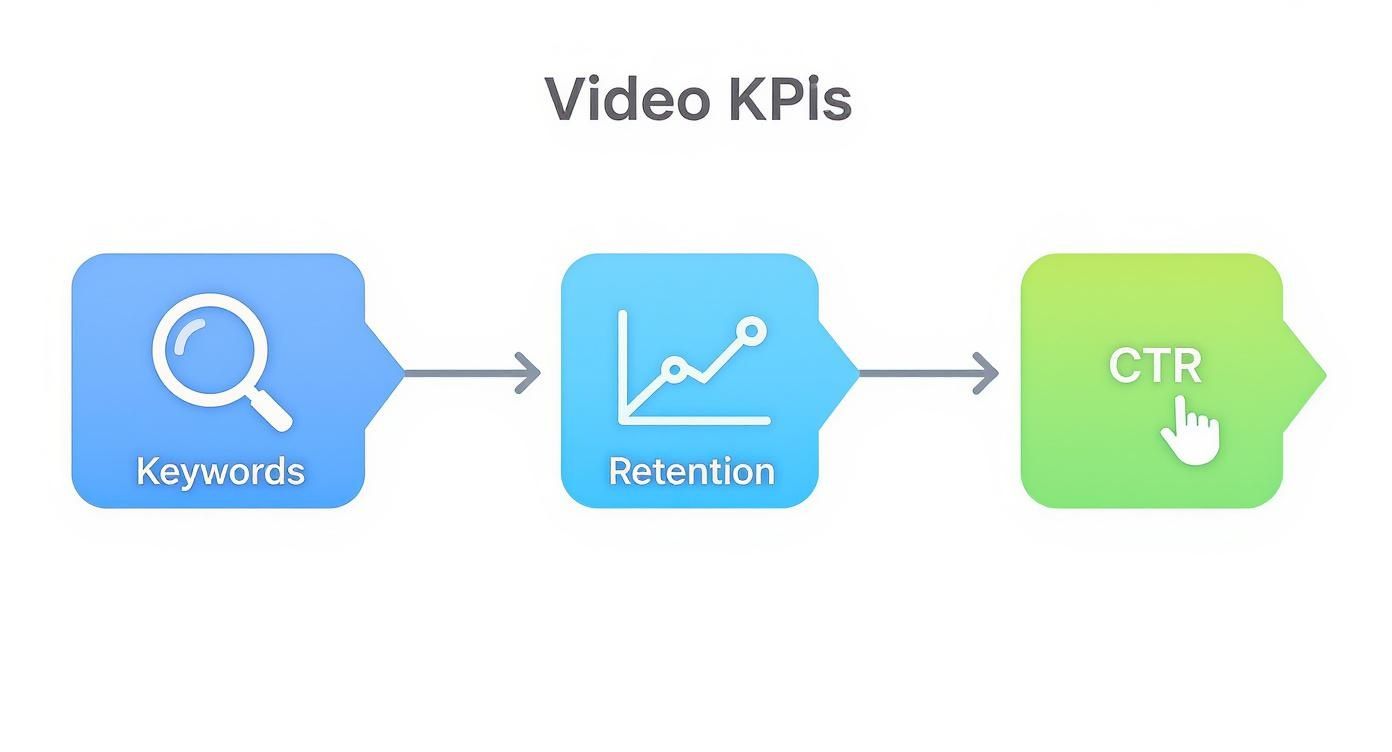
As the flowchart shows, strong keyword targeting leads to better click-through rates and audience retention, which in turn fuels higher rankings. It’s a virtuous cycle.
The biggest perk of using a specialized tool is getting a unified dashboard. Instead of jumping around in YouTube Studio, you get a single screen that automatically tracks your chosen keywords across both Google and YouTube. You can keep an eye on competitors, spot trends as they happen, and get automated reports that save you hours every single week. For a deep dive into the options out there, check out our guide on the best video SEO tools.
Pro Tip: When you're setting up your first project in a rank tracking tool, don't go crazy. Start with a focused list of 10-15 core keywords per video. This keeps your data clean and actionable, so you don't get buried in a mountain of irrelevant terms.
This space is evolving fast, too. The rise of AI keyword tracking means these systems are getting smarter about anticipating algorithmic shifts and spotting opportunities. By blending the raw data from your native analytics with the automation of a dedicated tool, you create a complete, actionable view of your video performance—one that empowers you to make smarter decisions and drive real growth.
Turning Ranking Data Into Actionable Insights
Collecting ranking data is just the first step. The real magic happens when you translate those numbers and graphs into a concrete plan of attack. A solid video rank tracking strategy isn’t about staring at dashboards—it’s about connecting the dots between your data and what’s actually happening with your content.
Your ranking for a specific keyword isn't set in stone. It’s a living, breathing metric that reacts to dozens of different signals. When you see a sudden change, your first instinct should be to play detective and figure out the "why." This diagnostic mindset is what separates creators who grow from those who get stuck.
Decoding Common Ranking Fluctuations
Let's walk through a few real-world scenarios. Imagine your video on "beginner guitar chords" has been sitting pretty in the top five on YouTube for weeks, but overnight it plummets to position 12. Panic mode. What do you check first?
This is where you need to correlate your ranking data with other key metrics right inside YouTube Studio. A sudden drop like this is almost always tied directly to viewer behavior.
Start by digging into these two areas:
- Audience Retention Graph: Look for a new, sharp drop-off somewhere in the video, especially near the beginning. Did you change up your intro? Maybe a competitor just launched a video with a killer hook that YouTube is now suggesting to your audience.
- Click-Through Rate (CTR) Over Time: Pop over to your CTR graph and see if it's taken a nosedive. It's entirely possible a competitor released a video on the same topic but with a much more compelling thumbnail or title, effectively stealing clicks that used to be yours.
This same logic applies when you see a video crushing it on one platform but flopping on another. It's a classic creator puzzle: why is your video on page one of YouTube but completely invisible on Google?
The answer almost always comes down to different algorithmic priorities. YouTube is obsessed with on-platform engagement signals like watch time. Google, on the other hand, still gives a ton of weight to traditional SEO factors, like the authority of other websites that embed your video.
Knowing this helps you focus your efforts. To give a video a boost in Google's rankings, you might want to work on getting it embedded in relevant, high-quality blog posts. But to climb the ladder on YouTube, you should be laser-focused on refining the content itself to keep people watching longer.
From Diagnosis to Optimization
Once you've sniffed out a potential cause, you can form a hypothesis and start taking action. The goal is to turn your data-driven observations into specific, testable changes. Your rank tracking tool then becomes your scorecard to see if your tweaks actually worked.
Here’s what this process looks like in practice:
- Observation: Your ranking for "how to edit in DaVinci Resolve" slipped from #3 to #9.
- Investigation: You jump into your analytics and see the CTR has tanked by 30% over the last week. A quick search reveals a slick, new video from a competitor now sitting at #2.
- Hypothesis: Their thumbnail is way more dynamic and their title is more benefit-driven. It's probably convincing viewers to click on their video instead of yours.
- Action: You design a new, more vibrant thumbnail. Then you A/B test a punchier title that highlights a specific outcome, like "Edit Videos 2x Faster in DaVinci Resolve."
- Measurement: You keep a close eye on your rank tracking tool every day for the next week to see if your position starts to recover.
This simple loop—observe, hypothesize, act, and measure—is the absolute core of effective video optimization. It takes you beyond just passively collecting data and empowers you to actively shape your search performance, turning every little insight into a real step toward growth.
Using AI Chapters to Enhance Search Discoverability

Let's be real: optimizing your video’s metadata can be a total grind. Crafting the perfect title and description is one thing, but manually scrubbing through a long video to create detailed, keyword-rich chapters? That’s often a bridge too far for busy creators.
This is exactly where AI tools are making a massive difference in video rank tracking and overall discoverability. Instead of spending ages typing out timestamps, you can now use AI to generate precise, SEO-friendly chapters in a matter of seconds. It's more than just a time-saver; it’s a killer SEO strategy that gives search algorithms the exact context they need to understand—and rank—your content.
How AI Chapters Fuel Search Visibility
Think of every single chapter as a new chance to rank. When you add detailed, descriptive chapters, you’re essentially baking a content outline directly into your video’s metadata. This gives both YouTube and Google a much deeper, more nuanced understanding of the specific topics you cover from start to finish.
This pays off in two huge ways for your rankings:
- Unlocks Long-Tail Keyword Opportunities: Your main title might target a broad term like "beginner guitar lesson," but your chapters can go after hyper-specific long-tail keywords like "how to play a G chord" or "easiest finger-picking pattern."
- Powers Google's "Key Moments": Well-structured chapters make your video eligible for Google's coveted "Key Moments" feature. This is where Google pulls specific timestamps from your video and displays them as direct links in the search results, which can dramatically boost visibility and click-through rates.
By breaking your video down into logical, keyword-rich segments, you are essentially spoon-feeding the algorithm. This helps your video show up for a much wider array of specific search queries, moving you way beyond just your primary keyword.
This extra layer of metadata is a low-effort, high-impact move. Instead of just one shot at ranking, you suddenly have a dozen.
Putting AI Chapter Generation into Practice
The best part is that using an AI chapter tool is ridiculously simple. A tool like TimeSkip, for example, slots right into your YouTube workflow with a browser extension. You don't need to be an SEO wizard to get incredible results.
Here’s a quick rundown of how it works:
- Install the Tool: Just add the extension to your browser.
- Generate Chapters: Head to your video’s page in YouTube Studio. With a single click, the AI analyzes your transcript and spits out a full list of descriptive chapters with accurate timestamps.
- Review and Copy: You’ll get a preview of the chapters. You can make a few tweaks if needed, then copy the whole list with another click.
- Paste and Publish: Paste the formatted chapters and timestamps straight into your video’s description box and hit save.
The entire process usually takes less than a minute, but it adds a serious layer of SEO value that can pay off for months, or even years, to come. As the algorithms get smarter, providing this kind of detailed structural data becomes even more critical.
For a deeper dive into the mechanics behind this, you can learn more about how YouTube chapters help AI understand and rank your content. By automating this piece of your optimization, you free yourself up to focus on what really matters: creating fantastic content.
Alright, let's tackle some of the most common questions that pop up when you start getting serious about tracking your video rankings. Getting these sorted out helps you build a smarter strategy instead of just guessing what to do next.
How Often Should I Check My Video Rankings?
For most channels, a weekly check-in is the sweet spot.
This gives you enough data to spot real trends—like a slow climb or a sudden drop—without getting lost in the minor day-to-day blips that are totally normal. It's about seeing the forest for the trees.
The exception? If you’ve just launched a big video or you're fighting for a super competitive keyword, you might want to peek daily for the first week. This gives you instant feedback on its initial performance, letting you make quick tweaks if things aren't heading in the right direction.
Why Does My Video Rank Differently on YouTube vs. Google?
This one trips up a lot of people. The simple answer is that YouTube and Google are different search engines playing by different rules, even though they're part of the same company.
-
YouTube is all about on-platform engagement. Its algorithm is obsessed with metrics like watch time, session duration, and audience retention. The main goal? Keep people on YouTube for as long as humanly possible.
-
Google cares about traditional SEO signals, too. While it does look at engagement, its algorithm also weighs factors like the authority of websites embedding your video and the quality of backlinks pointing to it.
This is exactly why a video that’s crushing it on YouTube might be nowhere to be found on Google’s first page. To win on both, your strategy needs to satisfy YouTube's craving for engagement and Google's broader SEO checklist.
What Should I Do if My Video Ranks for the Wrong Keywords?
First off, don't panic. Ranking for keywords you didn't expect isn't a problem—it's an opportunity. It’s the algorithm giving you a direct clue about how it sees your content and what topics it thinks are related.
Start by looking at the traffic. Is this new audience still relevant to your channel? Could they find your video useful even if it wasn't what they were looking for? If the answer is yes, you've just stumbled upon a new keyword goldmine. You might want to tweak your video's title, description, and tags to lean into these new terms.
But if the keywords are completely out of left field, it’s a sign that your metadata might be too vague or confusing. That’s your cue to tighten things up and get more specific about your main target keyword.
Ready to stop guessing and start ranking? TimeSkip automatically generates SEO-optimized chapters for your videos in seconds, helping you rank for more keywords and boosting viewer retention. Try it for free at timeskip.io and see the difference for yourself.
