

When you're trying to grow a YouTube channel, a longer video is easily your most powerful asset. We're talking about content that clocks in at 15 minutes or more. I know, I know—in a world obsessed with short-form content, that sounds completely backward. But trust me, longer videos are the secret sauce for building a real connection with your audience and getting the YouTube algorithm to notice you.
Why Going Long is a Winning YouTube Strategy
With everyone chasing viral shorts and quick trends, creating a lengthy YouTube video can feel like you're swimming against the current. But here’s the thing: long-form content is the bedrock of a successful, authoritative channel. Why? It all comes down to building trust and delivering a level of value that a 60-second clip just can't touch.
When someone decides to watch your 20-minute deep-dive, they're giving you their most valuable resource: their time. That's a huge signal of trust. A comprehensive tutorial, an in-depth review, or a detailed breakdown doesn't just answer a quick question; it establishes you as the go-to expert in your niche. And that deep engagement is exactly what the YouTube algorithm is built to reward.
The Algorithm Cares About Watch Time
At the end of the day, YouTube wants to keep people on its platform. That's its entire business model. So, it naturally favors videos that rack up serious watch time.
Let’s do some quick math. Say you have a 25-minute video with a 40% retention rate. That’s 10 minutes of watch time from a single viewer. Now, compare that to a 3-minute video with a fantastic 80% retention—that only brings in 2.4 minutes of watch time.
The numbers don't lie. A long YouTube video, even with a lower relative retention percentage, almost always generates more absolute watch time per viewer. This is a massive signal to YouTube that your content is valuable, prompting the algorithm to push it out to a much wider audience.
Building a Library of Evergreen Content
Long-form videos are also your channel's evergreen assets. A trendy short might give you a temporary spike in views, but a detailed guide or a thorough explainer can pull in consistent traffic for years.
These are the videos that rank for valuable long-tail keywords on both YouTube and Google, becoming the foundational pillars that drive steady, long-term growth. They're the kind of content people bookmark, share, and come back to again and again, cementing your channel's authority.
The data backs this up. An analysis of over 100,000 channels found that long-form content is still "king" for building sustainable channel momentum. The study even suggests an ideal mix of 70% long-form videos to 30% Shorts. The longer content gives a channel the "legs" to keep moving forward. You can dig into the full findings on Recurpost's blog. It's all about striking a balance—capturing immediate attention while building lasting value.
Structuring Your Video for Maximum Engagement
You can't just wing a successful long YouTube video. The real magic happens long before you even think about hitting the record button. It’s all about building a solid foundation—an architecture—designed to grab viewers, deliver insane value, and keep them glued to the screen right until the end.
Without a clear structure, even the most brilliant content can feel chaotic and send viewers clicking away. The blueprint I swear by is a classic three-act structure: a killer hook, a value-packed middle, and a satisfying ending. Think of it less like a rigid script and more like a roadmap that takes your audience on a journey, making sure every single minute counts.
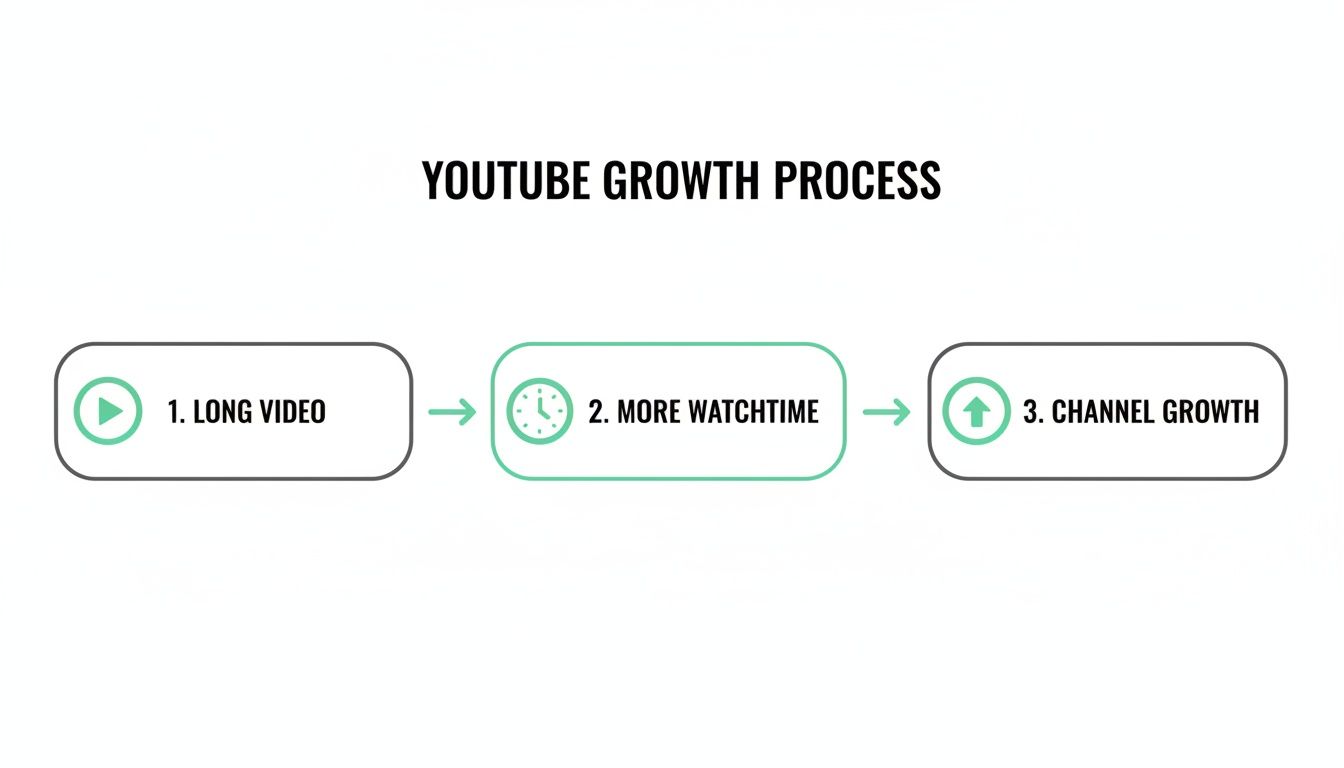
This process shows exactly how a well-structured long video feeds the metrics YouTube cares about most. When you nail the structure, you boost your watch time, and that’s the fuel that powers the growth of your entire channel.
Crafting an Unskippable Hook
You’ve got about 10-15 seconds to prove your video is worth someone's time. That opening, your hook, is without a doubt the most critical part of your video. Your one job is to immediately answer the viewer's unspoken question: "What's in it for me?"
Forget the long, animated intros or generic greetings. Jump straight into the action. You can do this by either presenting the problem you’re about to solve or teasing the single most valuable thing they’ll learn.
For instance, instead of a flat "Hi everyone, in this video we're going to talk about...," try hitting them with something like, "This one mistake is costing creators thousands of views on every long YouTube video they post, and by the end of this video, you'll know exactly how to fix it." See the difference? It creates instant curiosity and promises a real payoff for sticking around.
Key Takeaway: Your hook needs to be a verbal version of your thumbnail and title. It has to instantly confirm they made the right click and promise a clear, valuable outcome that sets the stage for everything that follows.
Building the Value-Packed Middle
The middle section is the heart of your video; it's where you make good on the promises from your hook. For longer videos, this is where viewer fatigue can really start to creep in. To fight this, you need to break your content into smaller, digestible chunks and sprinkle in "pattern interrupts."
A pattern interrupt is anything that breaks the monotony and snaps the viewer's attention back to you. It can be a simple visual shift or a change in topic. Planning these ahead of time is a non-negotiable for keeping people engaged over a long haul.
Here are a few pattern interrupts that work wonders:
- Visual Changes: Cut from a talking-head shot to a screen recording, B-roll footage, or even a quick physical demonstration.
- On-Screen Graphics: Use text overlays, bullet points, or simple animations to drive home key points.
- Storytelling: Weave in a short, relevant personal anecdote or a case study. It’s a great way to illustrate your point in a real-world scenario.
- Ask a Question: Directly engage the viewer by posing a question, prompting them to think or drop a comment.
Thinking in segments like this also has a massive SEO benefit. Each distinct topic you cover can become a chapter in your final video. By planning in chapters from the very beginning, you’re not just organizing your thoughts; you’re building a more searchable and user-friendly asset. A video on "Building a PC," for example, could be broken down into planned sections like "Choosing Your Components," "Motherboard Installation," and "Cable Management."
Delivering a Satisfying Conclusion
The end of your video is your final shot to make an impact. A weak or sudden ending can leave viewers feeling short-changed. A powerful conclusion should quickly summarize the key takeaways and give a crystal-clear call to action (CTA).
Reinforce the main value you promised in the hook. A simple recap like, "So, we've covered the three essential steps to..." helps lock the information into the viewer's brain.
After the summary, tell your audience exactly what to do next. Do you want them to watch another video? Subscribe? Download a checklist? Be specific. A well-crafted ending doesn't just end the video; it turns a passive viewer into an engaged subscriber and sets them up to watch your next long YouTube video.
Boosting Retention With Smart Editing and Chapters
A killer plan is the skeleton of your video, but the edit is where you breathe life into it. This is where a potentially long and intimidating video becomes an engaging, user-friendly experience that actually respects the viewer's time. Smart editing isn't just about slicing out the "ums" and "ahs"; it's about strategically pacing the content to keep the energy up and hold attention from the first second to the last.
For any long YouTube video, the editor's main job is to fight off viewer fatigue. This means going way beyond simple jump cuts.
Think about weaving in dynamic elements like B-roll to show what you're talking about, motion graphics to make key data pop, or a well-timed zoom-in to add a bit of drama. Every single element needs a purpose—to break up the visual monotony and snap the viewer's brain back into focus right when their attention might be starting to drift.
The Undeniable Power of Chapters and Timestamps
Beyond slick editing, knowing how to add timestamps to YouTube is a must for guiding viewers and making your content navigable. Chapters are, without a doubt, the single most powerful tool for making a long video feel accessible instead of overwhelming. They serve as a clickable table of contents, letting viewers see the entire scope of your video at a glance and jump straight to the parts they care about most.
This one feature completely changes the viewing dynamic. Instead of someone bouncing because they can't find a specific answer, they can now choose their own adventure through your content. This doesn't just make for happier viewers; it also seriously boosts your video's total watch time—a metric the YouTube algorithm absolutely loves.
The benefits of adding chapters are too good to ignore:
- A Better User Experience: Viewers feel in control and can easily find what they need, which makes them far more likely to come back for more.
- More Watch Time: By stopping viewers from giving up and leaving, chapters help you rack up more minutes watched across the board.
- Serious SEO Juice: Chapter titles are indexed by Google and YouTube, creating multiple new entry points for your video to show up in search results, especially for those juicy long-tail keywords.
Chapters turn your long YouTube video from a monologue into a searchable, interactive resource. This simple addition signals to both viewers and the algorithm that your content is well-structured, valuable, and respects the audience's time.
Why You Should Automate Chapter Creation
Let's be real. Making chapters manually means re-watching your entire video, meticulously noting the exact second each new topic starts, and then writing a clever title for it. For a 30-minute video, that’s tedious. For a two-hour podcast, it's a soul-crushing task that most creators (understandably) skip, leaving a ton of value on the table.
This is where automation becomes a total game-changer. An AI-powered tool like TimeSkip can scan your entire video and spit out accurate, SEO-friendly chapters in seconds. It plugs right into your YouTube workflow, turning a massive time-suck into a one-click process. That kind of efficiency is vital for busy creators who need to be focused on making the next great video, not getting bogged down in tedious post-production chores.
The appetite for long-form content isn't going anywhere. Users now watch over 1 billion hours of video on YouTube every single day, a number largely fueled by deep-dive content. For podcasters and educators, tools that streamline the workflow are no longer a luxury—they're essential. TimeSkip can generate SEO-optimized timestamps in under 5 seconds, which can boost visibility by up to 220% and improve retention. This shift makes it crystal clear: you have to make your long content as easy to navigate as possible.
Manual vs. Automated Chapter Creation
The difference between creating chapters by hand and using a tool isn't just about saving time; it's also about the quality and impact of the final result. You're either spending your valuable time on a manual task or letting a smart tool handle it better and faster.
Here's a quick look at how the two methods stack up.
| Feature | Manual Process | Automated with TimeSkip |
|---|---|---|
| Time Investment | 15-60+ minutes per video, depending on length. | Under 5 seconds for a video up to 4 hours. |
| Accuracy | Prone to human error, requiring careful re-watching. | AI-driven analysis ensures precise timestamps. |
| SEO Optimization | Relies on the creator's own keyword knowledge. | Automatically identifies and suggests SEO-friendly titles. |
| Workflow | Adds a significant, often-skipped step to post-production. | One-click integration directly within YouTube Studio. |
At the end of the day, whether you do it manually or use a tool, adding chapters is non-negotiable for any creator serious about publishing long-form videos. The payoff in viewer experience and search visibility is simply too big to pass up. By breaking your content into a navigable journey, you make it more valuable, more watchable, and far more likely to be discovered. If you want to go deeper, check out our guide on how chapter markers can boost viewer retention.
Advanced YouTube SEO for Long-Form Content
A long YouTube video is so much more than just a way to rack up watch time—it's an SEO goldmine. The sheer depth of a longer piece gives you a massive canvas to work with, letting you rank for dozens, sometimes hundreds, of specific keywords that shorter videos just can't touch.
This is where you graduate from basic SEO. You start treating your content like a strategic pillar, one that pulls in highly motivated viewers from both YouTube and Google.
The trick is to stop thinking of your video as one single asset ranking for a single keyword. Instead, see it as a collection of micro-content. Every chapter, every key moment, becomes a potential doorway for a viewer searching for a very specific answer. This mindset completely changes how you approach your video's metadata.
Target High-Intent Long-Tail Keywords
A short video might aim for a broad term like "video editing." But a long-form video has the runway to go much, much deeper. Your mission is to capture the traffic from people who know exactly what they’re looking for. We call these long-tail keywords, and they're a huge signal of high viewer intent.
Think about it. Someone searching for "video editing" is just browsing. But a person searching for "how to color grade S-Log footage in DaVinci Resolve" is ready to learn and will happily dive into a detailed, 20-minute explanation.
To unearth these gems, you can use the usual keyword tools, but don't sleep on the "People also ask" section on Google or the auto-complete suggestions on YouTube. These are direct pipelines into your audience's brain. For a deeper dive, check out our guide on building an effective long-tail keyword strategy.
Weaponize Your Video Transcript
Your video's transcript might be the most powerful, underused SEO tool you have. Both Google and YouTube crawl this text, giving them an incredibly detailed understanding of what your video is about, minute by minute. A clear, keyword-rich transcript is like handing the algorithm a blueprint to your content.
This is why mumbling or rambling can actively hurt your SEO. Every word counts. To really level up, you need to transcribe your YouTube videos and make sure the text is clean and accurate. It acts as a detailed map for search engines, guiding them straight to the good stuff.
Expert Tip: Once you have your transcript, read through it and pull out the main topics you cover. These are perfect candidates for your chapter titles, ensuring your video's structure perfectly mirrors its spoken content.
Optimize Chapters for Search Discovery
Don't just think of chapter titles as navigation—they're powerful SEO headlines. Treat each one like a mini blog post title, optimized for a specific long-tail keyword you've already identified.
Here's how that turns into multiple entry points for your video:
- A user searches Google for "best camera settings for low light."
- Google's crawlers see your long video has a chapter titled "Best Camera Settings for Low Light."
- Your video can then show up in the search results as a "key moment," dropping the user right at that exact timestamp.
This creates an incredible user experience and lets your single video rank for a whole slew of different search queries. While a 20+ minute video might only get 40-60% average view duration, that percentage translates to a much higher absolute watch time than a short video could ever achieve. And marketers are catching on—29.58% plan to invest more in YouTube, specifically favoring long-form for its SEO power.
This is exactly where a tool like TimeSkip becomes a lifesaver. Manually finding and titling all these key moments is incredibly tedious. TimeSkip’s AI analyzes your transcript, pinpoints these keyword-rich segments, and spits out optimized chapter titles in seconds. This can lift your video rankings, boost discovery by up to 25%, and increase total watch time by 15% simply by aligning your content with what people are actually searching for.
See How Your Video Is Really Doing in YouTube Analytics

Hitting "Publish" feels great, but that's really just the beginning. The real work—and the real learning—starts when you dive into your YouTube Analytics. This isn’t about gawking at big view counts; it’s about digging into the data to figure out what actually worked, what fell flat, and how you can make your next video even better.
The analytics dashboard can look like a lot at first, but for long-form content, you can cut through the noise by focusing on a couple of key reports. These metrics tell a story about how people are actually watching your video, showing you the moments they loved and the exact spots where they bailed.
Master the Audience Retention Graph
If you only look at one thing, make it the Audience Retention graph. This chart is the single most important piece of feedback you'll ever get, showing you second-by-second what percentage of your audience is still watching. It’s like a direct window into your viewers' minds.
Don't just look at the average percentage at the top. The real gold is in the shape of the curve itself. You’re looking for a few specific patterns:
- Sudden Dips: A steep drop in the graph is a huge red flag. Jump to that exact timestamp in your video. Was it a boring segment? Did your audio quality suddenly get terrible? These are your biggest learning moments.
- Gradual Declines: A slow, steady slope is pretty normal for a long video, so don't panic. But if it feels like it’s dropping off faster than usual, it’s a sign that the content just wasn’t compelling enough to hold the more casual viewers.
- Peaks and Bumps: These are pure gold! A little bump or peak means viewers are actually re-watching that specific part. It tells you that section was either incredibly valuable or maybe a little complex and needed a second look.
A cool thing happens when you add chapters: you'll often see a series of little bumps peppered throughout your retention graph. These bumps line up with your chapter markers, showing where people skipped ahead to find exactly what they were looking for. It’s a powerful, positive sign that your video's structure is working perfectly.
By spotting these patterns, you start to build a clear picture of what keeps your audience glued to the screen. Maybe your animated graphics cause engagement to spike, while your long, rambling monologues send people running. This is the feedback loop that helps you refine your content strategy. For a deeper dive, you can learn more about YouTube analytics explained in our full guide.
Figure Out How Viewers Find You
The other critical report to check out is Traffic Sources. This is where you see exactly how people are discovering your video. For long-form content, you’re hoping to see a healthy mix of sources, which tells you the algorithm is showing your video to people all across the platform.
Keep an eye on these key sources:
- YouTube Search: This is proof that your SEO work is paying off. People are typing keywords into YouTube, and your video is popping up as the answer.
- Browse Features: This is traffic from the YouTube homepage and the subscriptions feed. When this number is high, it means YouTube thinks your video is quality and is recommending it to people.
- Suggested Videos: This is arguably the holy grail for channel growth. When your video shows up next to other popular videos in your niche, you're tapping into a massive, pre-built audience.
If one source is doing all the heavy lifting, that tells you where your strengths are. If another one is lagging behind, you've just found your next area to improve. For example, if you have almost no search traffic, you know you need to get smarter about your keyword targeting for your next video. This data-driven approach is what turns a one-hit wonder into a channel that grows month after month.
Of course. Here is the rewritten section, crafted to sound like an experienced human expert.
Let’s Clear the Air: Common Questions on Long-Form Video
Even with a solid game plan, going long on YouTube can feel like stepping into the unknown. It’s natural to have questions. Let's tackle some of the most common worries I hear from creators so you can move forward with confidence.
What’s the “Perfect” Length for a Long Video?
Everyone wants a magic number, but there isn’t one. Generally, anything over 15 minutes is considered long-form. The real answer? Your video should be exactly as long as it needs to be to deliver incredible value, and not a second longer.
Forget trying to hit an arbitrary length. A 30-minute deep dive that keeps someone watching for 15 minutes is infinitely more valuable to the algorithm than a 10-minute video where they only stick around for 7 minutes, even if the retention percentage is higher on the shorter one.
The metric that truly moves the needle is total watch time. Focus on that. Cover your topic so thoroughly that your viewer leaves feeling satisfied, not like you were just trying to pad the runtime.
Do Chapters Secretly Kill My Audience Retention?
This is a huge fear for creators, but it’s mostly a myth. Yes, adding chapters might cause a small dip in your overall retention percentage simply because people can now skip ahead. But here's the trade-off: chapters almost always boost your video's total watch time and massively improve the viewer's experience.
Think of it this way: a viewer who can’t find the specific answer they need is going to click away. They’re gone. With chapters, that same person skips right to the part they care about, stays on your video longer, and sends a powerful signal to YouTube that your content is a well-organized, valuable resource.
You're turning a potential bounce into engaged viewing minutes. It's a no-brainer.
How Many Chapters Is Too Many?
There's no set number here; it all comes down to the natural flow of your video. The best rule of thumb is to create a new chapter for every distinct idea or sub-topic you discuss. The goal is to be genuinely helpful, not to hit some arbitrary chapter count.
- A 30-minute tutorial on video editing could easily have 5-10 chapters marking each step of the process.
- A 2-hour podcast interview might have 20 or more chapters, with each one marking a new question or a shift in the conversation.
Each chapter should feel like a logical break. This simple organization makes a long video feel less like a marathon and more like a browsable library, which puts the viewer firmly in control.
Should I Bother Adding Chapters to My Old Videos?
Yes. A thousand times, yes. Going back and adding chapters to your existing long-form content is one of the highest-impact, lowest-effort things you can do for your channel's health. It’s a killer SEO tactic that breathes new life into your archives.
When you add chapters, you’re suddenly optimizing that old video for dozens of new long-tail keywords you probably weren't ranking for before. This opens the door for brand new audiences to discover your content through search, sometimes years after it was first published.
This one simple update transforms your back catalog from a static library into an active asset that’s constantly working to find new viewers. It tells the YouTube algorithm your content is still organized and relevant, often earning it a fresh push in browse and search. It's the best way to maximize the ROI on every single long video you've ever poured your heart into.
Ready to stop wasting time and start optimizing your videos for maximum reach? TimeSkip is a simple Chrome extension that generates SEO-optimized chapters for your videos in under 5 seconds. Get two free video generations and see the difference for yourself at https://timeskip.io.
