

If you've just created a brand-new YouTube channel, you'll notice there's a default video length limit of 15 minutes. It's a simple, straightforward rule for every unverified account.
But what if you want to upload something longer? Good news—a quick, one-time account verification is all it takes to blow past that limit. Once you're verified, you can upload videos up to 12 hours long or 256 GB in file size, whichever you hit first.
Understanding Your YouTube Uploading Power
Think of a new YouTube account like a car with a governor on the engine. It runs perfectly fine for everyday trips around town, but that built-in limiter keeps you from really opening it up on the highway. YouTube's 15-minute cap is that governor. It’s a smart way to make sure new channels are run by actual humans, not spam bots, which helps keep the platform clean for everyone.
But what happens when your content needs more time to breathe? Maybe you’re creating in-depth tutorials, long-form interviews, or even full-length documentaries. This is where account verification becomes your best friend.
It's a quick process that basically hands you the keys to remove that governor, immediately giving you the freedom to upload much longer content. The moment you're verified, the platform sees you as a more trusted creator, and your creative possibilities expand in a big way.
Verified vs Unverified Accounts
The difference between these two account types is huge and directly impacts what kind of content you can create. An unverified account is fine for short clips or quick vlogs, but a verified one unlocks the potential for bigger, more ambitious projects.
For any creator serious about growing their channel, going long-form is a powerful strategy. Resources like the ultimate guide to making long YouTube videos are packed with great tips for taking full advantage of that extended time limit.
As you can see, the limits change dramatically once you're verified.
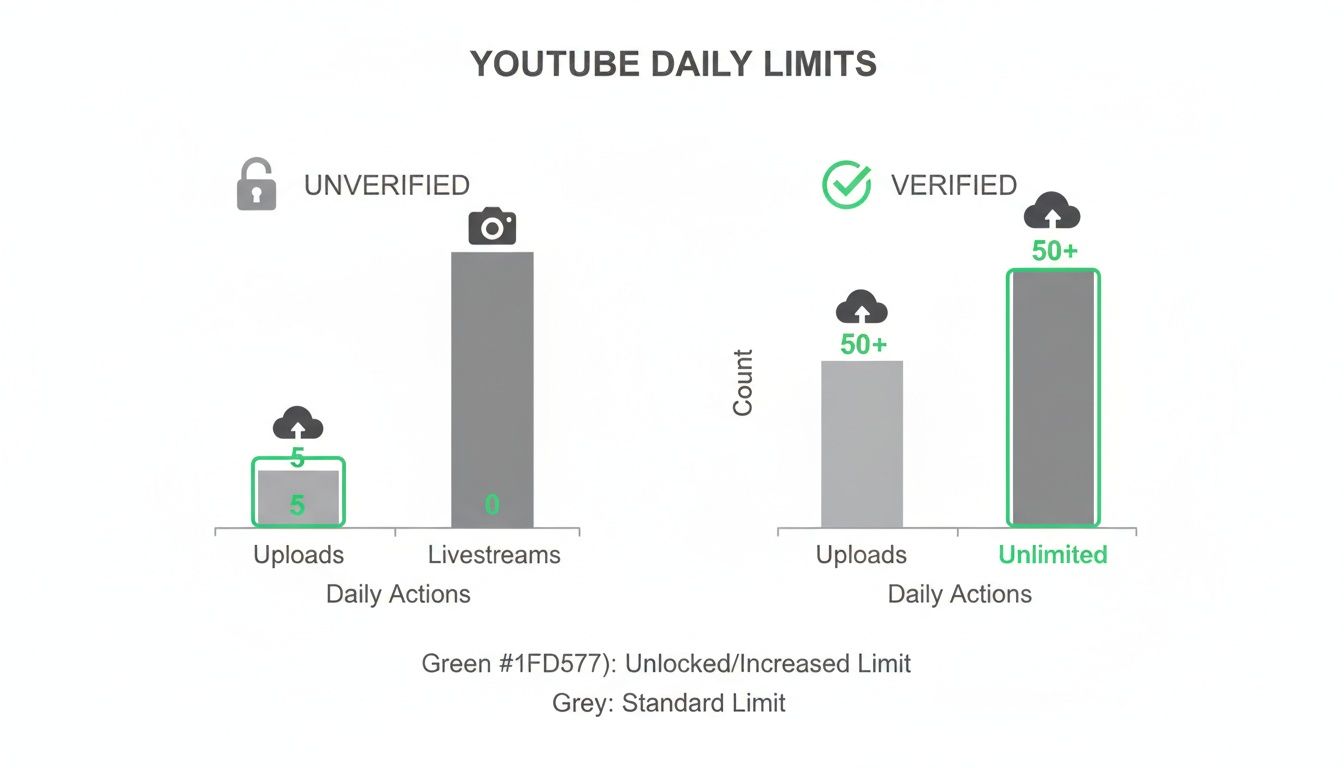
Here's a quick breakdown to make it even clearer.
YouTube Upload Limits at a Glance
This table sums up the key differences in video length and file size limits depending on your account's verification status.
| Account Status | Video Length Limit | Maximum File Size |
|---|---|---|
| Unverified | 15 minutes | 20 GB |
| Verified | 12 hours | 256 GB |
As you can see, taking those few minutes to get verified is a no-brainer.
The takeaway here is pretty simple: Getting verified isn't just a good idea, it's a must-do for any creator who wants to produce substantial content that truly engages an audience.
Once you have the basics down and your account is verified, you can stop worrying about the technical rules and start focusing on what really matters—making incredible content that keeps people watching, no matter how long it is.
The Story Behind YouTube's Upload Rules
To really get why the current YouTube video length limit exists, you have to look at how the platform’s rules got here in the first place. It wasn't a straight line. Instead, it was a constant balancing act between giving creators freedom and dealing with the massive headache of running the world's biggest video website.
When YouTube first went live back on April 23, 2005, it was the digital version of the wild west. Seriously, there were no video length limits at all. Creators could upload anything they wanted, for as long as they wanted. No questions asked.
This wide-open era was exciting, but it just wasn't built to last. The platform quickly became a playground for copyright infringement, with people uploading entire TV episodes, movies, and all kinds of copyrighted music. This put the young company in some serious legal and financial hot water.
The Introduction of the 10-Minute Cap
To get a handle on the chaos, YouTube made a pretty drastic move. In 2006, they rolled out a strict 10-minute upload limit for absolutely everyone. This one change was specifically designed to make it a lot harder for users to illegally upload full-length copyrighted stuff. It was a tough but necessary step to protect the platform and make sure it could stick around for the long haul.
The growth during this period was just staggering. By 2007, YouTube was using as much bandwidth as the entire internet did back in 2000—you can read more about it in this deep dive into YouTube's growth. Managing that kind of scale meant they needed smarter tools to keep content in check.
The initial 10-minute limit wasn't really about holding creators back; it was about survival. It was a practical fix for the overwhelming challenge of policing copyright on a platform that was exploding globally.
This early limit really set the stage for a more sophisticated approach. It pushed YouTube to innovate, leading them to build systems that could automatically spot copyrighted material without penalizing legitimate creators.
The Evolution Toward Longer Content
The real game-changer here was the creation and rollout of Content ID. This automated system gives copyright owners a way to find and manage their content on YouTube. Suddenly, the platform had a powerful tool to fight infringement without playing whack-a-mole.
With Content ID doing the heavy lifting, YouTube could finally start to loosen its strict time caps. The system could scan new uploads and flag potential problems, which meant a one-size-fits-all limit wasn't as critical anymore.
This leap in technology paved the way for the next big shift:
- July 2010: The limit was bumped up to 15 minutes for all users.
- Selective Lifting: YouTube started removing the limit completely for creators who had a solid track record of playing by the rules and respecting copyright.
This whole history shows a constant give-and-take. The YouTube video length limit isn't just some random number; it's the result of a long journey shaped by technology, legal battles, and the goal of empowering creators while keeping the ecosystem fair and legal.
Getting Your YouTube Account Verified for Longer Uploads
So, you're ready to break past YouTube's default 15-minute video limit? Good call. The gatekeeper here is a simple, one-time account verification. Think of it as getting the VIP pass for your channel—it proves you're a real human and not a bot, unlocking a suite of powerful features, including the ability to upload much, much longer videos.
The whole process is painless and takes just a couple of minutes. YouTube puts this little hurdle in place for a good reason: security. By linking your account to a phone number, you help them cut down on spam and keep the platform a space for actual creators. It’s a small step that tells YouTube you’re a trusted member of the community.
Your Step-by-Step Verification Guide
Getting verified is fast. Just follow these quick steps, and you'll blow the lid off that upload time limit.
- Head to the Verification Page: First things first, go to youtube.com/verify while you're logged into your Google Account. This is the direct link, no need to dig through settings.
- Pick Your Country and Method: Choose your country from the dropdown. Next, decide if you want your verification code sent via text message or an automated voice call. Honestly, most people just go with the text—it's quick and easy.
- Enter Your Phone Number: Pop in a phone number where you can get texts or calls right away. Make sure you have the phone handy.
- Get the Code and Submit: Click "Get Code." A 6-digit code should hit your phone within seconds. Type that code into the box on the YouTube page and hit "Submit."
This is the feature eligibility page you'll land on, where you can kick off the process.
Once you punch in the right code, you'll get a confirmation screen. And that’s it—you're officially verified!
What Verification Really Unlocks
The big prize, of course, is blasting your YouTube video length limit from a measly 15 minutes all the way up to 12 hours. But that's not all. Verification also opens up other features that are non-negotiable for anyone serious about growing a channel.
With a verified account, you don't just get longer uploads. You also unlock the ability to create custom thumbnails, appeal Content ID claims, and go live. It’s the foundational step for every creator looking to level up.
If you run into issues or are looking for other ways to manage this, some services offer platform-specific solutions for YouTube account verification. For most creators, though, sticking with YouTube's direct process is the simplest and safest route. By taking these few simple steps, you've just given your channel a serious upgrade.
Shorts vs. Live Streams: Understanding the Other Upload Limits

That standard YouTube video length limit we've been talking about? It's not a one-size-fits-all rule. YouTube has different formats built for different kinds of content, and each one plays by its own set of rules. Getting a handle on these differences is the key to matching your creative vision with the right tool for the job.
Two of the biggest players are YouTube Shorts and Live Streams. They operate on completely different principles than your standard video, serving opposite ends of the content spectrum—from fleeting, bite-sized clips to sprawling, multi-hour broadcasts.
The 60-Second World of YouTube Shorts
YouTube Shorts are all about quick, high-impact vertical videos. They’re YouTube’s answer to the short-form content boom, designed to grab attention instantly on mobile phones.
The absolute ceiling for a Short is 60 seconds. That's a hard cap. It forces you to be concise and get your point across fast, which is perfect for things like:
- Quick tips and tutorials
- Behind-the-scenes glimpses
- Funny skits or trending challenges
If you're looking for inspiration, we've got a great list of creative YouTube Shorts ideas to get your brainstorming started.
Shorts aren't just shorter videos; they're a whole different content ecosystem. Success here is all about the immediate hook and rapid-fire storytelling—a completely different skill set from creating long-form content.
Going Live Without the Clock
On the other end of the spectrum, you have YouTube Live. For verified accounts, live streaming basically throws the clock out the window, letting you broadcast for hours on end. This format is perfect for interactive events, deep-dive discussions, gaming sessions, or live Q&As where that real-time audience connection is the whole point.
But there’s one critical detail to know about the YouTube video length limit when it comes to saving your streams. While you can stream for an incredibly long time, any live broadcast that goes over 12 hours will not be archived or saved to your channel.
If you’re planning an epic, marathon-style event, you’ll need to break it into multiple streams to make sure the recordings are preserved for people to watch later. It’s a practical rule that saves both creators and the platform from having to manage impossibly huge video files.
YouTube Format Limits Compared
To make it simple, here's a quick side-by-side look at how these formats stack up.
| Format Type | Length Limit | Key Use Case |
|---|---|---|
| Standard Upload | 15 min (unverified) 12 hours (verified) | Deep dives, tutorials, vlogs, documentaries |
| YouTube Shorts | Up to 60 seconds | Quick tips, viral trends, behind-the-scenes |
| Live Streams | No broadcast limit (12-hour archive limit) | Interactive events, Q&As, gaming, live shows |
As you can see, each format has a specific job. Choosing the right one depends entirely on the story you want to tell and how you want your audience to experience it.
Troubleshooting Common Long Video Upload Problems
Nothing kills your creative momentum quite like watching a massive video file fail to upload after hours of waiting. If your long video is stuck, slow, or throwing up errors, don't panic. These issues are almost always caused by a few common culprits that are surprisingly easy to fix.
Before you even think about re-uploading that huge file, run through a quick diagnostic checklist. The problem might not even be on YouTube's end. More often than not, a slow or unstable internet connection is the real villain, especially for large files that need a rock-solid connection for hours on end.
Similarly, an incorrect file format can stop an upload dead in its tracks. While YouTube is pretty flexible, it definitely has its favorites when it comes to smooth processing.
Common Upload Roadblocks and Quick Fixes
If you’re staring at a frustratingly motionless upload bar, start by checking these three things. Most of the time, the solution is right here.
- Check Your Internet Speed: Run a speed test. Is your upload speed crawling along at a fraction of what your provider promised? Try the classic router restart, or better yet, plug directly into your router with an Ethernet cable. A wired connection is always more stable than Wi-Fi.
- Use a Supported File Format: While YouTube accepts a bunch of different formats, MP4 with an H.264 video codec is the undisputed gold standard. Using something less common can lead to painfully long processing times or an outright upload failure.
- Compress Your Video File: Let's be real, a 12-hour, 4K video file is going to be enormous. Use your video editing software to compress the file before you even start the upload. This can slash the file size without a noticeable drop in quality, making the whole process much faster and more reliable.
Don't mistake "processing" for "stuck." After your upload finishes, YouTube still needs to work its magic. High-resolution videos (like 4K or 8K) can take hours to process because YouTube is creating multiple versions of your video for different viewing qualities. It's a heavy lift, so be patient.
These simple steps will solve the vast majority of upload headaches. If you're still stuck, our guide on what to do when a YouTube upload is stuck dives into more advanced solutions. A few minutes of troubleshooting can save you hours of waiting and get your long-form masterpiece out into the world.
Turn Video Length Into an SEO Advantage

Getting your long-form video uploaded is really just the first hurdle. The real challenge is making sure people actually find it and stick around to watch. Longer videos have the potential to rack up some serious watch time—a huge ranking signal for the YouTube algorithm—but they also carry a big risk. An hour-long video with no clear navigation can feel like an intimidating wall of content, scaring off viewers before they even hit play.
This is where you need to get strategic. Your job is to transform that daunting video into an accessible, searchable resource. And the single best tool for that? Video chapters.
Think of chapters like an interactive table of contents for your video. They break down your content into logical, bite-sized sections, each with its own title and timestamp. This simple move has a massive impact on both the viewer experience and your video's SEO.
Unlock Deeper SEO with Video Chapters
Chapters do way more than just help viewers skip ahead. They feed crucial information directly to YouTube and Google's search algorithms, opening up brand-new avenues for your content to get discovered.
When you add descriptive, keyword-rich chapter titles, you’re essentially telling search engines exactly what topics you cover at specific moments. This allows your video to start ranking for dozens of long-tail keywords you might have never even thought to target.
A single long-form video can act like a collection of smaller, highly-focused videos. Each chapter becomes a potential entry point for a viewer searching for a very specific answer, dramatically expanding your video's reach.
For example, a one-hour video on "The Complete Guide to Landscape Photography" could suddenly start ranking for super-specific searches like "how to shoot golden hour portraits" or "best camera settings for waterfalls." Why? Because those topics were clearly marked as chapters. It's a game-changing strategy for anyone creating detailed, long YouTube video content.
The Power of Automation in a Crowded Space
The growth of the YouTube video length limit has directly fueled an explosion of content. With a staggering 500 hours of video uploaded every single minute, standing out is tougher than it's ever been. Creators need efficient tools just to keep up. You can learn more about these mind-boggling YouTube upload statistics.
Manually creating chapters for a long video is a painfully slow process. This is where AI-powered tools like TimeSkip come in, taking the entire task off your plate. In just a few seconds, it analyzes your video's transcript and generates perfectly timed, SEO-optimized chapters. This doesn't just save you hours of manual work; it ensures your chapters are structured to maximize discoverability and keep your viewers hooked.
Frequently Asked Questions About YouTube Video Length
Even with the rules laid out, you’re bound to run into some specific questions when dealing with the YouTube video length limit. Let's clear up some of the most common ones creators run into, so you can get back to what you do best.
What Happens If My Video Is Longer Than 12 Hours
So you've created an epic masterpiece, but it's a second over the 12-hour limit for verified accounts. What now? Well, YouTube will simply stop the upload in its tracks. No ifs, ands, or buts.
The same hard stop applies to the 256 GB file size cap. If your file is too beefy, YouTube won't accept it. There are no secret workarounds here—you’ll have to fire up your editing software and trim your video down before giving the upload another shot.
Does Video Length Affect My Channel Monetization
Absolutely. Video length is a huge piece of the monetization puzzle. If you want to run mid-roll ads, which can seriously boost your AdSense revenue, your video needs to be at least 8 minutes long. This unlocks more slots for ad breaks within your content.
But it’s a delicate balance. Sure, a longer video can technically fit more ads, but you have to keep your audience watching. A video stuffed with ads that tanks your watch time won't do you any favors. The golden rule is always to create valuable, engaging content first.
The 8-minute mark is the key that unlocks mid-roll ad potential. Shorter videos can still be monetized with pre-roll and post-roll ads, but the most lucrative ad format is reserved for longer content that holds viewer attention.
Why Is My Long Video Stuck on the Processing Screen
That dreaded "processing" screen can be nerve-wracking, especially after a long upload. But for big or high-resolution files, it’s usually just part of the process. How long it takes really boils down to a few things:
- Video Resolution: A 4K or 8K video has a lot more data to crunch than a standard 1080p file. YouTube has to create multiple versions of your video for different devices and internet speeds, and that takes time.
- File Format: For the quickest turnaround, stick with YouTube's recommended format: MP4 with an H.264 video codec. Using more obscure formats can throw a wrench in the works and cause major delays.
- Platform Traffic: Trying to upload during peak hours is like hitting rush hour traffic. YouTube's servers are slammed, and everyone's processing times can slow to a crawl.
If your video has been stuck for an unreasonable amount of time—say, over eight hours for a one-hour video—the easiest fix is often to just delete the upload and try again, preferably when fewer people are online.
Ready to make your long videos more discoverable and engaging? TimeSkip uses AI to generate SEO-optimized chapters in seconds, boosting your visibility and keeping viewers hooked. Try it for free and see the difference at https://timeskip.io.
