

Essential Guidelines For YouTube Title Check
Right after you draft a title—but before you schedule your video—give it a once-over. A quick audit helps you tighten up length, sharpen keyword placement, and boost its irresistible factor.
- Keep it under 60 characters for full visibility on mobile
- Slot your main keyword near the start to grab search relevance
- Promise value or spark curiosity—avoid empty clickbait
When YouTube rolled out title A/B testing in July 2024, creators suddenly had a reliable way to gauge what sticks. With 2.85 billion users on the platform by 2025 and 3.5 billion daily searches, that update became a go-to tactic. Dive into the numbers in Awisee’s YouTube Statistics Report.
Key Metrics To Review
Your title shouldn’t be set-and-forget. First, track impression growth to see if YouTube is even showing your video. Then measure click-through rate to know if viewers bite.
Below is a quick snapshot of the core checks I run on every title:
Key Elements Of Title Check
| Check | Purpose | Tool |
|---|---|---|
| Length | Ensure full visibility on mobile | TubeBuddy |
| Keywords | Boost search relevance | VidIQ |
| Clarity | Set accurate expectations | Headline Analyzer |
Run through these points regularly to catch small tweaks that add up to big CTR gains.
“Consistent title audits can boost CTR by up to 20% in just three months.”
Quick Title Check Workflow
When you’re ready to roll, this three-step flow takes under two minutes:
- Draft your title with the target keyword front and center
- Preview in a SERP simulator to catch any nasty truncation
- Pick your top two contenders and A/B test them for one week
Slip this mini-audit into your content calendar and you’ll notice each upload climbing higher in search and recommendations. If you use TimeSkip, some of these checks happen automatically—giving you more time to focus on the next video.
Try TimeSkip.
YouTube Title Best Practices

A sharp headline is your ticket through the noise. When I tightened up my own video titles, engagement climbed almost immediately. Now, I zero in on the 40–50 character window to maximize clicks and clarity.
By 2025, YouTube will boast 2.85 billion monthly active users and 74.8 billion visits—second only to Google. In a recent study, 81.6% of top-performing titles hit the sweet spot in persuasiveness, driving CTR through the roof. Discover more insights about YouTube user stats
Here’s what matters most:
- Stay within 40–50 characters so titles remain intact
- Weave in power words that resonate
- Put your main keyword up front
- Offer real value—no bait-and-switch
Ideal Title Length
Short titles avoid awkward truncation on mobile, where anything over 60 characters often vanishes. In practice, “Quick Video SEO Guide” outperforms “A Complete Tutorial on Improving Video SEO” simply because it’s tighter and punchier.
Try this approach:
- Write your first draft
- Remove filler words like “very” or “really”
- Preview in a phone simulator before you publish
Positioning Your Keyword
Let’s say you’re targeting “youtube title check.” Running it through the first five words alerts both YouTube’s algorithm and busy viewers to your topic right away.
Tips from my own channel:
- Slot the primary phrase within the opening line
- Keep the flow natural—no robotic stuffing
- Blend in context words so it reads smoothly
Injecting Power Words Without Clickbait
Words such as essential, simple, and proven bump your credibility without sounding spammy. I swapped “You Won’t Believe These Hacks” for “Proven Steps for Title Audits” and saw a 20% jump in click-throughs.
Titles that promise clear value tend to outperform vague hooks by up to 20%.
| Before | After |
|---|---|
| “Check This Out” | “Essential YouTube Title Checklist” |
| “Cool Video Tips 2025” | “Proven Video SEO Tips [2025 Update]” |
Check out our guide on writing effective YouTube video titles in our detailed article at TimeSkip.
Pair your polished title with an attention-grabbing thumbnail, then:
- Test two or three headline versions
- Watch CTR, impressions, and watch time
- Rotate in different emotional triggers like curiosity or urgency
Finally, circle back to older videos every quarter. Fresh power words, updated dates, or slight keyword tweaks can breathe new life into evergreen content and boost impressions over time.
Choosing The Right Title Analysis Tools
Juggling YouTube titles without proper support can eat up your day. A thoughtful blend of headline analyzers, SERP previews and keyword research suites will slim down your audit time.
Start by mapping your needs against budgets. That way you avoid overpaying for features you’ll never use.
- Headline Analyzers: Score emotional impact and relevance
- SERP Previews: Show how titles truncate on mobile and desktop
- Keyword Platforms: Reveal search volume, difficulty and related terms
Tools that handle batch scanning spare you from manual checks. You can even set alerts for titles that drift past 60 characters or miss critical keywords.
Integrating these scans into your content calendar keeps audits on track. No more scrambling in the 11th hour before uploads.
Below is a screenshot showing how an analyzer displays title scores and keyword suggestions.
This view pairs title health scores with keyword density metrics. In seconds, you see where a tweak will pay off.
Comparison Of Title Analysis Tools
Here’s an at-a-glance look at popular options:
| Tool | Feature | Pricing |
|---|---|---|
| Headline Analyzer | Emotional score and SEO tips | Free to $49/mo |
| Serp Preview Pro | Mobile and desktop preview | $29/mo |
| Keyword Explorer | Search volume and difficulty | $19/mo |
This snapshot helps you match features to your workflow and budget.
Key Takeaway
Using a mix of analyzers and previews dramatically speeds up title audits.
Batch scans can review dozens of titles in seconds, freeing hours each week.
Set alerts for low keyword occurrences or missing power words. Instant flags mean no guesswork.
You might be interested in testing batch scans with the TimeSkip AI Title Generator.
Link these alerts to your calendar so they pop up alongside your upload deadlines. Consistency becomes second nature.
Try different tools side by side. A free plan might suffice at first, then a Pro tier reveals advanced features you really need.
Budget-conscious creators often start with free headline checkers. When mobile truncation becomes a headache, SERP previews step in. Paired with keyword suites, you see real-time search suggestions and competitor angles.
Alert Configuration And Workflow
Alerts can land in your inbox or Slack channel—pick what your team checks most.
Automate daily title health scans so you catch issues early. Manual reviews become a thing of the past.
- Schedule scans around upload times to catch issues before they go live
- Link alerts to calendar events for timely fixes
- Review flagged titles in your weekly content meeting
Spending minutes instead of hours on title checks frees you up for creative work. Choose tools that align with your goals and budget to optimize titles in no time.
Start your YouTube title check lab with confidence.
Validating Titles With Analytics
Before you dive into edits, a quick analytics check can reveal if your new headline is resonating. Core figures—CTR, impressions, average view duration and watch time per impression—show how viewers react the moment your title appears.
Metrics give you the power to fine-tune. A jump in impressions means YouTube is serving your video more often. A rise or dip in CTR lets you know if your choice of words is clicking with your audience.
- CTR (Click-Through Rate): Ratio of clicks to impressions
- Impressions: How many times your title shows up in feeds, search results, or recommendations
- Average View Duration: Time people stick around after clicking
- Watch Time per Impression: A combined gauge of reach and retention
Analyzing Key Metrics
Pull your analytics data from YouTube Studio, focusing on the two weeks before and after a title tweak. This comparison highlights whether your fresh wording actually moved the needle.
In one test, swapping “Tutorial” for “Guide” produced a 18% surge in CTR within three days. That boost translated into more views and longer sessions. It’s proof that even small changes can yield noticeable gains when you pick the right terms.
Keep your metric review simple and consistent:
- Export the data around your title update
- Compare percentage shifts for each key metric
- Flag any swings of 5% or more
- Decide if you’re happy with the results or if it’s time to rethink the headline
Running A/B Tests
YouTube Studio now lets you pit up to three title ideas against each other. Since July 2024, watch time per impression can be your primary benchmark—in addition to CTR. Winners roll out automatically, while inconclusive outcomes revert to your original.
To set up an experiment:
- Open your video in YouTube Studio and choose “Experiment”
- Pick “Title Test” and submit up to three variations
- Select your main metric—CTR or watch time per impression
- Let the test run (seven days minimum is best practice)
- Monitor the daily progress updates
When the results are neck and neck on CTR, look at retention. The version holding viewers longer usually deserves the crown. And remember, if longer sessions are a bigger goal than raw clicks, it’s fine to override the auto-selected winner.
“Data-backed title decisions reduce guesswork and boost consistent growth”
| Decision Type | When to Override |
|---|---|
| Auto-Selected Winner | Clear lead in your primary metric |
| Manual Override | Inconclusive results but strong retention |
For a deeper dive into metrics and how they inform title tweaks, check out our guide on YouTube Analytics Explained.
Keep in mind that audience behavior shifts with the seasons. Revisiting these tests every quarter helps you stay in tune with changing trends.
Successful Title Optimization Examples
Putting theory into action shows how tiny tweaks can shift your metrics in a big way. Real-world tests often reveal insights you won’t find in any manual.
Here are three creators who transformed their YouTube performance by rethinking their titles.
Gaming Channel Example
An action streamer felt his titles were too bland. He swapped a single word to spark more emotion.
- Before: “Epic Boss Fight in Eldoria”
- After: “Insane Boss Showdown in Eldoria”
- Rationale: Added urgency and excitement
- Result: 25% CTR lift on YouTube search in one week
Shifting tone with just one adjective can drive a serious uptick in clicks.
Lifestyle Influencer Example
A wellness vlogger noticed viewers dropping off early. She trimmed her headlines to highlight core benefits.
- Before: “10 Morning Routine Habits That Will Completely Change Your Day”
- After: “5 Morning Habits for a Better Day”
- Rationale: Shorter, benefit-focused phrasing
- Result: 2× watch time boost over two weeks
Concise titles cut through mobile clutter, guiding viewers straight to the value.
Toolkit Of Proven Tweaks
Apply these simple changes across any niche to see steady gains:
- Front-Load Your Main Keyword
- Swap Generic Words for Power Triggers like “Insane” or “Proven”
- Keep Titles Under 50 Characters to Avoid Truncation
- Test Variations with A/B Tools Before Finalizing
Consistent A/B testing removes guesswork and reveals what truly resonates.
Feel free to drop this checklist into your process:
| Tweak | Purpose |
|---|---|
| Word Swap | Boosts emotion |
| Title Shortening | Improves clarity |
| Keyword Leading | Enhances search relevance |
| A/B Testing | Validates performance |
Tech Creator Example
A gadget reviewer hit a plateau in impressions. He reworked his title by reordering keywords and adding a freshness signal.
- Before: “Best Budget Smartphone Review”
- After: “Best Budget Smartphone Review [2025 Update]”
- Rationale: Injected timeliness and context
- Result: 15% impressions lift and 10% CTR boost in just two days
Bracketed year tags can breathe new life into evergreen content.
These cases prove that context and nuance matter. Even small shifts—when backed by data—can alter viewer behavior dramatically.
Next, apply this toolkit to your own channel. Use these examples and the checklist as your roadmap to improved titles and climbing metrics.
Combine small tweaks with data to make confident title updates.
Log every change and outcome in a simple spreadsheet. Schedule regular check-ins to refresh evergreen headlines.
Your title lab awaits—start testing today!
YouTube Title Optimization Checklist
Consistency is everything when you’re refining titles across a batch of videos. A reliable list of checks not only keeps you on track but also makes it easy to bring collaborators up to speed or streamline your solo process.
- Keyword Placement: Make sure the main phrase sits within the first five words
- Title Length: Stick to 50–60 characters so mobile viewers see the full headline
- Clickability Test: Sprinkle in action words like “Proven” or “Essential,” but skip any clickbait tricks
- Analytics Review: Block out time to inspect CTR and impressions once the video has live data
Printable Title Audit Steps
Before each upload (or whenever you tackle a library audit), breeze through these checks:
-
Brainstorm Keywords
Use VidIQ to uncover high-traffic search terms and note them down. -
Scan Competitors
Search YouTube for similar content. Observe how top creators phrase their hooks and what unique angles they highlight. -
Draft Variations
Sketch out 3–5 headline ideas. Mix in power words or bracket a year update for extra relevance. -
Preview in a SERP Simulator
Pop your drafts into a tool like SERP Preview to spot any truncation or awkward line breaks. -
Experiment with A/B Tests
Let YouTube Studio (https://studio.youtube.com) run the numbers, measuring winners by watch time per impression.
The infographic below visualizes how small tweaks in different niches can lead to big wins in real-world tests.
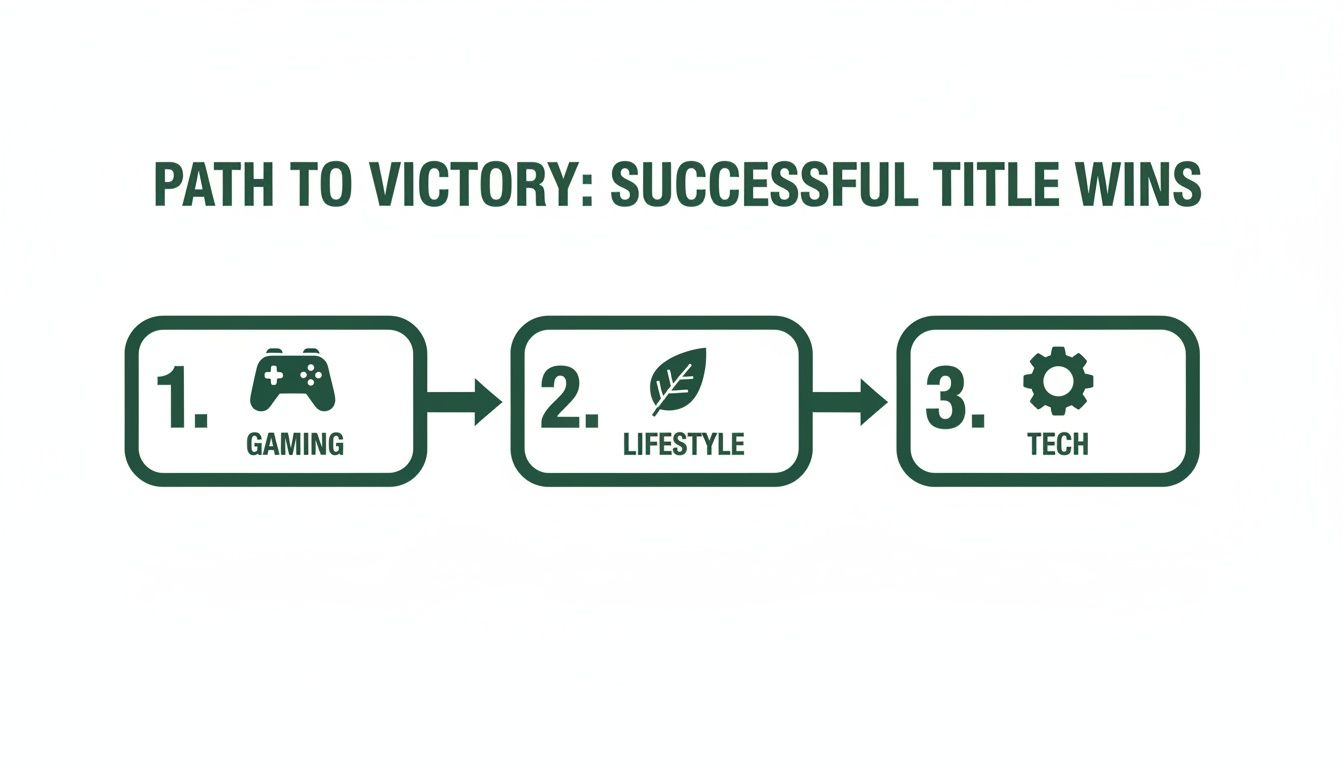
You’ll notice Gaming headlines that tug on emotions, Lifestyle titles that crystalize clarity, and Tech labels that underscore authority.
Keep this checklist at hand to ensure every title meets your best-practice criteria.
Aim to complete each title review in under 2 minutes by folding these checks into your upload routine.
| Task | Tool | Frequency |
|---|---|---|
| Keyword Brainstorm | VidIQ | Per Video |
| Competitor Scan | YouTube Search | Weekly Audit |
| Length Check | SERP Preview | Before Upload |
| A/B Testing | YouTube Studio | Quarterly |
Building these reviews into your calendar turns title optimization from a chore into an automatic habit.
Download the printable worksheet to keep this process front and center as you churn out new uploads. Print it out, tack it to your wall, or slot it into your project management software—whatever helps you stay committed.
Sharing this guide with teammates and doing periodic round-ups will lock in those best practices for every channel.
Consistency in your title process can lift CTR by up to 20% each quarter steadily.
YouTube Title Check FAQ
Whenever I run a quick YouTube title audit, the same four questions land in my inbox. From the perfect length to A/B testing in Studio, these bite-sized answers will point you toward more detailed walkthroughs.
- How long should my YouTube title be for optimal CTR?
- What tools integrate directly with YouTube for title analysis?
- How do I interpret inconclusive A/B test results?
- Can I run title tests on YouTube Shorts?
Pro Tip Consistent title checks can lift CTR by up to 20% over three months.
How Long Should My YouTube Title Be For Optimal CTR?
Aim for 40–50 characters so your headline displays fully across mobile and desktop. That sweet spot balances scan-ability with SEO power. In fact, 81.6% of top-performing videos fall into this range, avoiding awkward truncation.
What Tools Integrate Directly With YouTube For Title Analysis?
Browser extensions like TubeBuddy and VidIQ plug right into YouTube Studio. They overlay SEO scores, surface keyword ideas, and even track trending topics—no toggling between tabs required.
Analyzing Length And Performance
When an A/B test ends without a clear winner, dig deeper.
How Do I Interpret Inconclusive A/B Test Results?
If click-through rates are neck and neck, look at metrics such as average view duration and watch time per impression. Then:
- Swap in a fresh audience segment and rerun the test
- Blend your strongest headline elements into a third variation
“Reviewing watch time often reveals hidden winners when click signals tie.”
Can I Run Title Tests On YouTube Shorts?
YouTube’s native A/B tool doesn’t support Shorts just yet. Instead, rotate two title options across matching time blocks. After three days, compare impressions and CTR in YouTube Analytics to see which one sticks.
Deepening Your Title Check
Once you’ve tackled those FAQs, level up by auditing past uploads in bulk. A simple spreadsheet or a tool that flags title length and keyword placement will expose patterns like recurring truncation or low-click zones.
- Audit your last five uploads and schedule quarterly title reviews to catch truncation issues and uncover data-driven keyword angles.
TimeSkip helps automate chapter and title audits alongside real-time performance flags, so you never miss a tweak. Try it free at TimeSkip
