

A YouTube CPM calculator is a handy tool for figuring out your potential ad earnings. It essentially shows you what advertisers are willing to pay for every 1,000 ad impressions on your videos. Getting your head around this number is the first step to really understanding your channel's financial potential.
To estimate creator revenue from views and RPM rather than advertiser CPM alone, use the YouTube money calculator.
The term itself, CPM, just stands for Cost Per Mille (mille is Latin for thousand).
What Is YouTube CPM and How Is It Calculated

Let's cut through the jargon. Think of your YouTube video as a busy highway billboard. Every time 1,000 cars (your viewers) drive past and see an ad on your billboard, the advertiser pays a certain fee. That fee is your CPM.
Here's the most important thing to remember: CPM is what the advertisers pay, not what you, the creator, actually pocket. It's the gross figure before YouTube takes its cut or any other factors come into play. It's a fantastic indicator of how valuable advertisers think your audience is.
The Simple CPM Formula
Figuring out your CPM is surprisingly easy. You just need two numbers from your YouTube Analytics dashboard: your total ad earnings and your total number of monetized playbacks (the number of times ads were actually shown on your videos).
Here's the formula:
CPM = (Total Ad Earnings / Total Ad Impressions) x 1,000
Let's walk through a quick example. If your videos pulled in $200 from 50,000 ad impressions, the math would look like this: ($200 / 50,000) x 1,000. That gives you a CPM of $4.00.
This means that, on average, advertisers paid $4.00 for every thousand times an ad was shown across your content.
Why CPM Varies So Drastically
Not all YouTube channels are created equal in the eyes of an advertiser. This is exactly why a CPM calculator is so useful—it helps you see where your channel might fit in. Your niche plays a massive role here.
For instance, the average CPM across all of YouTube hovers around a modest $3.50 per 1,000 views. But if you're in a high-value niche like tech, that number can skyrocket to anywhere between $5 and $30. You can learn more about YouTube CPM and RPM rates to see just how much these factors can swing your earnings.
Why the huge difference? It all comes down to audience value. Advertisers are willing to pay a premium to get their products in front of viewers with high purchasing power or very specific interests.
Think about audiences watching videos on topics like:
- Personal finance and investing
- Software tutorials and tech reviews
- Real estate and business strategies
A channel focused on general entertainment might have a lower CPM, but it can often make up for it with a much, much higher volume of views. It's a classic case of quality versus quantity.
Why Your RPM Is More Important Than Your CPM
While getting a handle on CPM is a great first step, it’s a bit like knowing the sticker price of a car—it tells you part of the story, but it’s not the final number you actually care about. The metric that truly matters for your bank account is RPM, or Revenue Per Mille.
RPM is your actual, take-home earnings for every 1,000 views your videos get. It’s the number you see after YouTube has taken its cut and all the other deductions are factored in. Simply put, CPM is what the advertiser pays, but RPM is what the creator pockets.
Think of it this way: the advertiser pays for a whole pizza (the CPM). But before that pizza gets to you, YouTube, acting as the delivery service, takes a few slices for itself. What’s left in the box for you to eat is your RPM.
The YouTube Revenue Split Explained
The single biggest reason for the gap between CPM and RPM is YouTube's platform fee. For any ad revenue your videos generate, YouTube takes a significant slice before passing the rest on to you. This is a standard part of the YouTube Partner Program agreement.
Specifically, YouTube keeps 45% of the ad revenue. That means nearly half of what an advertiser pays never even makes it to your AdSense account. This split is absolutely critical to remember when you're trying to forecast your income with a YouTube CPM calculator. To see how this fits into the bigger picture, you can dig deeper into our guide on how YouTube analytics work.
Let's ground this in a real-world example.
Imagine a brand pays a $10 CPM to run ads on your latest video. At first glance, you might think you’re earning a cool $10 for every 1,000 ad impressions. But this is where the revenue split throws a wrench in the works and completely changes your final payout.
YouTube’s 45% cut immediately slashes that impressive $10 CPM. After the split, your actual take-home amount, or RPM, is closer to $5.50. This single fact is one of the most important lessons for new creators to learn.
Why Focusing on RPM Sets You Up for Success
By consistently tracking your RPM, you get a much more realistic view of your channel's financial health. It already has YouTube's cut and other variables baked in, giving you a reliable baseline for setting income goals and measuring real growth.
So, next time you use a YouTube CPM calculator, always remember to perform that second, crucial calculation: reduce the CPM estimate to find your probable RPM. This simple step transforms a vanity metric into an actionable financial figure that truly reflects what you're earning from all your hard work. You can discover more insights about these rates to get a better feel for industry benchmarks.
The Key Factors That Influence Your YouTube CPM
Ever scroll through your analytics and wonder why two videos with similar view counts have wildly different earnings? The answer lies in your CPM. It’s not some fixed number YouTube assigns you, but a dynamic figure that shifts based on a handful of powerful factors.
Learning to understand these variables is the first step toward strategically boosting your channel’s value to advertisers. Think of it like this: your channel is a piece of digital real estate. A storefront in a high-income neighborhood attracts brands with deeper pockets than one in a less affluent area. Your channel works the same way—its value fluctuates based on who is watching, what they’re watching, and when.
Your Audience Demographics
The single biggest factor hitting your CPM is, without a doubt, your audience's location. Advertisers will pay a serious premium to get their products in front of viewers in countries with high purchasing power. After all, that’s where people are most likely to buy.
This is why a single view from the United States is often way more valuable than a view from another region. Top-tier markets like the US can have CPMs over $10, while a country like Pakistan might be closer to $0.36. That's a massive difference. You can explore more data on global YouTube rates to really see how stark these geographical splits are.
The Niche of Your Content
Your channel’s topic, or niche, is another huge piece of the puzzle. It makes sense, right? Advertisers are willing to pay top dollar to reach audiences with specific, high-intent interests that tie directly to expensive products or services. This creates a clear food chain of content value.
This table gives you a rough idea of how much CPMs can vary between different content categories. It highlights just how important your niche's earning potential is.
Estimated CPM Rates by Popular YouTube Niche
| Niche | Estimated CPM Range |
|---|---|
| Finance & Investing | $12 - $30 |
| Real Estate | $10 - $25 |
| Tech & Software Reviews | $8 - $20 |
| Marketing & Business | $7 - $18 |
| Health & Fitness | $5 - $15 |
| Gaming | $2 - $8 |
| Vlogs & Lifestyle | $1 - $7 |
| Pranks & Comedy | $0.50 - $5 |
As you can see, the more directly your content connects to high-value purchases (like software, investments, or real estate), the more advertisers are willing to pay to get in front of your audience.
This simple diagram helps visualize the difference between what an advertiser pays (CPM) and what you, the creator, actually pocket (RPM).
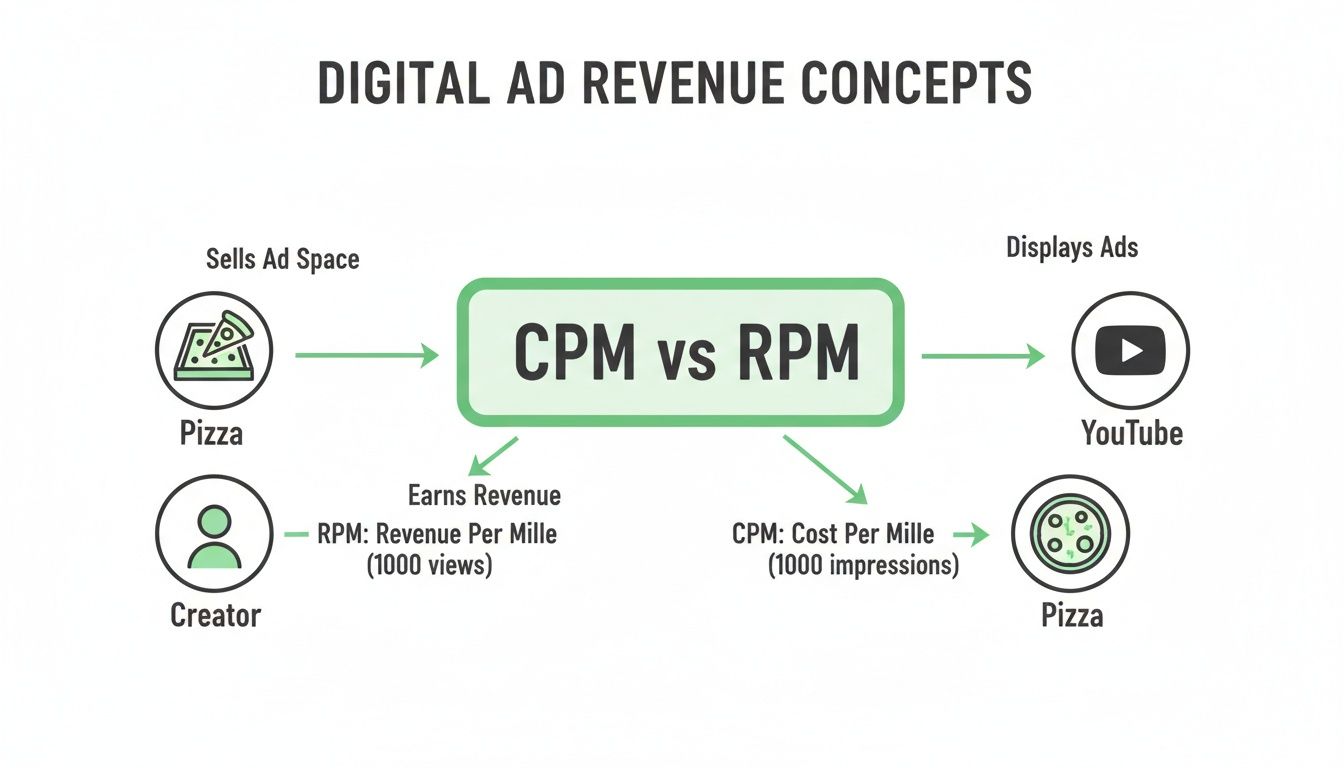
Think of the advertiser's payment as a whole pizza. Before a slice gets to you, YouTube takes its cut, leaving you with the RPM.
Seasonality and Ad Spend
Advertising budgets aren't static—they ebb and flow with the seasons. The biggest spike by far happens in the fourth quarter (Q4), from October to December. It's the holiday season, consumer spending is through the roof, and brands are fighting tooth and nail for ad space. This competition drives CPMs up for pretty much everyone.
On the flip side, you’ll almost always see a major CPM drop in January. It's the classic post-holiday slump. Companies pull back on their marketing spend after the holiday rush, and creators feel it. Don't panic—it's a totally normal part of the annual advertising cycle.
Advertiser-Friendly Content
Finally, the type of content you create has a direct impact on its monetization potential. YouTube’s algorithms are designed to place ads on videos deemed "advertiser-friendly." This is just a clean way of saying content that's free of excessive profanity, controversy, or graphic material.
Videos that are educational, family-friendly, or just have a positive vibe tend to attract a much wider range of advertisers. By sticking to these guidelines, you're essentially maximizing the pool of advertisers willing to bid on your videos, which helps keep your CPM healthy and consistent.
Using a CPM Calculator with Real-World Examples
 Knowing the theory behind CPM and RPM is one thing, but seeing how the numbers actually play out in the real world is where it all starts to click. A good YouTube CPM calculator is more than just a toy for estimating earnings. It’s a strategic tool that shows you exactly how your niche, audience, and view count collide to create your financial reality.
Let’s walk through three completely different scenarios. We'll look at each channel’s potential gross ad earnings and, more importantly, what the creator actually pockets after YouTube takes its share. This comparison makes it crystal clear why two channels with wildly different view counts can end up with surprisingly similar paychecks.
Example 1 The Small Gaming Channel
First up, we have a passionate gaming creator. Their channel is all about indie game reviews, which mostly pulls in a younger, international audience. This demographic typically comes with a lower CPM.
Here are the numbers:
- Monthly Views: 50,000
- Estimated CPM: $4.00 (Pretty standard for the gaming niche with a mixed audience)
- Monetized Playbacks: Let's say 80% of views show an ad, giving us 40,000 impressions.
Plugging this into the CPM formula, the gross ad earnings work out to be ($4.00 x 40,000) / 1,000 = $160. After YouTube takes its 45% cut, the creator’s estimated monthly take-home is a humble $88. Even with consistent views, that low CPM really puts a ceiling on the ad revenue.
Example 2 The Mid-Sized Finance Channel
Next, picture a finance channel that creates content on stock market analysis and personal investing. This creator is smart—they’re targeting a high-value, US-based audience of adults who have money to spend.
Let's run the numbers:
- Monthly Views: 250,000
- Estimated CPM: $18.00 (A very realistic figure for a finance niche in a Tier-1 country)
- Monetized Playbacks: With a more engaged audience, let's assume 85% of views are monetized, which comes to 212,500 impressions.
The calculation tells a completely different story. The gross ad earnings are ($18.00 x 212,500) / 1,000 = $3,825. Even after YouTube's 45% share, the creator’s estimated monthly take-home is a very healthy $2,103.75. This channel has just five times the views of the gaming channel but earns over 23 times the revenue.
Key Takeaway: Niche and audience demographics are massive multipliers for your earnings. A smaller, highly targeted audience can be far more profitable than a huge, general one.
Example 3 The Large Lifestyle Vlogger
Finally, let's look at a popular lifestyle vlogger. This channel has a massive global following, but the content is broad—covering everything from travel diaries to daily routines.
Here's the breakdown:
- Monthly Views: 1,000,000
- Estimated CPM: $6.00 (A blended average that reflects a diverse, international audience)
- Monetized Playbacks: 80% of views are monetized, totaling 800,000 impressions.
Their gross earnings are ($6.00 x 800,000) / 1,000 = $4,800. After YouTube's cut, their monthly take-home is around $2,640. Think about that. Even with a million views, their final income is only a bit higher than the finance channel with a quarter of the viewership.
These examples bring home another critical point: watch time. Keeping viewers glued to your videos is the secret to stacking up both views and revenue. You can even forecast how much you stand to gain with our handy YouTube watch time calculator.
As you can see, raw view count is far from the whole story. A channel getting 20,000 daily views might earn between $164 and $274 a month. But by optimizing content to push daily views to 85,000, that same channel could see its earnings jump to between $8,575 and $14,291 annually. The numbers don't lie—small improvements can lead to huge results.
Actionable Strategies to Increase Your YouTube CPM
Knowing what shapes your CPM is one thing, but actually using that knowledge to grow your channel’s revenue? That’s the real game. It’s time to shift from passively watching your analytics to actively influencing them. That's how you unlock higher earnings.
And no, you don't need a million subscribers to start seeing a real difference. With a few proven strategies, you can make your videos far more attractive to the advertisers with deep pockets, boosting the value of every single view you get.
Target High-Value Niches
As we've covered, your video's topic is one of the biggest levers you can pull to increase your CPM. While you should always make content you’re genuinely passionate about, strategically angling your videos toward more lucrative subjects can have a massive impact on your bottom line.
Think about creating videos that solve expensive problems. For instance, instead of a general gaming video, why not create a tutorial on high-performance PC builds? Instead of another daily vlog, you could pivot to personal finance tips for young adults.
Advertisers in these spaces—we're talking software companies, financial services, and high-end tech brands—have much larger budgets. They are more than willing to pay a premium to get their ads in front of an audience that is actively searching for the solutions they offer.
Optimize Your Videos for Valuable Keywords
Just like a blog post, your YouTube videos need some SEO love. When you optimize your titles, descriptions, and tags for high-value keywords, you help YouTube’s algorithm play matchmaker, connecting your content with advertisers hunting for your specific audience.
Use keyword research tools to find terms in your niche that have high commercial intent. These are the phrases people type in when they're close to pulling out their wallets.
- Go for review-style keywords: Phrases like "best software for..." or "[Product Name] review" signal that the viewer is in buying mode.
- Include location-specific terms: If it makes sense for your content, adding cities or countries can attract local advertisers running targeted campaigns.
- Use brand and product names: Mentioning specific products helps YouTube place super-relevant (and often high-paying) ads on your videos.
Structure Videos to Maximize Watch Time
Longer watch times send a huge signal to the YouTube algorithm: "Hey, people love this video!" This not only gives your video a boost in search results but also opens up more slots for mid-roll ads, which are a major driver of ad revenue.
To keep people watching, you need to structure your videos effectively. Hook them within the first 15 seconds, tell them exactly what they're going to get, and then deliver on that promise. Breaking your video into logical chunks with clear transitions is key.
One of the best ways to improve both structure and retention is by adding chapters. Creators who use chapters see up to 220% boosted visibility and 15% higher viewing duration, which directly pumps up those view counts and, in turn, your CPM earnings.
By making your content easy to navigate and even skimmable, you give viewers a reason to stick around longer. This translates directly into more ad impressions and more revenue. Beyond just tweaking your CPM, learning how to monetize your social media channels effectively can give you a broader strategy for turning your content creation into a real business.
Frequently Asked Questions About YouTube CPM
Jumping into the world of YouTube monetization can feel like you're trying to learn a whole new language, full of strange acronyms and numbers that never seem to stay still. Even after you've run the numbers through a CPM calculator, you probably have a few questions about what it all means for your channel. Let's tackle some of the most common ones.
One of the first things creators notice is how much their CPM can swing from one video to the next. This isn't a bug in the system; it's exactly how it's supposed to work. Your CPM is a live number that shifts based on advertiser demand for your specific audience at any given moment.
For example, a video breaking down investment strategies is going to pull in ads from finance companies willing to pay top dollar. Compare that to a funny cat compilation, and you'll see a massive difference in CPM. Similarly, a video that blows up in the United States will almost always earn more than one that's popular in a region with lower advertiser budgets.
How Long Does It Take to Get a High CPM?
Building a channel that commands a high CPM is a marathon, not a sprint. If you're expecting premium ad rates the day you get accepted into the YouTube Partner Program, you're going to be disappointed. A high CPM is the reward for consistently creating valuable content that attracts a profitable and engaged audience over a long period.
Think of it like building a reputation with advertisers. When you first start, they have no idea who your audience really is. But as you publish more and more videos in a specific niche—say, luxury car reviews or home renovation tutorials—you're building a library of proof. You're showing advertisers that you can consistently deliver the exact eyeballs they want to reach. This process can easily take many months, or even a couple of years, of dedicated work.
You can also use a YouTube monetization checker to make sure your content follows the platform's advertiser-friendly guidelines, which is a critical piece of the puzzle.
Can You Earn Money Without a High CPM?
Absolutely. While a high CPM is a fantastic goal for boosting ad revenue, it's a huge mistake to believe it's the only path to a successful creator business. Relying 100% on AdSense is a risky game, since your income can tank overnight due to seasonal shifts or algorithm changes.
The smartest creators build a diverse set of income streams to create a much more stable financial base. Ad revenue should be just one slice of the pie.
The most successful YouTubers treat their channel like a business hub, not just a place for ads. They build multiple revenue streams that give them financial security regardless of what the ad market is doing.
Look into these powerful alternatives to AdSense:
- Affiliate Marketing: Recommend products you genuinely use and love, then earn a commission when your audience buys them.
- Sponsorships: Work directly with brands to create custom integrations within your videos.
- Selling Merchandise: Offer your loyal fans branded products like t-shirts, mugs, or even digital goods like presets or templates.
These income streams allow you to earn money directly from the trust you've built with your audience, which makes your business far less vulnerable to unpredictable ad rates.
Ready to boost your video's visibility and watch time? With TimeSkip, you can generate SEO-optimized YouTube chapters in seconds, helping you rank higher and keep viewers engaged. Get started for free at https://timeskip.io and see the difference it makes.
