

Properly timing a YouTube video—using chapters and timestamps to guide your viewers—is one of the easiest ways to boost both watch time and SEO. It’s a simple change that helps people find exactly what they need in your content, which makes for a better viewing experience and tells the YouTube algorithm your video is a high-quality resource.
In the end, strategic timing makes your video more engaging and much easier to find.
Why YouTube Video Timing Is Your Untapped SEO Superpower
In a world where attention is the most valuable currency, just holding a viewer's interest is a huge win. That's where strategic video timing, using chapters and timestamps, becomes more than just a neat feature—it’s a core part of modern YouTube SEO. It turns a standard, linear video into an interactive guide that actually respects your viewer's time.
This approach is a direct response to how people actually behave on YouTube. The competition is insane. You're not just competing with a few other creators; you're up against the 14 billion videos on the platform, all fighting for the attention of 2.85 billion users every month.
The raw numbers are pretty brutal. The average YouTube video only keeps about 23.7% of its viewers until the end. Even worse, that drop-off happens incredibly fast.
Viewer Drop-Off in the First 60 Seconds
This table shows just how quickly viewers can lose interest. If you don't grab their attention and show them they're in the right place, they're gone.
| Time Elapsed | Average Viewer Retention |
|---|---|
| 0 seconds | 100% |
| 30 seconds | 66% |
| 60 seconds | 45% |
With 55% of your audience potentially leaving within the first minute, you need to prove your video's value immediately. Chapters are a perfect way to do that.
The Algorithmic Advantage of Chapters
When you add chapters, you’re essentially creating a clickable table of contents for your video. This simple structure gives you two massive benefits that the YouTube algorithm absolutely loves: a better user experience and a longer watch time.
- Happier Viewers: People can scan your chapters to see if your video has the answer they're looking for. This stops them from clicking away out of frustration, which sends all the right signals to the algorithm.
- Longer Watch Times: It might sound backward, but letting viewers skip ahead often keeps them on your video longer. They find the specific thing they need, might get curious and check out other sections, and are far less likely to just leave.
By making your content easier to navigate, you are directly optimizing for viewer retention. YouTube rewards videos that keep people on the platform, and well-timed chapters are one of the best tools you have to make that happen.
Ultimately, this all feeds back into the core ideas behind search engine optimization. If you want to see how this fits into the bigger picture, you can learn more in our guide that asks what is video SEO. By timing your video well, you're making it more valuable not just for people, but for search engines, too.
Thinking Like a Viewer to Craft Perfect Chapters
Crafting effective video chapters starts long before you ever touch the timeline. The real secret is getting inside your viewer's head. You have to understand who they are and, more importantly, what they're desperately trying to figure out.
Your job is to break down the video's journey into logical, satisfying chunks that mirror how a viewer thinks and searches for information.
Imagine you’re making a tutorial on baking sourdough bread. Someone watching isn't just looking for "baking bread." They're hunting for answers to very specific questions like, "how to feed a starter," "what is the stretch and fold method," or "how to get a good oven spring." Your chapters need to speak directly to those moments.
Naming Chapters for Search Engines
Generic chapter titles like "Introduction," "Step Two," or "Conclusion" are massive missed opportunities for SEO. You need to transform them into the exact keyword-rich phrases people are typing into Google and YouTube. It's about thinking like a search engine and your audience at the same time.
Here’s what that looks like in practice:
-
Vague: "Mixing Ingredients"
-
SEO-Optimized: "Mixing the Dough and Autolyse Process"
-
Vague: "Baking Tips"
-
SEO-Optimized: "Achieving the Perfect Crust and Oven Spring"
This simple switch turns every chapter into a potential entry point for new viewers, helping you rank for all sorts of valuable long-tail keywords. Of course, to really nail this, you have to know who you're talking to. SuperX has a fantastic guide to help you identify your target audience using real data.
By naming chapters based on viewer questions, you’re not just organizing content—you're building a network of search magnets that pull viewers directly to the most relevant parts of your video.
This approach does more than just organize your video; it drastically improves the viewing experience. That positive experience sends all the right signals to YouTube's algorithm. For a deeper look at how this all connects, check out our article on boosting YouTube audience retention. When a viewer finds their answer quickly, they trust you, and they're far more likely to stick around.
How to Generate SEO-Optimized Chapters Instantly
Let's be real: scrubbing through a long video just to find the right spots for chapters is a soul-crushing task. It can easily eat up hours you don't have. If you want to move from strategy to actually getting things done, you need a faster, smarter way to time your YouTube videos. This is exactly where AI tools like TimeSkip completely change the game, turning a tedious chore into something that takes just a few seconds.
Getting started is surprisingly quick. Once you install the Chrome extension, a small TimeSkip icon pops up right inside your YouTube dashboard. With a single click, the tool scans your video's transcript and structure to generate a full set of SEO-optimized chapters.
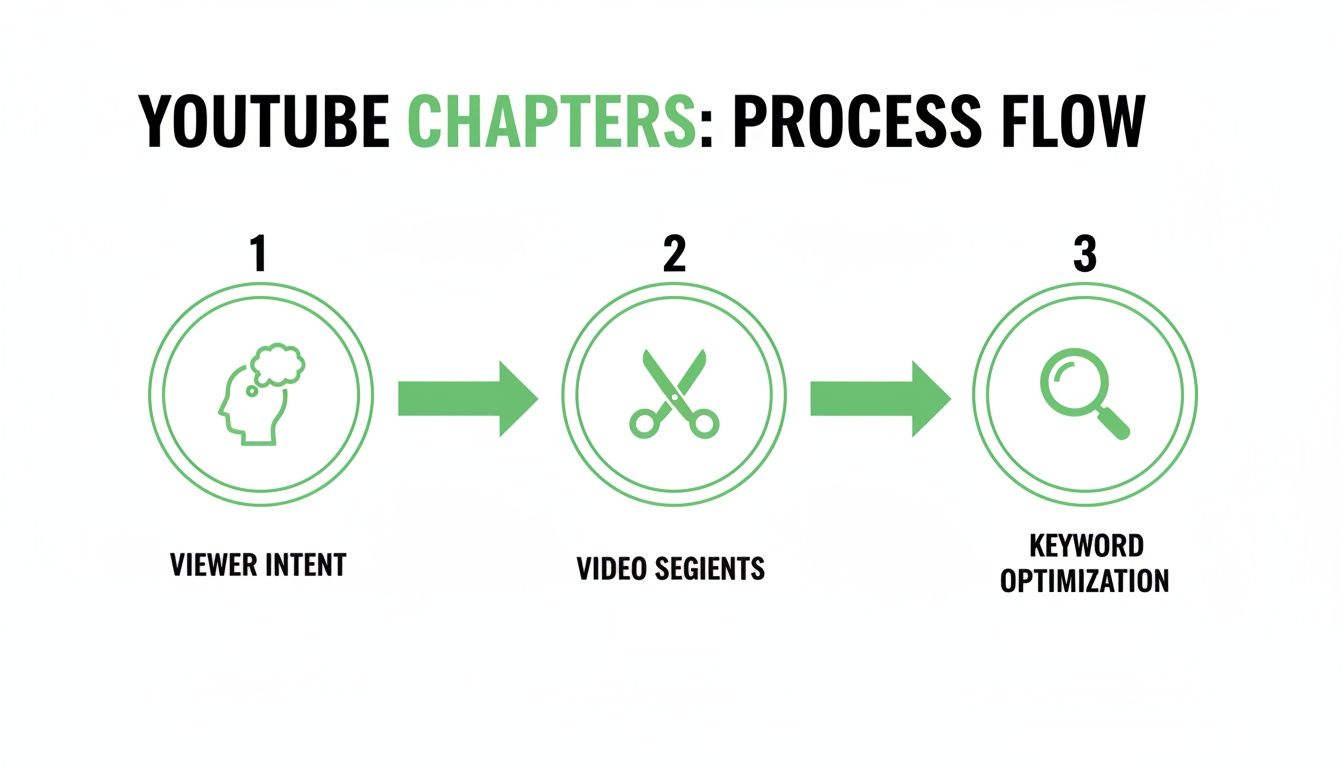
This workflow—understanding what viewers want, breaking the video into logical chunks, and then naming those chunks with good keywords—is the core of effective chaptering. The big shift is that AI can now handle this entire sequence for you, moving from viewer needs to SEO-ready chapters almost instantly.
Putting AI Chapter Generation into Action
Once you're on your video page in YouTube Studio and click that TimeSkip icon, the AI kicks into gear. In moments, you'll have a complete list of suggested timestamps and chapter titles right there in your browser.
This isn't just about saving time; it's about uncovering opportunities you might have missed. The AI is surprisingly good at spotting logical breaks and finding keyword-rich phrases for chapter names that you might overlook during a manual pass. This is an absolute lifesaver for podcasters, educators, or anyone creating long-form content. For them, AI-generated chapters can lead to 25% gains in discovery and boost watch time by 15% by targeting long-tail keywords.
The real magic of an AI chapter generator isn't just saving time—it's using data to create more effective, search-friendly chapters than you could easily come up with on your own. It lets you stop doing the grunt work and start focusing on strategy.
The tool gives you a simple interface where you can review, edit, and then copy the entire list of timestamps with one click. From there, you just paste it straight into your video’s description box. The whole process, from analysis to having a perfectly formatted list ready for YouTube, is seamless.
Making Sense of the AI's Suggestions
The AI presents its findings in a clean, straightforward list—no complicated dashboards to navigate.
You're looking at the final output: a neatly organized set of timestamps and descriptive titles, ready to be copied and pasted. This completely eliminates the tedious back-and-forth of watching the video, jotting down times, and then trying to write clever titles.
To see how this tool can be part of a bigger SEO strategy, check out our guide on finding the best YouTube timestamp generator. By automating this one crucial step, you free up a ton of valuable time to focus on what really matters: creating even better content.
Refining and Publishing Your Timestamps for Maximum Impact
An AI-generated list of chapters is an incredible starting point, but don't just copy and paste. A few quick refinements are what truly sharpen your competitive edge. The initial draft gets you 90% of the way there; that final human touch is what elevates your video strategy from good to great.
First, give the AI-suggested chapter titles a quick scan. Do they actually reflect the key moments in your video? More importantly, can you spot opportunities to weave in relevant long-tail keywords that a real person might be searching for?
Think of it this way: an AI might suggest a chapter title like "Setting Up Your Camera." A simple tweak to "How to Set Up Your Camera for Low-Light" makes it far more specific and, crucially, more searchable. This small change helps your video show up for more targeted queries.
Publishing and Troubleshooting Your Chapters
Once you’re happy with your chapter list, the next part is easy. Just copy the formatted timestamps and paste them directly into your YouTube video description. YouTube’s system is built to automatically recognize the format and will display the chapters right on your video's progress bar.
But sometimes, things don't work on the first try. It happens. If your chapters aren't showing up, it's almost always due to a simple formatting error.
Run through this quick checklist to fix the most common issues:
- The Zero Second Rule: Your list must kick off with a
00:00timestamp. If you miss this, YouTube won't recognize the list as chapters at all. - Minimum Chapter Count: You need at least three timestamps for the chapter feature to activate. Two just won't cut it.
- Correct Formatting: Each entry needs to be on its own line, following the
minutes:seconds(e.g.,03:15) orhours:minutes:seconds(e.g.,01:22:45) format.
Getting these small details right is the final, crucial step. It ensures all your strategic work pays off by creating a seamless and navigable experience for your audience—which is exactly what the algorithm wants to see.
Measuring the Real SEO Impact of Your Video Chapters
So you’ve published your video with those shiny new chapters. Job done, right? Not quite. Now comes the fun part: figuring out if all that effort is actually moving the needle. You can't just guess; you need to dig into your YouTube Analytics and let the data tell the story.
The first place I always look is the Audience Retention report for that specific video. Give it about a week to collect enough data, then pull up the retention graph. What you're hoping to see are new peaks or plateaus that line up perfectly with your chapter start times. These little spikes are gold—they're clear proof that people are either re-watching sections or skipping directly to the parts they care about most. It's the ultimate validation that your chapter topics are hitting the mark.
Checking Your Traffic Sources
Next up, head over to the Traffic Sources report in your analytics. The metric to watch here is "YouTube Search." If your keyword-rich chapter titles are doing their job, you should start seeing a lift in views coming directly from search. This happens because your chapters are essentially creating new entry points for your video, allowing you to rank for more specific, long-tail search queries.
While you're there, keep an eye on "Suggested Videos" traffic. Chapters create a better, less frustrating user experience, which often leads to a higher average view duration. That's a huge signal to YouTube's algorithm to recommend your video more often alongside other content.
Don't just look at one metric in a vacuum. The real magic happens when you see a lift in both search traffic and audience retention. That combo is a powerful sign to the algorithm that your video is a well-structured, valuable resource that's satisfying viewer intent.
To truly get the full picture of your ROI, you need to zoom out a bit. Tying specific video metrics into your channel's overall performance is crucial. You can find some great ideas in these powerful YouTube dashboard examples for tracking growth, revenue, and engagement all in one place. Combining the micro-data from one video with your channel-wide macro-data is how you'll know for sure what's working.
Got Questions About Timing Your YouTube Chapters?
Even with the best strategy, you're bound to run into a few questions when you start timing out your YouTube videos. Getting the right answers can be the difference between a frustrating afternoon of edits and a smooth, confident publish. Let's clear up some of the most common hangups creators face.
A big one I hear all the time is the fear that chapters will actually hurt audience retention. It makes sense, right? What if everyone just skips to the good parts and leaves? But in practice, the opposite tends to happen. While some viewers will definitely jump ahead, chapters are far more likely to stop a frustrated viewer from clicking away entirely.
By helping people find the exact answer they came for, you're creating a positive experience that the YouTube algorithm loves. This often boosts your overall watch time because of higher viewer satisfaction and better discoverability in search—more than making up for any skips.
How Many Chapters Should a Video Have?
There's no single magic number for this. A good rule of thumb is to create a chapter for each distinct topic or step you cover. For most videos over five minutes, shooting for at least 3-5 chapters is a solid goal. The idea is to improve navigation without creating a cluttered mess.
For much longer content, like podcasts or deep-dive tutorials, having 10-20 chapters is totally normal and a huge help for the audience. The guiding principle is simple: does each chapter cover a logical, self-contained idea? If the answer is yes, you're on the right track.
Why Are My YouTube Chapters Not Showing Up?
This is almost always a simple formatting mistake, and thankfully, it's an easy one to fix. If your chapters aren't appearing on the video timeline, run through this quick troubleshooting list:
- You must start at zero. The very first timestamp in your list has to be
00:00. - You need at least three. YouTube won't activate the chapter feature unless you have at least three timestamps listed.
- Check the format. Each timestamp needs to be on its own line and follow the correct
minutes:seconds(like04:15) orhours:minutes:seconds(like01:12:30) structure.
It's wild, but a single typo or formatting error can make the whole list invisible to YouTube. Double-checking these little details is what makes all your strategic work actually pay off.
Stop wasting hours scrubbing through timelines. TimeSkip generates perfect, SEO-optimized chapters in seconds, right inside YouTube. Try it for free and see how much time you get back.
