

Think of a YouTube timestamp as a clickable link that fast-forwards your viewers to a specific moment in your video. This simple feature transforms long-form content into easy-to-navigate chapters.
For any creator serious about channel growth, using timestamps isn't just a good idea—it's essential. They are a critical tool for improving the viewer experience, boosting audience retention, and seriously upgrading your video's SEO.
Why Timestamps Are a Non-Negotiable Tool for Growth
Just a few years ago, timestamps were a nice-to-have feature, a small perk for your most dedicated fans. Today, they're a cornerstone of any successful YouTube strategy. This is especially true for channels producing tutorials, podcasts, interviews, or any kind of detailed, long-form content.
The reason is simple: viewer habits have completely changed.
People are hungry for in-depth information, but they have zero patience for scrubbing through a 30-minute video to find the one thing they need. Clickable chapters, which are powered by timestamps, solve this problem instantly. They put viewers in control, letting them skip the intro or jump right to the section that answers their burning question.
Responding to Modern Viewing Habits
This isn't just a passing trend. It's a fundamental shift in how people consume content, and it’s why YouTube officially rolled out its native video chapters feature back in 2020. They were responding directly to this evolving behavior.
By 2024, viewers were watching over 1 billion hours of content on the platform every single day, with the average watch time per video climbing by an incredible 121%. The data is crystal clear: there's a huge demand for longer, more detailed videos, and timestamps are what make that content digestible.
This visual breaks down how timestamps create a direct line from your long-form videos to real channel growth.
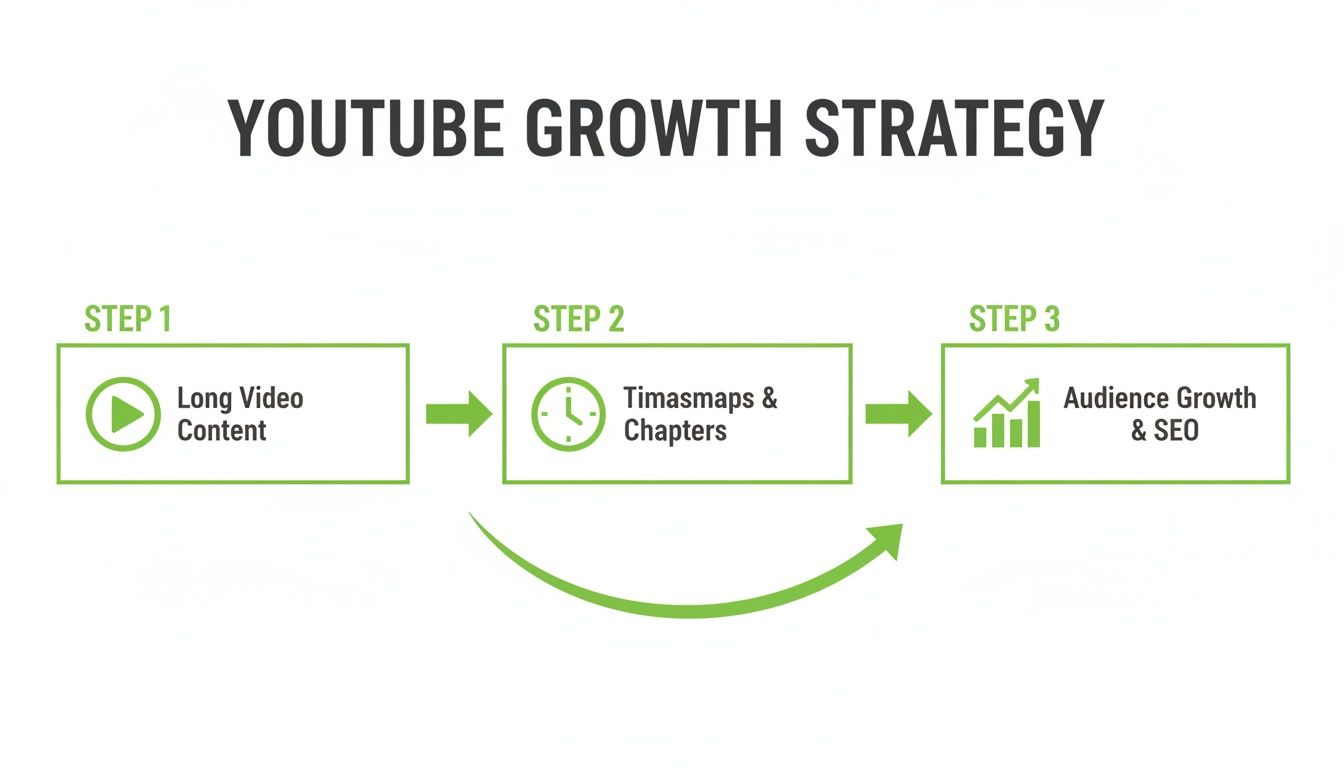
The formula is straightforward: you create valuable, in-depth content, timestamps make it incredibly accessible, and the result is a better user experience that fuels subscriber and view growth.
Turning Convenience into a Growth Engine
A positive user experience sends incredibly powerful signals to the YouTube algorithm. When a viewer uses a timestamp to find exactly what they need, they're far more likely to stick around, which drives up your total watch time. That kind of engagement tells YouTube your content is valuable because it's satisfying what the viewer is looking for.
By breaking down your content into logical, searchable segments, you aren't just helping your current audience—you're creating multiple new entry points for future viewers to discover your video through Google and YouTube search.
Basically, each chapter acts like a mini-video within your main video. This gives you the chance to rank for more specific, long-tail keywords that you might have missed otherwise. For example, a long podcast episode could suddenly start showing up in search results for a very niche question that was only answered in a single 2-minute chapter.
To get a better sense of the real-world impact, it's worth seeing how other content creators succeed by integrating these kinds of features into their workflow.
Ultimately, using a YouTube time stamp is no longer just about navigation. It's about maximizing your video's discovery, boosting retention, and building a solid foundation for sustainable channel growth.
The Manual Process for Adding Perfect Timestamps
While automated tools offer incredible speed, getting your hands dirty and learning the manual process for adding YouTube timestamps is a fundamental skill. It’s the best way to get total control over your video's narrative, ensuring every chapter lines up perfectly with your content. Honestly, it’s a hands-on approach that connects you more deeply with your own material.

The magic happens right inside your YouTube video description box. You're simply going to create a list of timecodes paired with descriptive titles, and YouTube will automatically convert them into those slick, clickable chapters.
Finding Your Video's Natural Breaks
Before you type a single number, the first move is to watch your own video with a critical eye. Your mission is to spot the logical segments where the topic shifts or you introduce a new key point. Put yourself in a viewer's shoes—if you were looking for specific info, where would you want to jump to?
These breaks are often dead obvious in structured content like tutorials or listicles. For something more conversational, like a podcast or an interview, listen for the transitions between different questions or storytelling arcs.
For instance, in a 45-minute podcast interview, your segments might look something like this:
- The guest's origin story.
- Their first major career breakthrough.
- A deep dive into a specific project.
- Discussion about a recent industry trend.
- Audience Q&A section.
- Final thoughts and call to action.
Jot these moments down as you watch, noting the exact time each new section kicks off. This simple outline is the blueprint for your chapters.
Following YouTube's Formatting Rules
Once you've mapped out your key moments, you need to format them correctly so YouTube can actually recognize them. The rules are simple but super strict. Getting them wrong is the number one reason I see timestamps fail to work.
There are three non-negotiable rules you absolutely have to follow:
- Start at Zero: Your very first timestamp in the list must be
00:00. This is the most frequently missed step. If you forget it, YouTube won't process any of your chapters. - Minimum of Three: You need to have at least three timestamps in your list for the chapter feature to activate. Two just won't cut it.
- List Format: Each timestamp has to be on its own line. Use the
HH:MM:SSorMM:SSformat, followed by a space, and then your chapter title.
A common mistake is bunching timestamps together on one line or using the wrong punctuation, like a hyphen instead of a space. Always, always put each timestamp on a new line. Trust me on this one.
A Practical Example in Action
Let's put these rules to work with our podcast interview example. After reviewing the video, you've nailed down the key segments and their start times. In your video's description box, you'd type out the following list:
00:00 Guest Introduction
03:45 Early Career Struggles
11:20 The Big "Aha!" Moment
22:15 Breaking Down the Marketing Strategy
35:02 Answering Viewer Questions
41:55 Where to Find More from the Guest
After you hit "Save," YouTube will process this list and transform it into a series of clickable chapters right on the video player's progress bar. Viewers can now hover over the progress bar to see your chapter titles or click directly from the description to navigate your content.
The process is straightforward, but for those times you want to share a specific moment without editing the description, you can also create a direct YouTube time URL. This is super handy for sharing clips in comments or on social media.
Automating Your Workflow with TimeSkip
Manually adding YouTube chapters is a great skill to have, but let's be real—it takes forever. If you're a busy creator, podcaster, or marketer, you're already juggling a dozen other things. Spending 30 minutes to an hour scrubbing through a long video, jotting down times, and crafting descriptions is a luxury you probably don't have.
That's where a smarter, more efficient approach comes in. You don't have to sacrifice quality for speed. Instead, you can automate the entire process and still get all the SEO benefits that make chapters so powerful.
The right tool doesn't just save you time; it actually helps you create better, more effective timestamps than you might on your own.
Meet the TimeSkip Chrome Extension
For creators looking to get their time back, the TimeSkip Chrome extension is an absolute game-changer. It’s designed to generate fully optimized, SEO-friendly video chapters in seconds. Think of it as your personal assistant for video navigation, handling the tedious stuff so you can focus on your overall strategy.
The real magic is how seamlessly it plugs right into your YouTube workflow. Once it's installed, you don't have to bounce between different apps or tabs. You just go to your video in YouTube Studio, click the TimeSkip icon, and let it do its thing.
The point of automation isn't just to work faster; it's to work smarter. TimeSkip analyzes your video's transcript to find the key topics and logical breaks, generating precise timestamps and relevant chapter titles you might have missed.
This is especially clutch for long-form content. The tool can process videos up to four hours long in under five seconds—a task that would be a massive headache to do manually. This makes it an essential tool for podcasters, educators, and anyone else creating in-depth videos. You can see how creators are using TimeSkip to automate their timestamp workflow and check out the results for yourself.
Turning Simple Timestamps into SEO Assets
What really makes a tool like TimeSkip stand out is its AI-powered keyword optimization. It doesn't just spit out timestamps; it turns them into powerful SEO assets built to get your video discovered on both YouTube and Google. This is a fundamental shift in how we should think about video chapters.
Here’s a look at how it works behind the scenes:
- Content Analysis: The extension crunches your video's audio and transcript to get a deep understanding of the core themes and topics you cover.
- Topic Identification: It pinpoints the exact moments where you switch subjects, which becomes the foundation for your video chapters.
- SEO-Driven Title Suggestions: Instead of generic labels, TimeSkip suggests keyword-rich chapter titles by analyzing what people are actually searching for.
For instance, a basic chapter title like "Camera Settings" might become a much more search-friendly suggestion like "Best DSLR Settings for Low-Light Video." That small tweak dramatically increases the chance that this specific segment of your video will pop up in search results, bringing new viewers directly to the most relevant part of your content.
This AI-driven approach means every single chapter is actively working to grow your video's organic reach, turning a simple navigation feature into a core part of your growth strategy.
Writing SEO-Driven Chapter Titles for Maximum Discovery
Adding YouTube timestamps is a great start, but the real magic happens when you name the chapters. You need a mindset shift here: stop thinking of chapter titles as simple labels. Instead, start seeing them as powerful, indexable SEO assets. Each title becomes a new digital doorway, a fresh opportunity for viewers to find your content through both YouTube and Google search.
This approach creates multiple entry points into a single video. When you optimize each chapter title around specific keywords, you're not just hoping people stumble upon your main video topic. You're actively targeting dozens of smaller, niche questions that your video answers along the way.
The Power of Search Intent in Chapter Naming
Think about how you actually use a search engine. You probably don't type in broad, generic terms. More often than not, you’re using long-tail keywords or asking a direct question. Your chapter titles need to mirror that exact behavior.
A generic title like "Lighting Setup" is fine, but it doesn't really grab the attention of someone desperately typing a problem into the search bar. A much stronger, SEO-focused title would be something like "How to Set Up 3-Point Lighting for Vlogging." This title is specific, solves a clear problem, and packs in keywords ("3-point lighting," "vlogging") that attract the right audience.
The goal is to speak the language of your audience's problems. When you do this, you dramatically increase the chances that a specific clip from your video will pop up as a direct answer in search results, often highlighted with YouTube's "key moments" feature.
This strategy transforms one video into a whole collection of highly specific, searchable answers.
Conducting Keyword Research for Chapters
You don't need fancy, expensive tools to come up with effective chapter names. A little keyword research using YouTube and Google's own search features will get you most of the way there.
Just start typing a core topic from your video into the YouTube search bar and pay attention to the auto-complete suggestions. These are goldmines because they’re based on what real people are actively looking for.
For instance, if a part of your video is about improving camera audio, type "how to improve camera audio" and watch what pops up:
- how to improve camera audio without a mic
- how to improve camera audio on a budget
- how to improve camera audio in windy conditions
These are perfect candidates for chapter titles. Each one is a long-tail keyword that targets a distinct sub-audience, ensuring every timestamp you create is backed by actual search data.
Automating SEO with Smart Tools
Let's be real—manually brainstorming dozens of SEO-friendly chapter titles for a long podcast or a detailed tutorial can be a massive time sink. This is exactly where AI-driven tools give you a huge strategic advantage.
A Chrome extension like TimeSkip does more than just generate timestamps. It digs into your video's transcript, figures out the core topics, and then suggests keyword-optimized chapter titles for you. It basically automates the whole research process, pulling out the most relevant and searchable phrases for each segment.
This makes sure your chapters aren't just accurate, but are engineered for maximum discovery right from the get-go. It turns a tedious creative task into a quick, data-driven win.
Of course, smart chaptering is just one piece of the puzzle. Many creators are also seeing huge results when they learn how to turn your podcast episodes into viral YouTube Shorts. By combining well-optimized long-form chapters with engaging short-form clips, you can create a powerful growth loop for your channel and build a robust system for attracting new viewers.
How to See if Your Timestamps Are Actually Working
So you’ve added timestamps to your videos. Great! But are they actually doing anything? This isn't just about making your video look neat and tidy; it’s a strategic move, and you absolutely need to track whether it's paying off. The good news is, all the proof you need is waiting for you right inside YouTube Analytics.
Think of this data as your roadmap. It tells you exactly how people are interacting with your chapters and where you can make improvements.

Forget the vanity metrics like raw view counts for a minute. The real gold is buried in your audience retention report. This is where you'll see the direct impact of your chapters on viewer behavior.
Decoding the Key Moments Report
Once you're in YouTube Analytics, head straight for the "Key moments for audience retention" report. This graph is your best friend. It shows you where viewers are hooked, where they bail, and which parts they’re watching over and over again.
When you have chapters enabled, YouTube overlays them onto this graph, giving you a crystal-clear picture of what’s happening.
You're looking for patterns that tell a story:
- Big spikes right at the beginning of a chapter? That’s a fantastic sign. It means your chapter title was so compelling that people jumped straight to it. They knew exactly what they wanted, and you delivered.
- A sudden, sharp drop-off within a chapter? This is a huge red flag. If tons of viewers are leaving right after a chapter starts, the content probably didn't live up to the promise of its title.
- Nice, steady plateaus or slow declines? This is the sweet spot. It means viewers who clicked on that chapter found what they were looking for and are sticking around.
By digging into these trends, you can figure out which topics your audience loves and which ones are falling flat. This kind of feedback is invaluable for planning your next videos.
If you want to get really nerdy and explore the retention graph in more detail, we break it all down in our guide: YouTube Analytics explained.
Giving Your Videos a Second Life
Here’s a benefit of timestamps that most people overlook: they can give your videos a "second life." Let's be real, not everyone has the patience for a 45-minute deep dive. But that same person might happily jump to a five-minute chapter that solves their specific problem.
This behavior is a massive boost to your total watch time, even if that specific viewer's average view duration looks low. It all adds up.
This is especially true today. YouTube’s own data shows that viewers are constantly skipping ahead to find the good stuff. With over 500 hours of video being uploaded every single minute, you can’t afford any friction. For long videos, well-placed timestamps can be the difference between someone watching for 60 seconds versus jumping between three key segments and sticking around for 15 minutes.
Turning Your Data into a Smarter Content Strategy
Don't just look at the data and close the tab. You need to use these insights to build a smarter content strategy.
Here’s how you can put it into action:
- Double Down on What Works: Notice a few chapters on a specific topic have crazy high engagement and lots of rewatches? Your audience is screaming at you. Make more videos about that. It’s a guaranteed win.
- Rethink Your Chapter Titles: See a chapter with a massive drop-off? Ask yourself if the title was misleading. Was it clickbait? Could the content have been better? Use that feedback to write more accurate, punchy titles next time.
- Fix Your Video's Flow: Are people constantly skipping your intro? Maybe it’s too long and rambling. Use that data to tighten up your future videos and get to the value way faster.
Common Questions About YouTube Timestamps
Even with the best strategy in place, you're bound to hit a few snags when working with a new feature. Getting your YouTube timestamp settings just right is the key to unlocking their full potential, so let’s clear up some of the most common issues creators run into.
Think of this as your go-to troubleshooting guide for all things chapters. The good news is, most problems are simple to solve and usually boil down to a small formatting error or a misunderstanding of YouTube's rules. Once you know what to look for, you'll be fixing any issue in minutes.
Why Are My YouTube Timestamps Not Working?
This is, without a doubt, the most frequent question I get. If your carefully crafted timestamps aren't morphing into those beautiful, clickable chapters, it's almost always due to one of these simple formatting rules.
First, your list of timestamps in the description must start with 00:00. This one’s non-negotiable. Forgetting this initial marker is the number one reason chapters fail to appear, period.
Second, you need at least three timestamps for the feature to even activate. A list with only two just won't cut it for YouTube. They also need to be listed in chronological order from start to finish.
Finally, triple-check your format. Each timestamp needs to be on its own line and follow the MM:SS or HH:MM:SS structure. After the time, add a single space and then your chapter title. If you’ve confirmed all of this, give YouTube a few moments to process the changes after you hit save—it isn't always instant.
A tiny typo, like using a period instead of a colon (
01.30instead of01:30) or forgetting the space between the time and the title, can break the whole system. Be meticulous with your formatting, and you'll sidestep 99% of all timestamp issues.
How Many Chapters Should My Video Have?
There's no magic number here. The right amount of chapters depends entirely on the length and structure of your video. The goal is to improve the viewing experience, not hit an arbitrary quota. A good rule of thumb is to add a new chapter every time you transition to a new major topic or key point.
Here's how I think about it:
- A concise, 10-minute tutorial might only need 3-5 chapters to guide viewers through the main steps.
- A 2-hour podcast or in-depth interview could easily have over 15 distinct chapters, one for each major question or discussion point.
Focus on creating logical, meaningful segments. If a chapter feels forced or is only a few seconds long, it’s probably better to combine it with another section. Always ask yourself: does this chapter help my viewer find exactly what they're looking for?
Should I Add Timestamps to My Old Videos?
Absolutely! Going back and adding timestamps to your older, evergreen videos is a brilliant and seriously overlooked growth strategy. It's a low-effort, high-impact way to get more mileage out of the content you've already put so much work into.
When you edit an old video's description to add chapters, it sends a signal to both YouTube and Google that the content has been updated. This prompts them to re-crawl and re-index your video, which can have a massive impact on its visibility.
This simple update gives your old content a second chance to rank for new, highly specific long-tail keywords tied to your chapter titles. You could see a forgotten video suddenly start driving a fresh wave of traffic from search queries you weren't targeting before, breathing new life into your back catalog. It’s one of the easiest SEO wins on the platform.
Ready to stop wasting time and start creating perfect, SEO-driven chapters in seconds? TimeSkip is the Chrome extension that automates your entire workflow, from generating precise timestamps to suggesting keyword-optimized titles. Try it free and see the difference at https://timeskip.io.
