

Feel like your channel has hit a glass ceiling? It's a common frustration. So many creators grind away, optimizing everything they can think of, but completely miss a massive, untapped audience hiding in plain sight: anyone who doesn't speak their language. This is where YouTube auto translate stops being a neat feature and becomes a serious growth engine for your channel.
Why YouTube Auto Translate Is Your Next Big Move
This isn't just about grabbing a few extra views from here and there. We're talking about unlocking entirely new markets and putting your content on a path to exponential growth. When you make your videos accessible to viewers in their native tongue, you're tearing down the single biggest wall between them and your content.
Think about it from a viewer's perspective. Someone in Brazil searching for "how to fix a leaky faucet" in Portuguese isn't going to stumble upon your English-language tutorial—unless you give YouTube a reason to show it to them. By providing translated captions and metadata, you're sending powerful signals to the algorithm that your video is relevant to that search, no matter the language.
Tapping into a Global Audience
The potential here is staggering, and YouTube's own data backs it up. In a single recent month, over six million people watched at least 10 minutes of auto-dubbed videos every single day.
Even more telling, creators who fully embraced these features saw an average 45% jump in views simply by adding multi-language audio to their localized channels. The evidence is clear: translation isn't a "nice to have," it's essential for any creator serious about growth. You can dig deeper into these audience growth stats on air.io.
This strategy creates a powerful feedback loop for your channel:
- You Show Up Everywhere: Translated titles and descriptions get your videos ranking in local search results across the globe.
- Engagement Skyrockets: Viewers who actually understand what you're saying are far more likely to stick around, hit the like button, and subscribe.
- Your Reach Explodes: Your content gets shared within international communities you could never have penetrated otherwise.
To give you a clearer picture, here's a quick rundown of what you stand to gain.
Global Audience Potential At a Glance
| Benefit | Potential Impact | Key Action |
|---|---|---|
| Increased Discoverability | Rank in non-English search results, reaching new viewers organically. | Translate video titles, descriptions, and keywords. |
| Higher Watch Time | Viewers stay longer when they can follow along in their own language. | Enable auto-translated captions for all videos. |
| Broader Market Access | Unlock entire countries and linguistic communities previously out of reach. | Use multi-language audio for your most popular content. |
| Stronger Community | Build a loyal international subscriber base that feels included and valued. | Engage with comments in different languages (Google Translate helps!). |
By making your content universally accessible, you're not just a local creator anymore—you're a global resource. The tools are already built right into the platform you use every day.
The YouTube auto-translate feature is the key that unlocks this potential, making a worldwide strategy accessible without needing a big team or budget.
The concept isn't limited to YouTube, either. Similar tech is breaking down barriers everywhere, from business meetings to travel, with tools like the auto translate device. For creators, the best part is that you don't need any extra hardware. It's time to stop thinking of translation as an afterthought and see it for what it truly is: your next major growth lever.
Activating and Using YouTube's Translation Features
Ready to take your channel global? The good news is that turning on YouTube’s translation features is pretty straightforward. Everything you need is right inside YouTube Studio, giving you full control over how your videos appear to international viewers.
But before you start adding languages, you have to nail your source material. All translations are generated from your video's main caption file—for most of us, that's English. If your original captions are a mess, those mistakes will get copied and often made worse in every other language.
It’s a simple but powerful process: create great content, translate it well, and watch your audience grow.
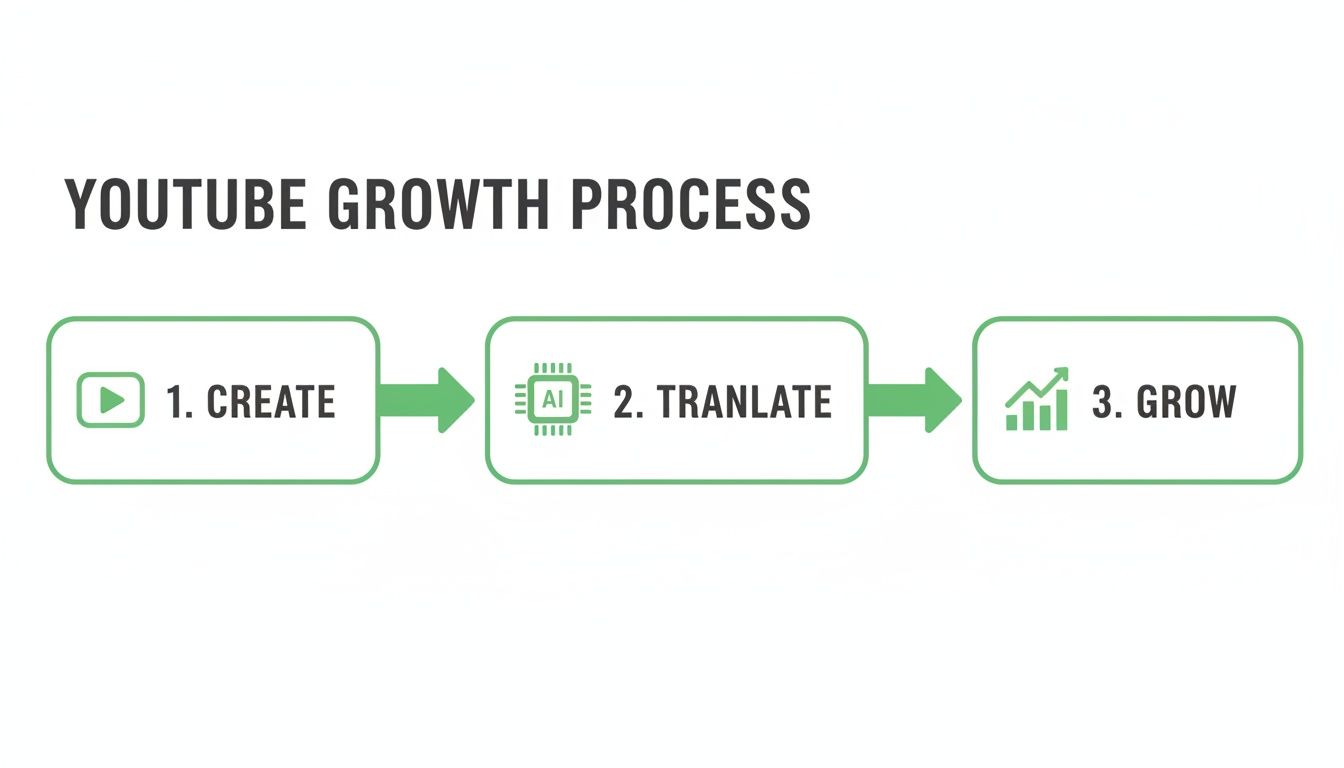
As you can see, AI-powered translation is the critical link between your content and a worldwide audience. It makes global reach a real possibility, not just a lofty goal.
Preparing Your Captions for Translation
Your first stop is YouTube Studio. Head over to the “Subtitles” section on the left and pick the video you want to work on. You’ll probably see an “English (Automatic)” track already published. That’s YouTube's first pass with its speech-to-text AI.
Your job is to perfect this base transcript. Click “Duplicate and Edit” on the automatic captions. This opens up an editor where you can fix misheard words, add proper punctuation, and make sure the timing is synced perfectly with your speech. Seriously, don't skip this step.
Think of your original English transcript as the foundation of a building. If the foundation is cracked and uneven, everything you build on top of it—in this case, every translated language—will also be unstable and flawed.
Once your primary captions are polished and accurate, you're ready to bring in new languages. In that same “Subtitles” menu, click the “Add Language” button and choose one from the list. Let’s say you want to add Spanish.
After selecting Spanish, you'll see it pop up in your language list. Under the “Subtitles” column for Spanish, click “Add.” This will give you three options:
- Upload file: Perfect if you have a professionally translated SRT or VTT file ready to go.
- Auto-sync: You can paste in a full transcript, and YouTube will try its best to time it to the video.
- Auto-translate: This is the magic button. Click this to instantly generate Spanish captions based on your perfected English transcript.
The YouTube auto translate feature will fill the editor with the new text. It’s impressively fast, but you should always give it a quick once-over, especially for key phrases or technical jargon. After a quick check, hit “Publish,” and your video now officially has Spanish subtitles.
For a deeper dive into the nuances of captions, check out our complete guide on YouTube closed captioning. Repeating this process for other popular languages like German, Hindi, or French can massively broaden your video's accessibility in just a few minutes.
Boosting Discoverability with Translated Metadata
So, you've turned on YouTube auto translate for your captions. That’s a great first move, but it really only solves half the problem.
Think about it: if someone in Germany is searching for content in German, a video with an English-only title and description is practically invisible. It'll almost never show up in their results, no matter how perfectly translated your captions are.
To really tap into a global audience, you have to start speaking their language before they even click play. This means translating your video's core metadata—the title and description. This is the crucial step that takes your video from being merely watchable in other languages to being actively discoverable by brand new international viewers.
Why Translated Metadata Is a Game Changer
Your video's metadata is basically the set of signposts that guide the YouTube algorithm. When you add a Spanish title and description, you're giving YouTube a crystal-clear signal: "Hey, show this video to people searching in Spanish!"
The algorithm loves this kind of clarity and rewards you by ranking your content for those local search terms.
This creates a powerful new way for people to find you. Instead of hoping they'll stumble across your English-titled video and think to turn on captions, you're meeting them right where they are—in their native search results. This is a direct line to organic growth from regions you might have never reached otherwise.
Your English metadata gets you found by an English-speaking audience. Your German, Hindi, and Portuguese metadata get you found by German, Hindi, and Portuguese-speaking audiences. It's that simple.
Translating your metadata is one of the smartest investments you can make in your channel’s international SEO. To go even deeper on this, check out our complete guide to metadata for YouTube.
Adding Multilingual Metadata in YouTube Studio
Getting this done is surprisingly straightforward.
Head over to YouTube Studio, pick the video you want to update, and find the "Subtitles" tab in the left-hand menu. Yes, this is the same place you manage your caption files.
You’ll see that familiar "Add Language" button. Go ahead and select a new language you want to target, like French.
Once you add it, you'll see new columns appear for "Title & Description." Click the "Add" link under that column.
A new window will pop up. On the left, you'll see your original English metadata, and on the right, you'll have empty fields for the French version. Just paste your translations in, hit save, and you're done. YouTube will now automatically show the French metadata to users who have their language set to French.
This gives you an amazing level of control. A title that performs well in English might land better with a completely different angle or keyword in another culture. You get to fine-tune your messaging for every audience.
The Challenge with Chapters and the AI Solution
Now, what about your chapter titles? Translating every single chapter title manually can be incredibly tedious, especially for longer videos.
This is where AI-powered tools really shine. A tool like TimeSkip doesn't just generate SEO-rich chapters for you; it can also help you translate those chapter titles in a fraction of the time. This helps your video get found for those super-specific, long-tail searches in dozens of languages, all without the mind-numbing manual work. Every single part of your video starts working harder to pull in a global audience.
To help you decide on the best approach for your channel, here’s a quick breakdown of doing it by hand versus using a tool.
Manual Translation vs AI-Powered Tools
| Feature | Manual Translation | AI Tools (like TimeSkip) | Best For |
|---|---|---|---|
| Speed | Slow, especially for bulk content and chapters. | Nearly instantaneous for dozens of languages. | AI tools for creators who value their time. |
| Accuracy | High, if using a professional translator. | Generally high, but may need minor cultural tweaks. | Manual for content needing perfect nuance. |
| Cost | Can be expensive to hire translators for multiple languages. | Cost-effective subscription model for unlimited use. | AI tools for budget-conscious creators. |
| Scalability | Difficult to scale across many videos and languages. | Easily scalable across entire content libraries. | AI tools for channels looking to grow globally, fast. |
| Keywords | Relies on your own multilingual SEO knowledge. | Often suggests SEO-optimized terms and phrasing. | AI tools for maximizing discoverability. |
Ultimately, while manual translation gives you precise control, it's often not practical for busy creators. AI tools bridge that gap, offering the speed and scale you need to make a real impact on the global stage without getting bogged down in the details.
Navigating Common Auto Translation Accuracy Issues
While the YouTube auto-translate feature is a fantastic tool for reaching a global audience, let's be real—it's far from perfect. Relying on it blindly can lead to some confusing, or even cringeworthy, errors that can quickly cheapen the viewing experience you've worked so hard to build.
Knowing where the AI typically trips up is half the battle. It often gets tangled in the very things that make human language so rich and interesting. Think slang, cultural idioms, and inside jokes—these almost never land correctly. For instance, a simple phrase like "that's a game-changer" might get translated literally, completely losing its punch in Spanish or Japanese and leaving international viewers totally lost.
This gets even trickier with niche content. If your channel is all about coding, engineering, or medical science, the AI can easily butcher specialized jargon. Fast-paced dialogue or overlapping conversations in an interview are also huge hurdles, often leading to a jumbled mess of nonsensical captions.
Fixing Errors Without Fluency
So, how do you possibly quality-check a language you don't even speak? The secret isn't a full, line-by-line review. It's all about the "spot-check."
Here’s a practical approach:
- Isolate Your Key Terms: Pinpoint the most critical nouns and verbs in your original script—the words that carry your core message. Pop them into a reliable tool like Google Translate to see their most common translations. Now, give the translated YouTube captions a quick scan. Are those key terms showing up correctly and consistently?
- Check Proper Nouns: The AI has a bad habit of mangling names of people, brands, or products. A quick scan for these specific words can be very revealing. If it messes up a name, that's a red flag that more subtle errors are probably lurking.
- Analyze Sentence Structure: Keep an eye out for sentences in the translation that are bizarrely short or long compared to your original script. This is often a sign that the AI struggled with a complex thought, either chopping it up awkwardly or mashing separate ideas together.
The most powerful fix you can make actually happens before you even hit "auto-translate." A clean, well-punctuated English transcript is the single biggest factor for getting an accurate translation. As they say: garbage in, garbage out.
Prioritizing Your Efforts with Analytics
Don't feel like you need to manually review captions for every single language. That's a surefire way to burn out. Instead, let your data guide you.
Jump into your YouTube Analytics, click on the "Audience" tab, and find out where your international viewers are actually coming from. If you've got a surprise pocket of viewers tuning in from Germany and Brazil, then German and Portuguese are the two languages that deserve your attention.
By focusing your review on the top 2-3 languages that show up in your analytics, you're investing your time where it matters most. This targeted approach ensures your effort has a real impact on your channel's global appeal and keeps your viewers happy.
Take It a Step Further: How Translated Chapters Amplify Reach and Retention
By now, you see how translating your captions and metadata can crack open the door to brand-new audiences. But what if you could do more than that? What if you could guide those new viewers not just to your video, but to the exact moment they need, all in their own language?
This is where a truly global strategy clicks into place. It’s the powerful combination of translation and one of YouTube’s best engagement tools: video chapters.
Imagine you just published a deep-dive podcast with a full set of SEO-optimized chapters in English. Every chapter title is a little headline, packed with keywords people are searching for. Now, picture translating those keyword-rich titles into Spanish, German, and Hindi.
All of a sudden, you're not just ranking for a single video title. You're creating dozens of multilingual deep links that Google and YouTube can index and serve up to users. Your video transforms from one piece of content into a searchable, multilingual knowledge base.
The SEO Power of Multilingual Chapters
Let's get practical. A viewer in Mexico probably isn't searching for "how to improve microphone quality," but you can bet they're looking for "cómo mejorar la calidad del micrófono."
When your translated chapter title matches their exact search query, Google can show them a direct link to that specific timestamp in your video.
This is a massive leap in discoverability. You're creating super-specific entry points for international viewers, effectively bypassing some of the competition and giving them an answer right away. This strategy lets you target long-tail keywords across multiple languages, tapping into search traffic you would have otherwise missed entirely.
Translated chapters are one of the most underutilized SEO tactics on YouTube. They allow you to rank for hyper-specific search queries in markets around the globe, turning a single video into dozens of potential discovery points.
Of course, before you can translate them, you need to have them. For creators looking to maximize their organic reach, learning how to add effective YouTube chapters is the critical first step.
How Translated Chapters Boost Viewer Retention
Getting found is only half the battle. You have to keep viewers engaged, which is what signals value to the algorithm and drives that all-important watch time.
When an international viewer lands on your video, they want their answer, and they want it fast. If all they see is a long, untranslated video, they’re likely to bounce.
Translated chapters solve this problem instantly.
A viewer from France can scan the chapter list in French, immediately spot the section that's most relevant, and jump straight to it. This simple bit of user-friendliness makes their experience dramatically better.
This has a few key benefits for your channel:
- It Reduces Viewer Friction: International audiences don't have to guess or scrub through the timeline to find what they're looking for.
- It Increases Session Duration: By making it easy for viewers to find value, they're much more likely to stick around and watch multiple sections or even the whole video.
- It Signals Quality: A well-structured video with multilingual chapters tells both viewers and the YouTube algorithm that you’ve put in the effort to create a high-quality, accessible experience.
When you pair the YouTube auto translate feature with smart chaptering, you're moving beyond basic accessibility. You're building a sophisticated, user-centric viewing experience that helps you grow a loyal global audience, one timestamp at a time. This is the final piece of the puzzle for turning your channel into a truly discoverable, international brand.
Got Questions About YouTube Translation? We've Got Answers
Stepping into the world of multilingual YouTube can bring up a lot of questions. It's totally normal. Getting the right answers is what gives you the confidence to push forward and really make the most of YouTube's auto-translate features. Let's clear up some of the most common things creators wonder about.
Is This Going to Cost Me a Fortune?
This is usually the first question on everyone's mind, and the answer is a good one: Nope! YouTube's built-in auto-translation for your captions, titles, and descriptions is completely free. That makes it a fantastic, no-risk starting point for any channel, big or small.
Of course, if your content is highly technical or full of niche jargon, you might want to consider professional translation services for maximum accuracy. These services usually charge by the word or by the minute, but for most creators, YouTube's free tools are more than enough to get started.
What Happened to Community-Contributed Subtitles?
If you've been on the platform for a while, you might remember that YouTube used to let viewers submit their own subtitle translations. While that was a great idea in theory, the feature was eventually discontinued for most channels.
Today, the power is back in your hands. As the creator, you have full control over your video's translations, which is actually a good thing. It helps you maintain a consistent level of quality and brand voice across your entire library.
Can Translated Videos Actually Hurt My Channel?
Absolutely not. In fact, it’s the exact opposite. There's a persistent myth that adding translations might somehow confuse the algorithm or tank your original English video's performance. The reality is that YouTube's system is smart enough to handle multilingual content without a hitch.
Think of it this way: when you add translated titles, descriptions, and captions, you're not messing with your original video. You're simply opening up new doors for people to find it. Your video will still get recommended to your English-speaking audience just like before, but now it also has a chance to show up for viewers searching in Spanish, German, or Hindi. It's a win-win that only expands your potential audience.
Is AI Translation Good Enough, Really?
AI translation has come a long way, but let's be real—it's not perfect. For most general-interest content, AI does a surprisingly good job of getting the main message across and making your videos accessible to a global audience. It can handle a huge chunk of everyday dialogue with impressive accuracy.
Think of AI translation as a powerful assistant, not a full-on replacement for a human expert. It does 80% of the heavy lifting, freeing you up to focus on tweaking key terms and culturally specific phrases that need a human touch.
The best approach is often a hybrid one. Use the YouTube auto-translate feature to quickly and easily add captions to your entire library. Then, for your most important videos—or for languages that are popular with your audience—spend a little extra time on a manual review. You could even hire a native speaker for a final polish. This balanced strategy gives you both scale and quality.
Ready to make your chapters work harder for your global audience? TimeSkip automates the creation of SEO-rich chapters and helps you manage multilingual timestamps, making global discoverability effortless. Generate your first two videos for free.
