

Think of a Video Content Management Software (VCMS) as a specialized, intelligent library just for your video files. It’s way more than just a folder in the cloud. A VCMS is a central hub where you can organize, protect, share, and even analyze your entire video collection, all from one place.
Why Your Video Strategy Needs a Central Hub

Imagine your videos are books. Right now, they’re probably scattered across a dozen different rooms—some on laptops, a few in Dropbox, others hiding on random hard drives. Trying to find the right one feels like a frustrating scavenger hunt, right? That’s the chaotic reality for most people trying to manage video without a dedicated system.
This mess leads to wasted time, inconsistent branding, and some pretty serious security risks. A video content management software (VCMS) fixes this by acting as a smart hub built specifically for the unique demands of video.
Unlike generic storage like Google Drive or OneDrive, a VCMS is engineered to handle the entire lifecycle of your content. It gives you the proper infrastructure to manage everything from the initial upload to secure delivery and detailed performance analytics.
The Problem with Scattered Video Assets
Without a central system, creators, marketers, and educators run into a whole host of problems that quietly sabotage their video strategy. What should be valuable assets quickly turns into digital clutter.
Here are some of the most common frustrations:
- Messy and Inaccessible Files: Team members can't find the latest version of a video, leading to delays and, even worse, using outdated content.
- Inconsistent Branding and Messaging: Videos published on different platforms end up with different logos, intros, or calls-to-action, which dilutes your brand identity.
- Significant Security Risks: Your valuable video assets might be sitting on unsecured drives or shared via insecure links, leaving them wide open to theft or unauthorized access.
- Missed SEO and Discovery Opportunities: Without proper metadata and organization, your videos are nearly invisible to both internal teams and external search engines.
A VCMS transforms video from a collection of isolated files into a searchable, secure, and strategic library. It creates a single source of truth that empowers teams to work efficiently and maximize the impact of every video they produce.
Establishing a Foundation for Growth
Getting a VCMS isn't just about tidying up your files; it’s about building a scalable foundation for your entire video operation. By bringing all your assets into one place, you unlock powerful capabilities that are otherwise impossible. You can control who sees what, ensure every piece of content is on-brand, and gather real data on how people are engaging with your videos.
This structured approach is crucial. Whether you're a YouTuber trying to better organize your YouTube videos or a company managing tons of training material, a VCMS gives you the control you need. It turns your video library from a liability into a powerful, searchable asset.
Ultimately, a VCMS isn't just a "nice-to-have." It’s a fundamental part of any serious video strategy that’s built for growth, security, and efficiency.
Exploring Core VCMS Capabilities
So, what really separates a powerful video content management software from a basic cloud storage folder like Google Drive or Dropbox? It comes down to a handful of core features designed to manage your entire video workflow, from the moment you upload a file to the final performance report. These capabilities are the engine that drives a more efficient, secure, and strategic video operation.
Think of it like this: anyone can dump files into a folder. But a true VCMS gives you command and control over every single video asset. It turns that chaotic mess of files into an intelligent, high-performance library where every video is easy to find, totally secure, and ready to be deployed at a moment's notice. Let's break down what that actually looks like.
The Centralized Media Library
At the heart of any VCMS is its centralized media library. This isn't just a list of files; it's a smart, searchable database for all your video content. The main goal here is to completely eliminate that frustrating "Wait, where did I save that final version?" problem for good.
Instead of digging through endless nested folders, your team can find exactly what they need in seconds using advanced search filters. You can search by keywords, dates, creators, or any custom tags you dream up. This is all thanks to rich metadata management, which lets you attach detailed information to each video, making every asset instantly identifiable.
Automatic Transcoding for Any Screen
Ever uploaded a video that looked perfect on your laptop but was a pixelated, buffering mess on a smartphone? The culprit is usually file formatting, and a core VCMS feature called automatic transcoding is the fix. When you upload one high-resolution video, the system automatically creates multiple versions of it in different resolutions and file sizes.
This behind-the-scenes magic ensures that when a viewer hits play, the platform serves up the perfect version of the video for their specific device and internet speed.
- For the viewer: This means lightning-fast load times and a smooth, buffer-free experience, whether they're on a giant 4K monitor or a phone with a spotty connection.
- For you: It means you don't have to manually create and manage a dozen different versions of the same video, which saves a massive amount of time and headache.
A great VCMS works tirelessly in the background to guarantee a flawless viewing experience. It intelligently adapts your content for any screen, ensuring your message is delivered with professional quality every single time.
Robust Security and Access Control
Protecting your video assets is non-negotiable, especially for internal communications or premium content. A VCMS offers security that goes way beyond a simple password-protected link. Granular access controls let you decide precisely who can view, edit, download, or share specific videos or even entire collections.
You can set permissions based on user roles (like "Admin" or "Viewer"), departments, or individual accounts. For businesses that sell their video content, many platforms also offer Digital Rights Management (DRM), which encrypts the video stream to prevent illegal downloading and piracy. This kind of security is essential, and as more businesses rely on video, the market is exploding. The global video content management software market was valued at USD 5.8 billion in 2025 and is projected to hit USD 19.4 billion by 2035, growing at a 12.9% CAGR. You can find more details on this growth from Future Market Insights.
Essential VCMS Feature Checklist
When you're evaluating different platforms, it’s easy to get lost in a sea of features. This checklist breaks down the non-negotiables—the core functions that separate a true VCMS from a simple video host.
| Feature | Core Function | Why It's Important for Creators and Marketers |
|---|---|---|
| Centralized Library | A single, searchable hub for all video assets. | Ends the "where's that file?" chaos. Makes content discovery fast and easy for the entire team. |
| Advanced Search & Tags | Filtering content by metadata, keywords, dates, creators, etc. | Allows you to find the exact clip you need in seconds, dramatically speeding up your content workflow. |
| Automatic Transcoding | Converts a single video upload into multiple formats for different devices and bandwidths. | Guarantees a smooth, buffer-free playback experience for every viewer on any screen without manual effort. |
| Granular Access Control | Setting specific permissions for who can view, edit, or download content. | Protects sensitive internal videos, secures premium content, and ensures team members only see what's relevant. |
| DRM & Encryption | Advanced security to prevent unauthorized downloading and piracy. | Essential for monetizing content or protecting proprietary information from being stolen. |
| Detailed Analytics | In-depth data on viewer engagement, drop-off points, and demographics. | Moves beyond simple view counts to show what's working (and what isn't), helping you make smarter content decisions. |
| Custom Video Player | The ability to customize the look, feel, and branding of the video player. | Maintains brand consistency across all your embedded videos and provides a professional viewing experience. |
| API & Integrations | Connects the VCMS to other tools in your marketing stack (like a CRM or email platform). | Creates a seamless workflow by allowing different systems to talk to each other and share data automatically. |
Think of this table as your shopping list. If a platform is missing several of these key items, it might not have the power you need to truly scale your video strategy.
Insightful Analytics and Reporting
Finally, a VCMS gives you deep, actionable data on how your audience actually interacts with your videos. While a platform like YouTube might tell you how many people watched, a VCMS tells you how they watched it.
Detailed analytics dashboards show you the metrics that really matter:
- Viewer Engagement: Pinpoint exactly which parts of your video people are watching, re-watching, or skipping over entirely.
- Audience Demographics: Get a clear picture of where your viewers are located and what devices they're using.
- Playback Performance: Monitor things like load times and buffering to make sure the technical quality is always top-notch.
This data is gold for refining your content strategy. It helps you understand what resonates with your audience, identify what to improve in your next video, and ultimately prove the ROI of your hard work. And when you've gathered these insights, you can use one of the best AI video editing tools to quickly make changes and improve future performance.
What a VCMS Actually Does for Your Brand
Okay, let's move past the technical jargon. What does bringing a video content management software into your world really do? It's not just about getting organized; it’s a strategic shift that pays off in real, measurable ways. You'll save time, lock down your brand assets, and get your message in front of way more people.
Think of it this way: your videos are like a pile of high-quality lumber. That lumber has tons of potential, but on its own, it's just a stack of wood. A VCMS is the fully-equipped workshop—it gives you the power tools, the organizational systems, and the safety measures you need to turn that raw material into something valuable.
Let's connect the dots between the features on a pricing page and the results you'll actually see.
Supercharge Your Team's Workflow
One of the first things you'll notice is how much more productive your team becomes. All those wasted hours searching for the right video file, chasing down the latest version, or manually reformatting a clip for different platforms? Gone. A VCMS acts as a central hub that automates the tedious stuff.
Your workflow suddenly becomes smooth and efficient. Imagine your marketing team gearing up for a big campaign launch. Instead of emailing massive files back and forth, they just grab the single, approved master version from the VCMS. The system automatically transcodes it for social media, email, and the website. A task that used to take days now takes minutes.
A VCMS doesn't just store your content—it creates an ecosystem of efficiency. By automating repetitive tasks and providing a single source of truth, it frees your team to focus on creativity and strategy instead of digital housekeeping.
Lock Down Your Brand Consistency and Security
Your brand is everything, and consistency is the bedrock of trust. A VCMS gives you the power to make sure every single video is perfectly on-brand. You can enforce branded players, add watermarks, and standardize end screens across all your content, creating a seamless experience for your viewers no matter where they watch.
This control also extends to security. With granular user permissions, you get to decide exactly who can view, edit, or share your videos. This is a game-changer for a few reasons:
- Protecting internal communications: Keep sensitive training materials or all-hands meeting recordings under lock and key.
- Securing premium content: If you sell online courses or have a subscription video service, DRM and access controls are your best defense against piracy.
- Managing client assets: Agencies can create secure, private portals where clients can review and approve video projects without any risk.
This level of control means your video library remains a protected, consistent, and powerful representation of your brand.
Make Your Videos Impossible to Miss
This is where the magic really happens. A great VCMS dramatically boosts how easily your videos get discovered and how well they perform. It helps you unlock the 10 powerful benefits of video marketing that directly lead to business growth by turning your videos into SEO machines.
Features like automatic transcription and captioning are huge. They don't just make your videos more accessible; they create a text-based version of your content that search engines like Google can actually read and index. Suddenly, your spoken words are helping you rank in search results.
On top of that, a top-tier video content management software handles the nitty-gritty SEO details for you:
- Centralized Metadata: Easily manage and update titles, descriptions, and tags across your entire library to target the right keywords.
- Schema Markup: Many platforms automatically generate the special code (video schema) that tells Google, "Hey, this is a video!" This seriously increases your chances of snagging a rich snippet in search results.
- Video Sitemaps: Your VCMS can automatically create and submit sitemaps to search engines, making sure they find and index every single video you publish.
By taking care of all this technical SEO, a VCMS does way more than just hold your files—it actively works to get them in front of the right audience, driving organic traffic and making sure every video makes an impact.
Integrating a VCMS into Your Tech Stack
Any powerful tool is pretty much useless if it just sits on a digital island. The real magic of a video content management software happens when it stops being just another login for your team and becomes the connected heart of your entire tech ecosystem.
Think of your VCMS as the central hub for all things video—like Grand Central Station for your content. Every other tool, whether it’s your CRM or marketing platform, is a final destination. A smart integration strategy is what builds the tracks, letting valuable data and assets flow smoothly between them. The result? An automated, intelligent workflow that just works.
Creating a Connected Content Ecosystem
The whole point is to get your tools talking to each other. When a VCMS is woven into your stack correctly, all those manual, soul-crushing tasks start to disappear. No more downloading a video from one place just to upload it somewhere else. The systems sync up on their own, saving you hours and cutting down on human error.
This kind of connectivity is what lets you truly get the most out of your video across the board. For example, hook up your VCMS to your marketing automation platform, and suddenly you can track which leads watched which videos, then use that intel to automatically trigger personalized follow-up campaigns.
Key Integration Points for Maximum Impact
To build this kind of seamless pipeline, you need to connect your VCMS to the tools your teams are already living in every day. These connections transform your video library from a passive archive into an active asset that fuels other parts of your business.
Here are the connections that deliver the biggest bang for your buck:
- Customer Relationship Management (CRM): Pipe video viewing data directly into customer profiles in your CRM. This gives your sales team unbelievable insight into a lead’s interests before they even make the first call.
- Marketing Automation Platforms: Use video engagement stats (like watch time or completion rates) to score leads, segment your audience, and build laser-focused email or ad campaigns.
- Learning Management Systems (LMS): For corporate training or online courses, integrating your VCMS with an LMS makes sure all your training videos are managed from one place, kept secure, and always up-to-date.
- Content Management Systems (CMS): A direct link to your website’s CMS (think WordPress or HubSpot) turns embedding videos into blog posts or landing pages into a simple drag-and-drop affair.
This flow chart really brings to life how a VCMS unlocks key benefits, driving efficiency, locking down security, and ultimately expanding your content's global reach.
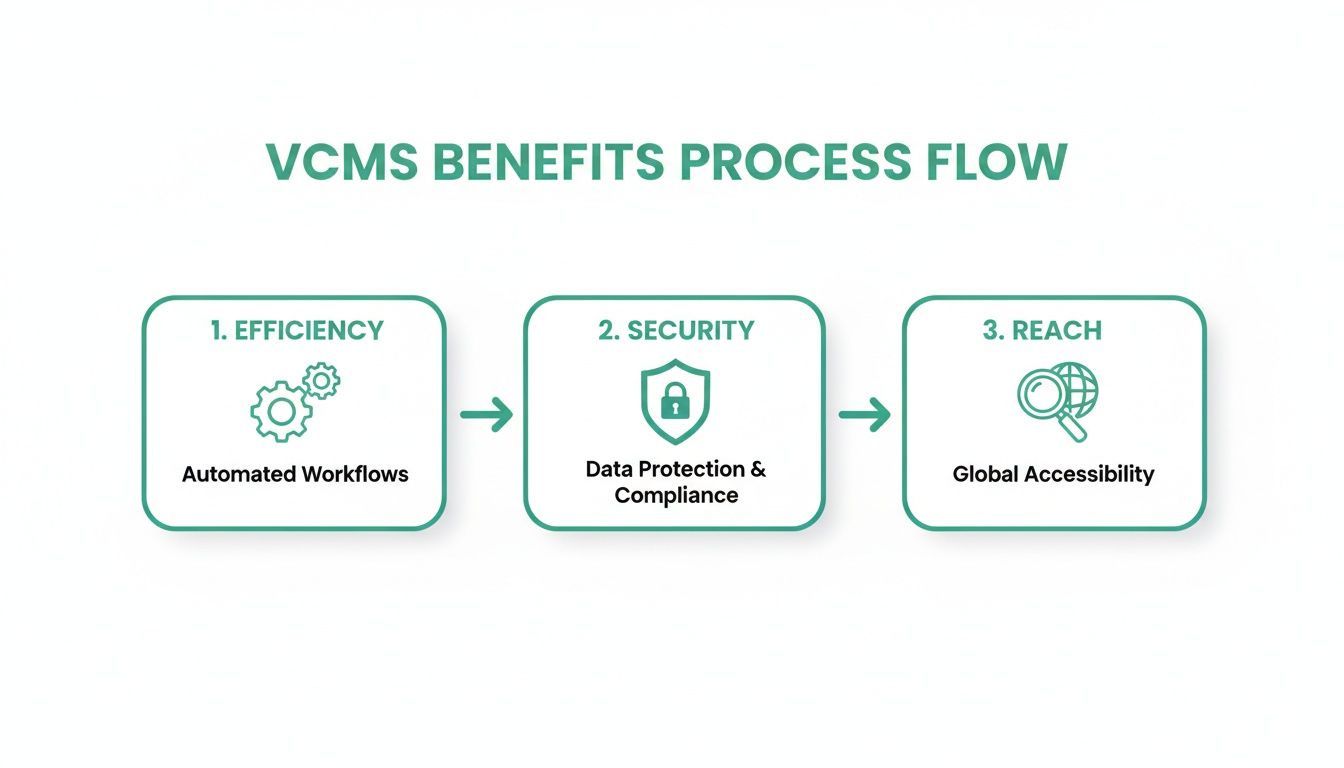
As the graphic shows, a well-integrated system creates a positive feedback loop. Efficient workflows and tight security work together to amplify your video's impact across the board.
Supercharging Workflows with Specialized Tools
While a VCMS is your command center for video assets, it doesn’t have to do everything. In fact, plugging in specialized third-party tools can seriously supercharge specific parts of your workflow, especially when it comes to getting content out on public platforms like YouTube.
For instance, your VCMS is the perfect place to securely store the master file of your latest webinar. But once you decide to publish it on YouTube, a specialized tool can take the baton to maximize its performance on that specific platform.
This is where a focused approach really pays off. Your VCMS handles the core asset management, and you plug in dedicated tools to optimize for specific channels. It’s the best of both worlds.
A great example is automating your YouTube SEO. While your VCMS holds onto the pristine, high-res video file, a tool like TimeSkip can plug directly into your YouTube workflow. It automatically generates SEO-optimized chapters, which are proven to boost viewer retention and make your videos way more discoverable in Google and YouTube search. This combo of a central VCMS and specialized optimizers is a masterclass in how to improve workflow efficiency at every step.
This kind of smart integration is only becoming more important as the video management market explodes. The broader market, which includes enterprise and security uses, was valued at USD 20.6 billion in 2025 and is projected to hit an incredible USD 125.06 billion by 2035. That’s a compound annual growth rate of 19.76%. You can read the full research about this market growth to get a sense of where the industry is headed. By building a connected, efficient video pipeline now, you’re setting your brand up to ride that wave, getting the most out of every single tool in your stack.
How to Choose the Right VCMS for Your Needs
With a market flooded with options, picking the right video content management software can feel overwhelming. It’s easy to get lost in flashy marketing and endless feature lists.
The secret? Forget all that noise and get laser-focused on what you actually need. A platform that's a perfect match for a solo creator is probably a terrible fit for a massive corporation, and the other way around. The key is to start by defining your main goal. Are you a creator trying to monetize content? A marketing team hunting for leads? Or a huge company managing thousands of internal training videos? Your answer is the compass that will guide every other decision.
Define Your Core Requirements
Before you even glance at a pricing page, you need to map out your non-negotiables. Think of it as drawing up the blueprint for your ideal setup. This step keeps you from getting distracted by shiny features you’ll never use and makes sure you end up with a platform that solves your real-world problems.
Start by asking a few simple questions:
- What's our main goal here? Is this for internal training, public-facing marketing, or delivering monetized content?
- Who’s going to be using it? Just you, a small team, or hundreds of people across different departments?
- What’s our current video situation? Are we starting fresh, or do we need to move hundreds (or thousands) of existing videos?
- What other tools does it need to talk to? Do we need it to play nice with our CRM, LMS, or marketing automation software?
Your unique requirements are your North Star. Without them, you’re just wandering through a crowded market. A clear picture of your needs is the most powerful tool you have for picking the right VCMS.
Key Evaluation Criteria
Once you’ve got your requirements locked in, you can start comparing platforms based on a few make-or-break criteria. Each of these impacts your workflow, your budget, and your ability to grow down the road. The video streaming software market is expected to hit USD 42.29 billion by 2031, so picking a platform that can grow with you is a must. You can discover more insights about these market trends.
Scalability
You need a platform that grows with you, not one that holds you back. Look for pricing tiers and storage options that can easily scale up (or down) as your video library gets bigger and your audience grows. You don't want to get stuck with a costly and painful migration a year from now just because you outgrew your first choice.
Integration Support
A VCMS shouldn't be an island. Check for ready-made integrations with the tools you already rely on, like HubSpot, Salesforce, or WordPress. If you don't see what you need, look for a solid API that gives your developers the power to build custom connections.
User Experience (UX)
How easy is the thing to actually use? A clunky, confusing interface will just gather digital dust because your team won't want to use it. Always, always ask for a live demo or sign up for a free trial. See for yourself how intuitive daily tasks—like uploading, tagging, and embedding videos—really are. A great UX will save you countless headaches and hours in the long run.
Choosing the right VCMS boils down to knowing who you are and what you need. A solo creator has a very different checklist than a large marketing team or an enterprise.
To help you figure out what matters most for your situation, we've broken down the key decision factors in this table.
VCMS Selection Criteria Comparison
| Selection Criterion | Considerations for Solo Creators | Considerations for Marketing Teams | Considerations for Enterprises |
|---|---|---|---|
| Budget and Pricing | Look for free tiers or affordable monthly plans. Pay-as-you-go models are a huge plus to avoid overpaying for unused resources. | Mid-tier plans with predictable pricing are ideal. Focus on value—features like analytics and lead capture are worth paying for. | Custom enterprise pricing is standard. Focus on total cost of ownership (TCO), including support, training, and potential integration costs. |
| Ease of Use (UX) | The interface must be dead simple. You don't have time for a steep learning curve. Drag-and-drop functionality is your best friend. | The platform should be intuitive enough for non-technical marketers to use daily. Collaboration features are a must-have. | Role-based access controls are critical. The system needs to be robust but usable for various skill levels across different departments. |
| Key Features | Basic storage, reliable embedding, and simple analytics. Monetization options (like subscriptions or ads) are a nice bonus. | Advanced analytics, lead generation forms, marketing automation integrations (e.g., HubSpot), and SEO tools are essential. | Top-tier security, SSO, detailed audit logs, advanced live streaming capabilities, and integrations with LMS and internal comms tools are non-negotiable. |
| Integration Needs | Social media sharing and basic website CMS integration (like WordPress or Squarespace) are usually enough. | Must connect seamlessly with your CRM, email marketing platform, and analytics tools to track ROI and customer journeys. | Deep integration with the entire tech stack is required: CRM, ERP, learning management systems (LMS), and custom internal software via a robust API. |
| Scalability & Growth | Needs to handle growing viewership and an expanding library without forcing a platform switch. Flexible storage options are key. | Should scale to support major campaigns and content growth. The ability to add more users and features without disruption is vital. | Must be able to support thousands of users, petabytes of data, and global delivery. Reliability and uptime are paramount. |
This table isn't about finding a single "best" platform—it's about finding the one that ticks the right boxes for your team and goals. Use it as a guide to cut through the marketing fluff and focus on the criteria that will truly make a difference for you.
Turn Your VCMS into a Growth Engine
Let's be honest: a video content management software that just sits there like a digital filing cabinet isn't doing you much good. It's a strategic asset, and to get a real return on your investment, you have to think beyond simple storage. The real goal is to build a powerful, scalable video engine that actually delivers results.
When you get smart about it, your VCMS can shift from being a cost center to a genuine revenue driver. It all comes down to having solid strategies for discoverability, data analysis, and content relevance. This is how you turn a passive video library into an active growth machine.
Nail Your Metadata Strategy
If you do only one thing, get this right: create a disciplined metadata and tagging strategy. Without one, your library will quickly become a digital black hole where amazing content goes to die. Think of metadata as the signposts that make every single video instantly findable.
A strong strategy means anyone on your team can find the exact clip they need in seconds, not hours. This boils down to a few key habits:
- Consistent Naming Conventions: Create a simple, standardized format for video titles. No more guesswork, just predictable, searchable names.
- Descriptive Tagging: Use a mix of broad and specific tags. Categorize content by topic, campaign, target audience, or even the overall tone.
- Detailed Descriptions: Write clear, keyword-rich descriptions that quickly summarize what the video is about and why it exists.
This foundational work pays off big time in efficiency and makes sure your best content is always ready for action.
Let Analytics Guide Your Decisions
Your VCMS analytics dashboard is an absolute goldmine of audience intelligence. It’s not just telling you what people are watching, but how they're watching it. Use this data to stop guessing and start making smarter decisions about the video content you create next.
Look for the patterns in your top-performing videos. Do people stick around for in-depth tutorials, or do they prefer short, punchy clips? Where are the drop-off points? Answering these questions with data allows you to fine-tune your approach and create stuff that actually connects. To really make this work, you need a solid foundation in creating marketing videos that drive conversions.
Your analytics tell a story about what your audience truly wants. Listen to that story, adapt your strategy, and you'll consistently produce videos that grab attention, drive engagement, and hit your business goals.
Have a Plan for Your Content's Lifecycle
Videos aren't meant to live forever. A proactive content lifecycle plan is your secret weapon for keeping your library fresh, relevant, and accurate. It’s what stops outdated information from confusing customers or watering down your brand message.
Your plan should map out exactly how you'll manage content over time.
- Regular Audits: Set a recurring calendar reminder—quarterly or bi-annually—to review your video library and flag anything that's underperforming or out-of-date.
- Update or Archive: For videos with old information, make a call. Can it be updated with new graphics and data, or is it time to archive it for good?
- Repurpose Your Winners: Find your evergreen, high-performing videos. Look for smart ways to slice and dice them into new formats like blog posts, social media clips, or email content.
By actively managing your content from creation to retirement, you ensure your video content management software stays a lean, effective asset that drives your strategy forward. It stops being a simple repository and becomes the command center for your entire video operation.
Frequently Asked Questions
Got questions about video content management? You're not alone. Let's tackle some of the most common ones that come up when people are trying to figure out if a VCMS is the right move for them.
What Is the Difference Between a VCMS and YouTube?
This is a big one. Think of a VCMS as your private, behind-the-scenes studio and archive, while YouTube is your public stage. They’re built for completely different jobs.
A VCMS is all about control. You get total command over your original, high-res files—how they’re stored, who sees them, how your brand is presented, and what kind of deep-dive analytics you can pull. It treats your videos as valuable company assets.
YouTube, on the other hand, is a massive social platform designed for discovery and public engagement. It's fantastic for reaching a wide audience, but you give up a ton of control over your master files, branding, and the nitty-gritty user data.
Do I Need a VCMS for Just a Few Videos?
It’s tempting to think a simple cloud drive is enough if you only have a handful of videos. But the question isn't about how many videos you have; it's about how important they are.
The moment you start seeing your videos as strategic tools instead of just files, a VCMS becomes a no-brainer. Even with a small library, a VCMS gives you the structure to control branding, secure sensitive content (like internal training), track specific viewer actions, or plug videos into your sales funnels. It sets you up to scale without creating a mess later.
A VCMS is less about the quantity of your videos and more about the strategic importance of them. If your videos are vital to your business operations, a management system is a smart investment from day one.
How Does a VCMS Improve Video SEO?
A VCMS can be an absolute powerhouse for your video SEO, mainly because it puts you in the driver's seat of your metadata. It gives you one central place to manage and enforce consistent titles, descriptions, and tags across your entire library—a fundamental first step for getting noticed by search engines.
But it goes way beyond the basics. Most platforms come loaded with advanced SEO tools that are a real pain to handle on your own:
- Automatic Transcriptions: They create a text version of your video's audio that search engines like Google can actually read and index. Suddenly, you're ranking for keywords that are spoken in your video, not just written in the description.
- Video Sitemaps: A good VCMS will generate and submit video sitemaps for you. This is like handing search engines a perfectly organized map to find every single piece of video content you own.
- Structured Data: They often wrap your video embeds with special code (schema markup) that gives search engines extra context. This is what helps you land those eye-catching rich snippets in the search results.
Ready to supercharge your YouTube SEO and make your videos more discoverable? TimeSkip automates SEO-optimized chapter creation in seconds, boosting viewer retention and helping you rank higher. Try it free today and see the difference. Learn more about TimeSkip and start optimizing now.
