

Trying to get noticed on YouTube can feel like yelling into a hurricane. With thousands of hours of video uploaded every single minute, just hitting "publish" and hoping for the best is a losing game.
This is where tapping into YouTube search trends becomes your unfair advantage. It's not about chasing fleeting viral hits, but about strategically creating content that millions of people are already looking for.
Why YouTube Search Trends Matter More Than Ever
Let's be real: the "build it and they will come" strategy is dead on arrival. Success on YouTube requires a more calculated approach. Instead of guessing what viewers might want, you can use real data to guide your content and drive actual growth.
Focusing on search trends fundamentally shifts your mindset. You stop being just a content creator and start becoming a problem solver for a built-in audience. This is easily the most effective way to build a channel that grows sustainably over time.
When you create a video that directly answers a trending search, you're not just hoping for an audience—you're serving one that's already waiting. This dramatically increases your video's chances of getting discovered, watched, and shared.
The Power of Meeting Search Demand
Think of YouTube as more than just an entertainment hub; it's a colossal information engine. It has cemented its place as the world's second-largest search engine, fielding over 3.5 billion searches every single day.
This insane volume, especially from Gen Z and millennial audiences, is exactly why successful creators are so obsessed with search optimization. With a global user base that's shot past 2.85 billion, mastering search isn't just a good idea—it's essential for survival. You can dig deeper into YouTube's SEO landscape and statistics if you're a data nerd like me.
What does this mean for you? It means your content strategy needs to be built on a foundation of search data. By understanding what people are actively typing into that search bar, you can:
- Get a serious competitive edge: Jump on emerging topics before your competitors even know they exist, and establish yourself as the go-to expert.
- Boost your discoverability: The YouTube algorithm is designed to reward videos that satisfy search queries. Give it what it wants, and it will reward you with higher rankings and more impressions.
- Attract the right audience: Viewers who find you through search are often way more engaged because your content directly solves their problem or piques their interest.
- Drive views for months (or years): Unlike a viral hit that fizzles out in a week, content based on steady search trends can pull in consistent views long after you've published it.
The core idea is simple: stop creating content in a vacuum. By finding and acting on YouTube search trends, you turn your channel from a passive library of videos into an active resource that consistently meets viewer demand and fuels long-term, organic growth. This guide will show you exactly how to do it.
How to Find Trending Topics Before They Go Viral
Catching a trend early is like having a superpower on YouTube. It’s the difference between showing up late to a party and being the one everyone wants to talk to. Nailing this isn’t about luck; it’s about building a repeatable process that goes way beyond a quick glance at the "Trending" tab.
To get ahead of the curve, you need a solid toolkit for spotting patterns before they hit the mainstream. This means combining clues from different places, from YouTube’s own search bar to more advanced analytics platforms. The goal is to build a discovery workflow that consistently surfaces topics people are actually searching for.
Think of it this way: smart trend identification is the engine that drives your entire content strategy, leading to real, sustainable channel growth.
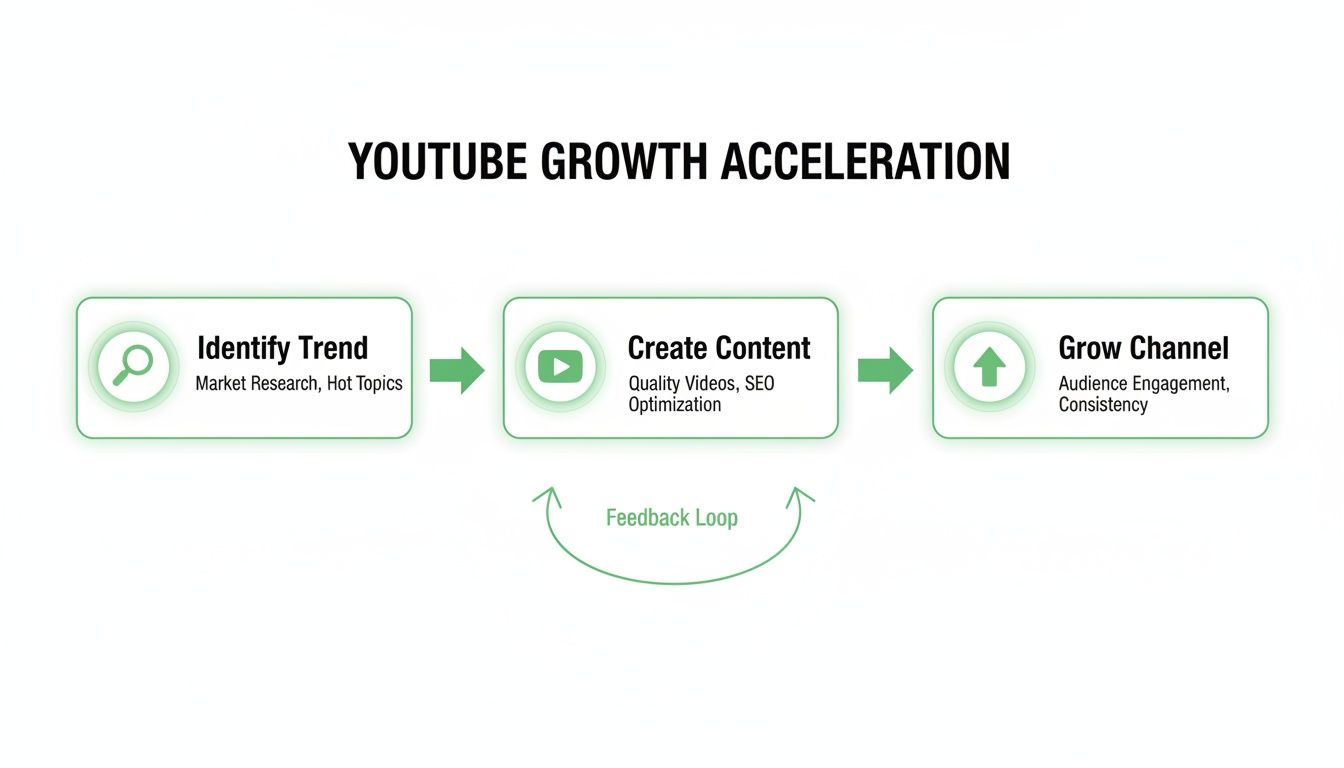
Growth isn't random. It’s a direct result of this strategic loop, and it all starts with finding the right topics at the right time.
Use YouTube as Your Primary Research Tool
Your first and best source for uncovering search trends on YouTube is YouTube itself. The platform constantly drops hints about what viewers want, and its autocomplete feature is an absolute goldmine.
Just start typing a broad keyword from your niche into the search bar. Before you even hit enter, pay close attention to the suggestions that pop up. These aren't just random guesses; they are the most popular queries people are actively typing in right now.
For example, a gaming creator who types "new game patch" might see "new game patch early access" or "new game patch bug fixes." These longer, more specific phrases—what we call long-tail keywords—tell you exactly what your audience is curious about. A video titled "New Game Patch Bug Fixes You NEED to Know" will almost always outperform a generic "New Game Patch is Here."
Go Deeper with Trend Analysis Tools
While YouTube search gives you immediate clues, dedicated tools offer a much more powerful, data-backed view. Google Trends is the classic starting point, letting you compare the search popularity of terms over time. A pro tip is to filter the search specifically for "YouTube Search," which gives you a far more relevant dataset for your video strategy.
By interpreting this data, you can see if a topic is just a flash in the pan or if it has consistent, seasonal interest you can build content around year after year.
The real magic happens when you combine the bird's-eye view from tools like Google Trends with the granular insights from specialized platforms. This layered approach helps you validate ideas and uncover opportunities others miss.
Beyond Google Trends, a whole suite of dedicated YouTube keyword research tools can give you a serious competitive edge. Choosing the right one depends on your specific needs and budget.
A Comparison of YouTube Trend Discovery Tools
Here’s a quick breakdown of some of the most popular tools to help you decide which one fits your workflow.
| Tool | Best For | Key Feature | Pricing Model |
|---|---|---|---|
| Google Trends | High-level trend analysis and seasonal patterns | Comparing keyword popularity over time, filtered for YouTube search | Free |
| VidIQ | In-depth keyword research and competitor analysis | "Daily Ideas" feature suggests personalized, high-potential topics | Freemium with paid plans |
| TubeBuddy | On-platform optimization and workflow efficiency | Keyword Explorer tool with weighted and unweighted scores | Freemium with paid plans |
| Exploding Topics | Surfacing breakout topics before they go mainstream | Identifies fast-growing search terms across the web | Free with premium features |
Each tool offers a unique lens for viewing trends. I recommend starting with the free options to get a feel for what data is most valuable to you before committing to a paid plan.
Using these platforms, you can quickly size up a topic's potential. They usually provide key metrics right on the YouTube page, like:
- Search Volume: An estimate of how many people are searching for a keyword each month.
- Competition Score: A gauge of how hard it will be to rank for that term.
- Trending Videos: Highlights videos in your niche that are gaining traction unusually fast.
The sweet spot you're looking for? Keywords with high search volume and low competition. These are your golden opportunities for growth.
Distinguish Between Different Types of Trends
Not all trends are created equal. Knowing the difference is key to building a balanced content calendar that drives both immediate traffic and long-term, sustainable growth. Your research will generally uncover three main types.
Breakout Topics: These are the sudden, explosive spikes in interest, usually tied to a news event, a viral challenge, or a new product release. They can bring a massive surge of traffic, but their lifespan is incredibly short. Jump on them fast, but don’t build your whole strategy around them.
Seasonal Trends: These are the predictable, recurring patterns you can count on. A finance channel, for instance, knows to plan content around "how to file taxes" every January through April. Spotting these in advance lets you prepare high-quality, optimized content right as search demand starts to ramp up.
Evergreen Trends: These topics have a steady, consistent level of interest over a long period. Think "how to tie a tie" or "beginner guitar lessons." While they don't offer explosive growth, they are the bedrock of a successful channel, delivering reliable views and subscribers for years to come.
A truly effective strategy weaves all three types together, capturing those big, momentary spikes while building a library of content that delivers value for the long haul.
Decode Search Intent to Create Videos People Actually Watch
Finding a hot new trend is a rush, but it’s just the starting line. The real magic in capitalizing on search trends on YouTube happens when you figure out the why behind the search. Every single query has a purpose, a specific itch the viewer needs scratched, and your video has to be the one that delivers.
This is the whole game of decoding search intent. You have to get inside the head of someone typing "instant pot recipes for beginners" and ask what they really want. They aren't looking for a gourmet chef showing off. They need dead-simple instructions, a clear list of ingredients they can actually find, and a final dish that looks like something they could pull off.
Get this wrong, and you've lost them in the first 30 seconds. That's a negative signal to the YouTube algorithm, and it's a fast track to obscurity. Your job is to put on your detective hat, dig into the search results, and reverse-engineer what the audience is craving—and what YouTube is already rewarding.
The Three Main Flavors of YouTube Search Intent
Generally, every search query on YouTube falls into one of three buckets. Knowing which bucket a trending topic belongs to is your first clue for deciding what kind of video to make. For a deeper dive, check out our guide on what is search intent in SEO.
- Informational Intent ("How to"): The viewer needs an answer, a fix, or a tutorial. Think "how to change a tire" or "what is blockchain." For these, your video has to be crystal clear, educational, and get straight to the point. No fluff.
- Commercial Intent ("Best of"): The viewer is in research mode, sizing up a product or service before they pull out their wallet. Searches like "iPhone 15 Pro review" or "best budget microphones for streaming" live here. These videos demand honest comparisons, detailed breakdowns, and an authentic, trustworthy vibe.
- Navigational & Entertainment Intent ("Let's watch"): The viewer already knows who or what they're looking for, whether it's a specific creator or just some good old-fashioned entertainment. Queries like "MrBeast" or "funny cat videos" are perfect examples. Here, personality, storytelling, and pure entertainment value are king.
Looking at a trend through this lens instantly gives you creative direction. A breakout trend about new software is probably informational, screaming for a step-by-step tutorial. A seasonal spike for "Black Friday deals," on the other hand, is purely commercial.
Analyze Top Videos for Clues
The easiest way to figure out what viewers want is to see what's already winning. Type your target search trend into YouTube and pull up the top 3-5 videos. Don't just watch them—dissect them.
You need to ask yourself some critical questions about what makes these videos work:
- Video Length: Are they quick, under-5-minute hits or long, deep-dive analyses? This tells you how much time your audience is willing to invest.
- Content Format: Are they screen recordings? Talking-head explainers? Vlogs? The dominant format is a massive clue about viewer expectations.
- Tone and Style: Is the vibe serious and academic, or is it casual and personality-driven? You need to match the energy that's already resonating.
- Introduction Hook: How do they grab your attention in the first 15 seconds? That's your blueprint for what viewers find most compelling about the topic.
This isn't about ripping off other creators. It's about understanding the unspoken rules of that specific search query so you can meet the audience's expectations, and then blow them away by doing it even better with your own unique spin.
While search is a huge discovery tool, it's only part of the puzzle. A massive 70% of YouTube views actually come from recommendations—the 'Up Next' sidebar, the homepage, and suggested videos. But that initial 30% from search is what lights the fuse. It teaches the algorithm who your video is for, which is critical for getting those recommendation views. You can discover more YouTube insights about this growth dynamic and see how search and recommendations feed each other.
When you align your video with both the typed-in query and the hidden expectations of the viewer, you give the algorithm everything it needs. That’s how you turn a video with a handful of search views into a viral hit powered by thousands of recommendation views.
Turning Trends into a Practical Video SEO Strategy

Alright, this is where the fun begins. You've done the hard work of digging into search trends on YouTube, and now it's time to turn that research into real, measurable results for your channel. Knowing what people are searching for is one thing; getting your video in front of them is the real prize.
The secret is weaving that insight directly into your video's metadata. This is where the rubber meets the road—your title, description, and even your video chapters all need to sing in harmony. Get this right, and you don't just have a video; you have a powerful, discoverable asset that works for you long after you hit "publish."
Craft Compelling Titles That Earn Clicks
Your video title is your digital handshake. It’s the first thing anyone sees, and it has to do two jobs at once: signal relevance to the YouTube algorithm and convince a real person to click. Think of it as part billboard, part SEO magnet.
So many creators fall into the trap of writing bland, keyword-stuffed titles like "New Camera Review 2024." It’s technically correct, but it’s boring. A much better approach is something that sparks curiosity, like, "I Used This New Camera for 30 Days. Was It Worth It?" It still tells the algorithm what the video is about but frames it with an intriguing personal story.
Here are a few title formulas I've seen work time and time again:
- The "Honest Review" Angle: An Honest Review of [Product] (My Pros & Cons After 2 Years)
- The "Expert Tested" Angle: We Tested 10 [Tools] – Only 3 Are Worth Your Money
- The "Problem/Solution" Angle: Fix This Common [Problem] in Under 5 Minutes
A key tactic here is to front-load your main keyword. The algorithm gives more weight to the words at the beginning of a title, so putting your target search term first helps your video get recognized immediately.
Write Descriptions That Drive Deeper Engagement
The video description is prime real estate that too many creators ignore. Don't just dump a few links in there and call it a day! This space is a goldmine for expanding on your topic with natural language and related long-tail keywords.
Instead of a sterile list of keywords, write a few conversational sentences that spell out the video's value. If your video is a "Beginner's Guide to Sourdough," your description should include phrases real people search for, like "learn how to feed your starter," "common sourdough mistakes to avoid," and "get a perfect crust every time."
Think of your description as a supporting argument for your video's relevance. It provides context for the algorithm and gives viewers a reason to believe your content will solve their problem or answer their question.
This is also the perfect spot to link to other relevant videos, resources, or affiliate products. It's a win-win: you add value for the viewer and create a web of content that keeps them on your channel longer.
Unlock Hidden Reach with SEO-Optimized Chapters
Video chapters, or timestamps, might just be the most underrated SEO tool on YouTube. They do more than just help viewers skip ahead; they turn a single video into a multi-ranking powerhouse.
Each chapter title is a fresh opportunity to target a specific micro-search. A video on "home organization" can suddenly rank for "how to declutter your closet," "best kitchen pantry storage solutions," and "organizing small bathroom spaces" — all because of its chapters.
Your video is no longer just competing for one broad term. It's now in the running for dozens of highly specific queries, dramatically expanding its reach. These timestamped chapters can even get pulled into Google search results as "Key Moments," giving you another shot at visibility.
Now, creating these manually can be a real time-sink, especially for podcasts or long tutorials. That’s where automation tools come in handy. For example, TimeSkip can generate SEO-optimized chapters for you in a single click.
As you can see, the tool automatically finds logical sections and suggests keyword-rich titles you can copy right into your description. It’s a simple move that can bring in viewers searching for very specific answers.
Let's break down a quick before-and-after:
- Before Chapters: A 45-minute podcast on "starting an online business" mostly ranks for that main keyword. Its reach is pretty narrow.
- After Chapters: The same podcast, now with chapters like "Choosing a Niche," "Building a Website on a Budget," and "First 100 Customers Strategy," starts popping up in searches for all those specific queries.
By layering keywords this way, you're turning your video from a single fishing line into a wide net. You end up catching a much bigger audience of people who are actively looking for the exact information you’re providing. It’s a small change that can make a huge difference in your video's long-term performance.
Using YouTube Shorts to Test and Amplify Trending Topics
YouTube Shorts are way more than just a quick dopamine hit for your audience. For savvy creators, they're a secret weapon—a low-risk, high-reward testing ground for jumping on search trends on YouTube.
Think about it. Instead of sinking days into a full-length video only to find a trend has already peaked, you can whip up a 60-second Short to see if anyone actually cares. It’s a nimble way to validate your ideas without committing a ton of time and energy.
This strategy lets you be ridiculously responsive. The moment you spot a trend bubbling up, you can publish a relevant Short in a fraction of the time it takes to produce a long-form video. You capture that crucial early momentum while you're still mapping out the bigger piece.
Validating Ideas with Short-Form Content
The Shorts feed runs on a totally different discovery algorithm. It often pushes your content to a much broader, newer audience than your regular videos might reach right off the bat. This gives you a fast, unfiltered signal on whether a topic truly has legs.
Let's say your Short about a new software update gets an unexpected spike in views and engagement. That’s your green light. It's a clear sign that a bigger audience is hungry for more info on that exact subject.
On the flip side, if a Short on a trend you're tracking falls flat, you've just saved yourself countless hours. You can ditch the idea and pivot to something else without the sting of a failed video project. It makes your entire production workflow so much more efficient.
The Short-to-Long-Form Funnel Strategy
Once you've got a winner, the real strategy kicks in. That viral vertical video isn't the finish line; it's the perfect trailer for the main event—your in-depth, long-form video.
You can point viewers to your full-length video with a pinned comment, a link in the description, or even a simple text overlay in the Short itself. This creates a killer content funnel that works on two levels:
- Initial Discovery: The Short grabs a massive, top-of-funnel audience from the Shorts feed.
- Deeper Engagement: It then funnels the most interested viewers over to your main video, where you build authority and rack up watch time.
This strategy is incredibly potent because it leverages the explosive reach of Shorts to feed the algorithm positive signals about your long-form content. A sudden influx of viewers from a popular Short tells YouTube your main video is relevant and valuable.
The sheer scale of Shorts makes this possible. With over 70 billion daily views, viewing habits have been completely reshaped. And with an engagement rate of 5.91%—higher than both TikTok and Reels—Shorts offer an unparalleled chance to send a highly engaged audience right where you want them.
One of the most effective ways to produce Shorts quickly is by repurposing clips from your longer videos. There are great guides on creating YouTube Shorts from existing videos that walk you through this. This "trailer" method lets you test multiple hooks from a single long video to see which one resonates most with the Shorts audience before you go all-in on promoting the full piece. It’s a smart, data-driven way to squeeze more value out of every video you create.
How to Measure Your Success and Refine Your Strategy

Hitting "publish" isn't the finish line. It's actually the start of a crucial feedback loop where the real learning begins.
All that hard work you put into researching search trends on YouTube doesn't mean much if you never circle back to see what actually worked. This is the moment to put on your analyst hat and dive into YouTube Analytics. The goal is to turn raw data into your next big win.
You have to know if your trend-focused content is truly connecting with viewers. By digging into the right metrics, you can see precisely how people are finding you, what's holding their attention, and where you can make small tweaks for big gains. This iterative process is what separates stagnant channels from those that see consistent, long-term growth.
Pinpointing Your Traffic Sources
First stop: the "Reach" tab in your video's analytics. This is where you get the hard data on how your video is being discovered. Look for the Traffic source types card—it’s your best friend here, breaking down exactly where your views are coming from.
You'll want to pay close attention to the percentage of views from "YouTube search." If you did your job targeting a trend, this number should be a significant driver of traffic, especially in the first few days after publishing. A healthy number here is direct proof that your SEO strategy is paying off.
Just below that, you'll find the YouTube search terms card. This thing is an absolute goldmine. It shows you the exact queries people typed into the search bar to find your video. More often than not, you'll uncover surprising long-tail keywords you hadn't even considered, giving you a fresh pipeline of ideas for future content or even new chapter titles.
Interpreting Audience Retention and Engagement
Knowing how people find you is only half the battle; you also need to know if they're sticking around.
Flick over to the "Engagement" tab and get familiar with the Audience retention graph. This chart shows you, second by second, exactly where viewers are hooked and where they're dropping off.
A healthy graph will have a nice, gradual downward slope. Sharp dips are red flags, pointing to a specific part of your video that just isn't landing. On the flip side, look for any spikes or flat plateaus—these are the golden moments that really resonated with your audience.
If you've implemented SEO-optimized chapters, you'll often see small bumps in the retention graph right at the start of each new chapter. This is a fantastic sign. It means viewers are using your timestamps to find the exact information they need, which in turn boosts your video's overall watch time.
This data is invaluable for refining your content format. Maybe your intros are too long. Perhaps a certain segment needs to be more visually engaging. Every video becomes a lesson in what keeps your audience hooked.
Building a Continuous Feedback Loop
Data is useless unless you act on it. The final piece of the puzzle is building a simple system for continuous improvement. A great way to do this is with some simple A/B testing, even without any fancy tools.
Here’s a practical framework to follow:
- Publish with your best title and thumbnail. Based on your trend research, launch with what you believe is the strongest combination.
- Monitor the first 48 hours. Keep a close eye on the click-through rate (CTR). A "good" CTR varies by niche, but anything above 5% is generally a solid starting point.
- Test a variation. If the CTR is lower than you'd like, change one element—either the thumbnail or the title. A common tactic is to make the thumbnail more intriguing or the title more emotionally driven.
- Analyze the results. Give it another 48 hours and see if the CTR improves. This simple test can reveal powerful insights about what grabs your audience's attention.
Over time, this process of analyzing, testing, and refining becomes second nature. It’s also important to track your video's rank for key terms to see how your SEO efforts perform long-term. There are dedicated guides on effective video rank tracking that can help you set up a more structured monitoring system. Ultimately, the effectiveness of your strategy can be quantified by precisely Measuring Social Media ROI, translating engagement and trends into tangible returns and guiding further refinements.
