

Keywords on YouTube are the words and phrases you use to tell the platform—and your potential audience—what your video is all about. Think of them as signposts in a massive digital library, guiding viewers straight to your content through search and recommendations. Nailing your keyword strategy is non-negotiable if you want to get discovered.
Why Your Keyword Strategy Is The Key To YouTube Discovery
Before we jump into the tools and how-tos, let's get one thing straight: you have to understand viewer intent. Keywords aren't just a string of words people type into a search bar; they're a window into a viewer's immediate need, question, or curiosity. Getting this right is the absolute foundation of building a channel that the algorithm loves.
When someone searches on YouTube, they have a goal. Your job is to figure out that goal and create the video that satisfies it perfectly. This is how you get the algorithm to work for you, not against you.
Thinking Like Your Audience
Let's walk through a real-world example. Someone searching for "easy dinner recipe" has a pretty vague goal. "Easy" could mean a lot of things: few ingredients, quick cleanup, or a short cooking time. The intent is fuzzy.
Now, what if they search for "15-minute pasta recipe"? The intent is crystal clear. This person is crunched for time and wants a specific type of meal they can whip up in less than 15 minutes. A video titled "Quick & Delicious 15-Minute Pasta" is a direct match. It’s far more likely to get the click and, more importantly, be watched all the way through.
This shift in mindset is everything. You stop targeting random words and start solving specific problems.
A great keyword strategy isn't about gaming the algorithm. It's about building a solid bridge between a viewer's problem and your video's solution. When that connection is strong, YouTube rewards you with more traffic.
How Intent Shapes Search Behavior
The viewer's intent directly influences the language they use to search, and you need to match that language. This is especially true for huge, competitive categories like entertainment.
For instance, a global analysis of YouTube queries revealed that the single keyword “song” was the most searched term worldwide. Right behind it were “movie” and “video,” which shows just how many people start their searches with broad, simple terms. You can dig deeper into these global search trends to see how they vary.
To really make an impact, you have to go beyond these high-level keywords by understanding the different types of viewer intent.
Before we break down the main types of intent, it’s helpful to see them in action. This table lays out what a viewer is looking for with each intent type and what kind of video is the perfect match.
Decoding Viewer Intent on YouTube
| Intent Type | What The Viewer Wants | Example Keyword | Ideal Video Format |
|---|---|---|---|
| Informational | To learn something or find an answer. | "how to fix a leaky faucet" | How-to, tutorial, explainer |
| Navigational | To find a specific channel or creator. | "Marques Brownlee" | Channel trailer, latest upload |
| Transactional | To research a product before buying. | "iPhone 15 Pro review" | Product review, comparison, unboxing |
By figuring out which intent your content serves, you can zero in on the keywords that attract the right kind of viewer—someone who isn't just browsing but is actively searching for the exact value you offer. That powerful alignment is what turns a one-time viewer into a loyal subscriber.
Building Your Keyword Research Workflow
Okay, let's move from theory to action. To consistently find winning video ideas, you need a repeatable process—a workflow that takes the guesswork out of figuring out what your audience is actually searching for. It all begins with what we call "seed" keywords.
These foundational ideas are usually hiding in plain sight. Seriously, just look. Dive into your own comments section, browse forums like Reddit or Quora where your community hangs out, and listen to the exact language people use.
What questions pop up over and over? What problems are they wrestling with? Each one of these is a potential seed keyword ready to blossom into a full-blown video topic. A simple comment like, "I'm still confused about how to set my camera's white balance" is the perfect jumping-off point.
Assembling Your Keyword Toolkit
Once you have a handful of these seed ideas, it's time to expand that list using a mix of free and paid tools. You don't need a huge budget to get started; in fact, some of the best insights come from sources that won't cost you a dime. Your goal is to find that sweet spot: keywords with decent search volume but competition you can actually beat.
Your first stop should always be YouTube’s own search bar. Start typing a seed keyword and watch the autocomplete suggestions that appear. These aren't random guesses; they're the most popular, real-time searches related to your term, giving you a direct pipeline into your audience's brain.
For a deeper analysis, you’ll want to bring in a few more tools:
- TubeBuddy & VidIQ: These browser extensions are non-negotiable for serious creators. They overlay crucial data right on the YouTube page, showing you search volume estimates, competition scores, and the exact keywords your top competitors are ranking for.
- Ahrefs or Semrush: While these are premium SEO platforms, their YouTube-specific features are incredibly powerful. If you're ready to get serious, they can uncover precise search volumes, keyword difficulty, and a massive web of related terms you'd never find otherwise.
If you're looking for more options, we've broken down over a dozen platforms in our complete guide to YouTube keyword research tools.
This simple flow—from search to satisfaction—is what it's all about.
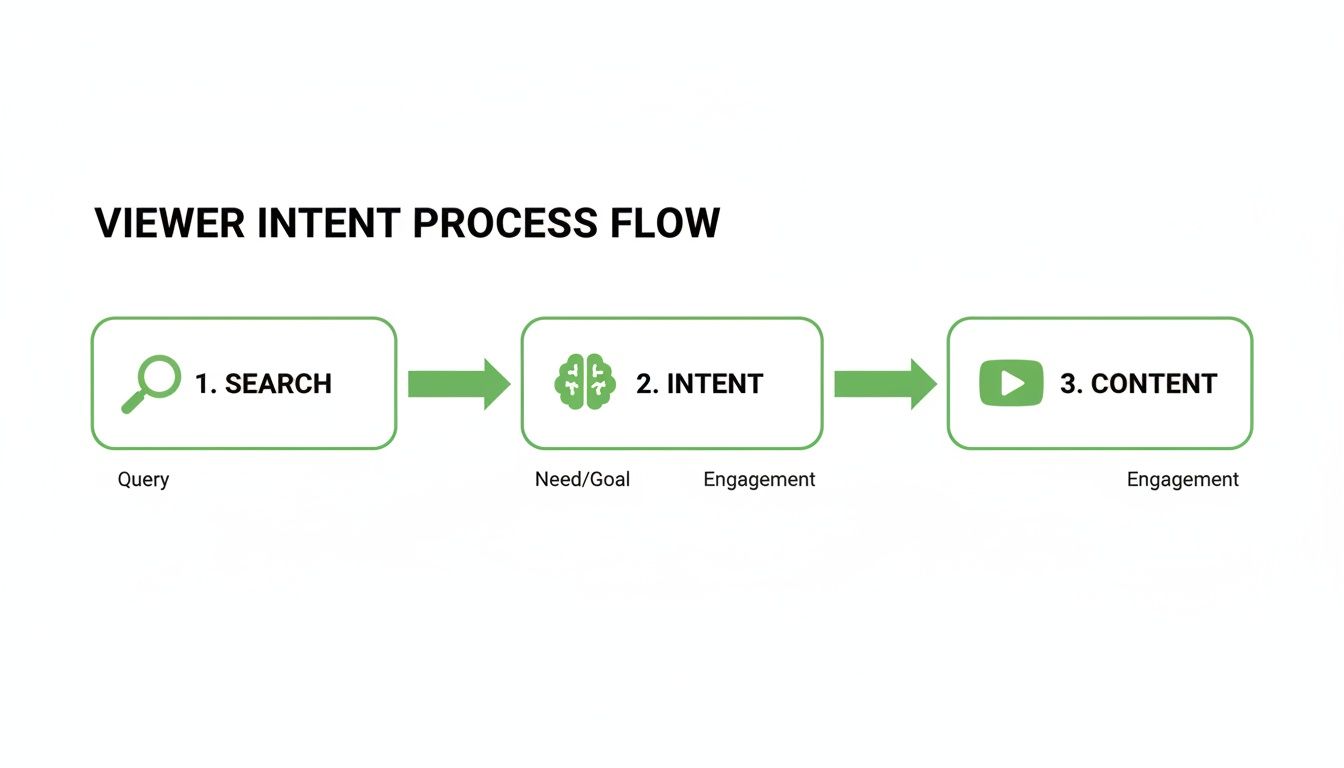
Understanding the why behind a search is every bit as important as the what.
Analyzing And Selecting Your Keywords
After you've built out a respectable list, the real work begins: analysis. You're trying to strike a delicate balance between search volume and competition. Sure, a keyword with 100,000 monthly searches looks tempting, but if it's already dominated by massive channels, you'll be shouting into the void.
On the flip side, a keyword with just 100 monthly searches might be easy to rank for, but it won’t move the needle for your channel's growth. The magic usually happens in the middle ground—terms with a few thousand monthly searches and a "low" or "medium" competition score in a tool like VidIQ.
Don't just chase a single keyword for each video. Think in clusters. Aim for one primary keyword, a couple of secondary variations, and a handful of related long-tail phrases. This sends a much stronger, more cohesive signal to the YouTube algorithm.
As you refine your process, it's worth looking into expert advice on how many keywords to target per page in traditional SEO, as the core principles apply to video, too. You want to cast a wide enough net to catch relevant viewers without diluting your focus. This methodical approach is what turns random keyword stabs into a core pillar of your channel’s growth strategy.
Winning With Long-Tail Keywords And Niche Targeting

Trying to rank for massive, single-word keywords like "fitness" is a fast track to getting lost in the noise. The real opportunity, especially for channels that are still growing, is in mastering long-tail keywords. These are the specific, multi-word phrases that signal exactly what a viewer wants to find.
Think about the difference in motivation here. Someone just typing "fitness" into the search bar is probably just browsing. But a viewer searching for "at home dumbbell workout for beginners" knows precisely what they need and is ready to watch a video that delivers on that promise. That’s your ideal audience right there.
By targeting these super-specific phrases, you're not just finding random viewers; you're attracting motivated people who are way more likely to watch longer, engage with your content, and hit that subscribe button. It's the secret weapon for building authority in a crowded space.
Finding And Using Long-Tail Opportunities
So, where do you actually find these golden phrases? It's easier than you think. Start by just listening. Your own comments section is a goldmine of the exact language your audience uses. A comment like, "how do I stop my sourdough starter from being too runny?" is a perfect long-tail keyword handed to you on a silver platter.
From there, you can branch out:
- YouTube Autocomplete: Just start typing your main topic into the search bar and see what YouTube suggests. Those suggestions are based on what real people are searching for right now.
- Niche Forums: Spend some time on sites like Reddit or Quora that are related to your topic. The titles of threads and the specific questions people are asking are overflowing with long-tail ideas.
The YouTube keyword game has really shifted away from chasing broad, vanity terms. Success now comes from systematically targeting these intent-rich phrases that mirror how real people actually search. This lets you completely own a specific niche before you even think about tackling more competitive topics.
Why This Strategy Is A Game-Changer
This pivot to long-tail keywords lines up perfectly with how YouTube's algorithm actually ranks content. The platform loves to promote videos that closely match a user's query and keep them watching. When your video is the perfect answer to a specific long-tail search, it naturally earns better watch time and retention, which are powerful ranking signals.
This creates a powerful compounding effect over time. When you really dial this in, you can start dominating a whole category of specific searches. To learn more about satisfying direct user queries, which is the heart of this strategy, check out this master guide to On-Page SEO for answer engines. The whole idea is to turn your content into a precise solution, attracting a loyal and highly engaged audience.
Where To Place Keywords For Maximum Algorithmic Impact
Alright, you've done the hard work of finding the right keywords. Now comes the fun part: strategically placing them where they'll have the biggest impact. Getting this right is what separates channels that feel stuck from the ones that seem to grow overnight.
The goal isn't to just sprinkle keywords everywhere. It's about sending a clear, consistent signal to the YouTube algorithm about what your video is about. Think of it like creating a web of relevance—each placement reinforces the others, making your video the undeniable answer when someone searches for your topic.

Your Video Title Is The Top Priority
If you only focus on one thing, make it your title. This is your single most important piece of SEO real estate on YouTube. Your main keyword absolutely needs to be in the title, and the closer to the front, the better. The algorithm gives a lot more weight to the words that appear first.
For example, a title like "Keto Meal Prep for Beginners | Easy Low-Carb Recipes" is way more powerful than "Easy Low-Carb Recipes | My Keto Meal Prep for Beginners." The first version immediately tells both people and the algorithm what the video’s core focus is.
Crafting A Keyword-Rich Description
Your description is your chance to add context and really flesh out your topic for the algorithm. Those first two or three sentences are crucial because they're what everyone sees before clicking "Show more." Make sure to naturally work in your primary keyword and a couple of secondary ones right there at the top.
Don't just list keywords, though. Write a natural, human-readable summary of what your video covers. You can weave in related long-tail keywords throughout the text, almost like a mini-blog post. A deep understanding of how to use this space is key to mastering your metadata in YouTube, which can seriously boost your discoverability.
Leveraging Tags The Right Way
YouTube's official stance is that tags play a "minimal" role, but in my experience, they're still a best practice that helps provide extra context. Think of them as a final confirmation signal you're sending to the algorithm.
Here’s a simple but effective strategy:
- First Tag: Always make your exact primary keyword the very first tag.
- Variations: Add 3-5 long-tail variations and related phrases that people might search for.
- Broad Categories: Toss in 2-3 broader category tags to help YouTube connect your video with the larger topic.
The key here is quality over quantity. A few highly relevant tags are far more effective than just stuffing the box with dozens of random terms.
YouTube’s algorithm is constantly connecting dots. Placing keywords in your title, description, and tags creates a clear, undeniable picture of your video’s subject matter, making it easier for the platform to recommend it to the right audience.
The Overlooked Keyword Opportunities
Want to get a leg up on the competition? Look beyond the big three. The algorithm actually analyzes your video’s auto-generated transcript, so make sure you speak your main keywords naturally within the first minute or so of the video itself.
Playlists are another goldmine. A playlist titled something like "Advanced Photoshop Tutorials for Designers" sends another powerful signal to YouTube about a whole collection of your videos. I've even seen creators use a pinned comment with a keyword-focused question to add a little extra relevance.
Getting this right matters. Solid video SEO research shows that structured metadata directly influences discovery on a platform that gets around 1.7 billion organic visits every month. You can dig into more stats that show how structured data drives performance over on keywordseverywhere.com.
Turning Video Chapters Into A Keyword Multiplier

While your title and description are non-negotiable, one of the most powerful—and most overlooked—places to put your keywords on youtube is right inside your video's timeline. YouTube Chapters, also known as timestamps, do way more than just help viewers skip ahead. They turn a single video into a discovery engine.
Think about it: each chapter title acts like its own tiny, searchable headline. Suddenly, your one-hour video isn't just trying to rank for its main title anymore. It now has the potential to rank for dozens of specific, long-tail search queries that perfectly match what you've named your chapters.
How Keyword-Rich Chapters Multiply Your Reach
Let's say you have a 30-minute tutorial on "Adobe Premiere Pro Basics." Instead of just hoping to rank for that one term, you can get way more specific with your chapters.
02:15"How to import footage into Premiere Pro"07:40"Best export settings for YouTube 4K"14:12"Using keyframes for smooth animation"
Now, your video has multiple doors for viewers to walk through. Someone searching Google or YouTube for "best export settings" might see a link that drops them right at the 07:40 mark of your video. This is an insanely effective way to capture highly motivated viewers who are looking for exact answers. For a deeper dive on this, check out our guide on optimizing YouTube Chapters for better visibility.
Chapters give both viewers and the YouTube algorithm a detailed roadmap of your content. This deepens the platform's understanding of your video, making it more likely to surface in search results for a wide range of relevant queries.
Automating Chapter Creation For SEO
Let's be real—manually creating dozens of keyword-optimized chapters is a huge time suck. It's exactly why most creators don't even bother. This is where automation becomes a total game-changer. Tools like TimeSkip were built to solve this exact problem, analyzing your video's transcript to generate SEO-rich chapters in seconds.
This turns a tedious manual chore into a quick, one-click action that systematically expands your video's search footprint every single time you upload.
By automating this part of your workflow, you save hours while making sure every piece of long-form content you publish is fully optimized to rank for a ton of different long-tail keywords. This creates more pathways for people to find you and gives the algorithm richer data, which almost always leads to better rankings and a serious lift in organic views.
Common YouTube Keyword Questions Answered
Even with a solid plan, you're bound to run into some specific questions about using keywords on YouTube. It happens to everyone. Let's clear up some of the most common ones that tend to trip creators up.
Getting these details right can honestly make a huge difference in your channel's growth over the long haul. Most people get stuck on the small stuff, but a few quick answers can get you back to what you should be doing: creating great videos.
How Many Keywords Should I Use In My YouTube Tags?
There's no magic number here, but a good rule of thumb is to aim for 10-15 highly relevant tags. The goal is always quality over quantity. Stuffing the tag box with a bunch of random terms can actually confuse the algorithm and hurt your video’s performance.
Start with your main keyword, then add a few longer, more specific variations. After that, sprinkle in some broader category keywords. A handful of super-relevant tags that perfectly describe your video are way more powerful than 30 loosely related ones. YouTube's algorithm is all about relevance, so give it a clear signal.
Think of your tags as a final confirmation for the algorithm. Your title and description do all the heavy lifting, while your tags are there to reinforce the message and add a little more context.
Should I Target Keywords With High Search Volume Or Low Competition?
This is a classic dilemma. For most channels, especially if you're still growing, the sweet spot is targeting keywords with decent search volume and low-to-medium competition. Chasing after a monster keyword like "gaming" is almost always a losing battle against the massive, established channels that already dominate that space.
Instead, get specific. Focus on finding long-tail keywords that are unique to your niche. They'll have lower search volume, sure, but it's a much more targeted audience, and the competition is way less fierce. This approach gives you a realistic shot at ranking, attracting viewers who are genuinely interested in your topic, and building authority before you try to take on the giants.
How Long Does It Take For YouTube SEO To Work?
Patience is key here. YouTube SEO is a long-term game, not an overnight fix. While you might see some initial views trickle in within a few days or weeks of optimizing a video, the real impact builds over months and even years. Think of it this way: a viral trend dies out, but a well-optimized video can keep pulling in steady views from search indefinitely.
The secret is consistency. When you consistently apply good keyword practices to every single video you upload, you're building a library of content that the algorithm learns to understand and trust. This leads to compounding growth over time, turning your channel into a 24/7 traffic source that works for you even when you're not.
Ready to turn your video chapters into a keyword multiplier without all the manual work? TimeSkip uses AI to generate dozens of SEO-optimized chapters in seconds, helping your videos get discovered for more search terms. Start boosting your visibility and saving hours of time today. Try it for free at https://timeskip.io.
