

Adding the right YouTube tags is all about giving the algorithm clear, simple signals about your video's content. Think of it as a direct line of communication, helping connect your video with the people who are actually looking for it. This one small step can have a big impact on where your video shows up, from search results to the suggested videos feed.
Why YouTube Tags Are Still a Big Deal for Discoverability
Let's clear the air: anyone who says YouTube tags are dead is missing the point. While their role has definitely changed over the years, they are still a vital piece of the discoverability puzzle.
Think of tags as signposts. They guide YouTube's algorithm, helping it understand the specific details and nuances of your video that might not be obvious from the title and description alone. This isn't about gaming the system; it's about being strategic and giving the platform as much context as possible.
When you hit "publish," YouTube scans a bunch of different things to figure out what your video is about. Tags give you a chance to provide direct, explicit keywords. For example, if your title is "My Ultimate PC Build 2024," using tags like "custom pc build," "gaming pc setup," and "how to build a computer" makes the video's focus crystal clear and helps it reach viewers searching those exact phrases.
The Role of Tags in Today's Algorithm
Back in the day, tags were a massive driver of video SEO. Now, the algorithm is a lot smarter, paying close attention to titles, descriptions, and even the words you say in your video (your transcript). But that doesn't make tags useless—far from it. They’ve just settled into a more supportive, yet still critical, role.
Tags are especially powerful for a few specific situations:
- Catching Common Misspellings: If your brand or topic is often misspelled (like "TimeSkip" vs. "Time Skip"), you can pop both versions into your tags. This is a simple trick to capture every possible search.
- Adding Niche Context: Got a video on a super specific or technical topic? Tags help the algorithm make sense of jargon or terms that aren't widely known.
- Reinforcing Your Main Keywords: Tags act as a confirmation signal. They back up the main keywords you've already used in your title and description, which builds YouTube's confidence that it's categorizing your video correctly.
The modern approach to YouTube tags is all about relevance, not quantity. A few highly specific, targeted tags will always do more for you than a long list of vague or trending keywords. Your goal is to add clarity, not create confusion.
At the end of the day, using tags effectively means you're filling in any potential information gaps for YouTube's algorithm. It's a fundamental part of a solid optimization strategy. To really nail this, you should understand how all the different types of metadata for YouTube work together to boost your channel. Smartly chosen tags give your content its best shot at getting in front of the people who want to see it, which means more qualified views and better engagement.
How to Find High-Impact Tags for Your Videos
Finding the right tags isn't about guesswork; it's a repeatable process of figuring out what your audience is actually searching for. Honestly, the best place to start is often the simplest one: the YouTube search bar itself.
Just start typing a broad topic related to your video—what we call a "seed keyword"—and pay close attention to the autocomplete suggestions. Those phrases aren't random; they're the most common queries real people are typing into YouTube. It’s a direct line into your viewer's brain.
Let’s say your video is about baking sourdough bread. Your seed keyword is "sourdough bread." Typing this into search might spit back some popular long-tail keywords like:
- "sourdough bread for beginners"
- "no knead sourdough bread recipe"
- "how to feed a sourdough starter"
Every single one of those suggestions is a potential high-impact tag because it reflects a specific question or need. This first step builds the foundation for a tag list that actually lines up with how people search.
This whole process is about connecting your video to the algorithm through tags so it can find the right viewers.
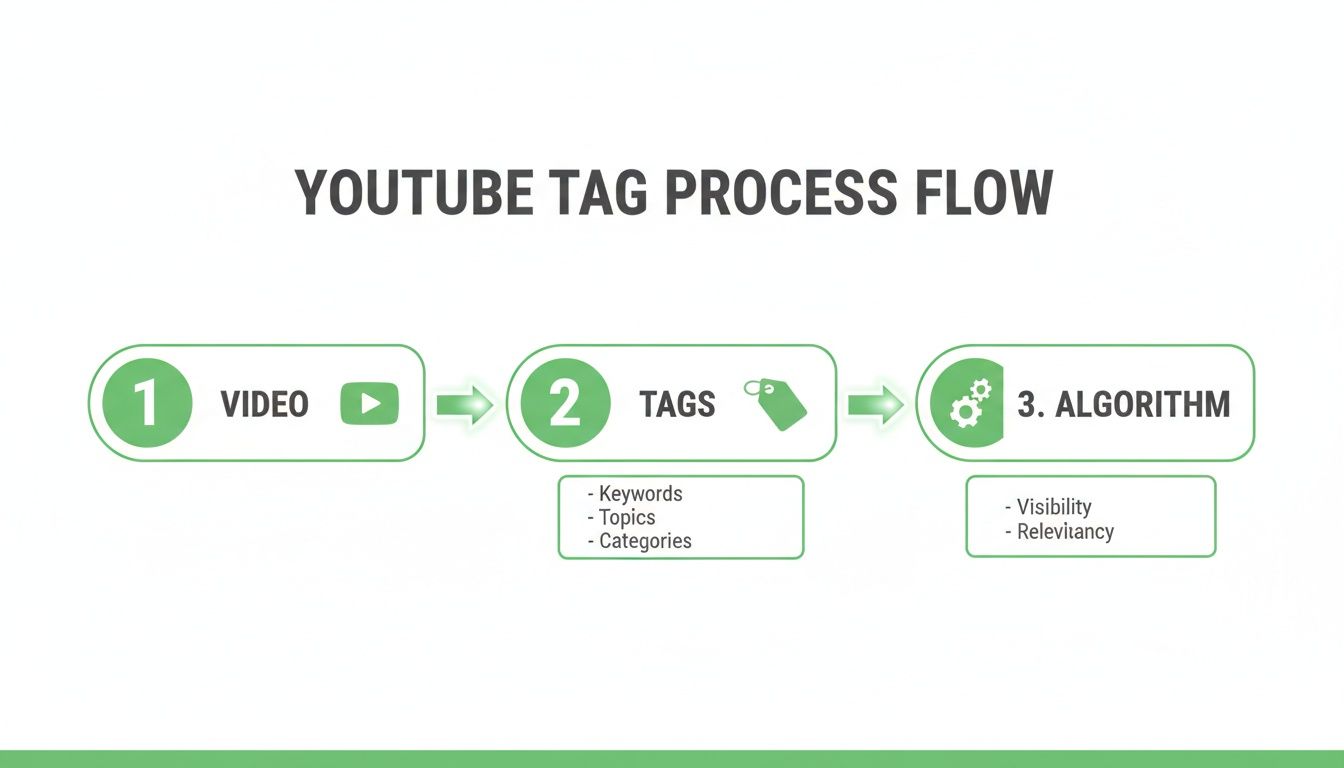
As you can see, tags are that critical bridge between your uploaded video and how the algorithm understands and distributes it.
Analyze Top-Performing Competitor Videos
Once you've got a baseline list from YouTube's search suggestions, it's time to do a little competitive recon. Look up your main topic and pull up three to five videos that are crushing it (think high view counts, recent uploads). These videos are succeeding for a reason, and you can bet their tag strategy is part of it.
You can't see tags directly on a video page anymore, but there’s a backdoor. Right-click anywhere on the page and select "View Page Source." Then, just hit CTRL+F (or CMD+F on a Mac) and search for "keywords." The text that follows is a direct look at that creator's tag list. This little trick gives you instant insight into the keywords driving views for top content in your niche.
Don't just copy and paste their tags. The goal here is to look for patterns and inspiration. Identify relevant keywords you might have missed and add the best ones to your own curated list.
Build Your Tag List Strategically
Now it’s time to bring it all together. You should have a healthy mix of broad terms from your initial brainstorm and super-specific, long-tail phrases from your research. Your mission is to build a comprehensive list that covers your topic from all angles. To really nail this, you need to understand the evolving search paradigm and answer engine optimization, where conversational questions are changing the search game.
A killer tag list usually includes:
- Primary Keywords: The main focus of your video (e.g., "sourdough bread recipe").
- Secondary Keywords: Broader, related terms (e.g., "baking," "homemade bread").
- Long-Tail Keywords: Specific, multi-word phrases that answer a direct question (e.g., "how to get an open crumb sourdough").
This structured approach makes sure your tag list is built on data, not just a hunch. For a deeper dive into the research process, check out our complete guide on how to find keywords for YouTube videos at this link. Following this framework will help you consistently find tags that match what viewers are looking for, giving your videos the best possible shot at being discovered.
Using SEO Tools to Gain a Competitive Edge
Relying on the YouTube search bar for tag ideas is a decent start, but if you really want to sharpen your strategy, you need to bring in the data. This is where you move from guessing to making calculated, data-driven decisions.
Specialized YouTube SEO tools like TubeBuddy and VidIQ are pretty much non-negotiable for serious creators. They plug right into your browser and overlay a layer of crucial data on top of YouTube’s normal interface.
Suddenly, you’re not just seeing a competitor's video. You’re seeing its performance score, the exact tags they’re using, and even an estimate of how much traffic each tag is pulling in. It’s like getting a backstage pass to see what’s actually working for them.

This is what turns tag research from a guessing game into a repeatable science. You can finally see the numbers behind the rankings and find the sweet spot between what people are looking for and what you can realistically rank for.
Interpreting Key Metrics
When you fire up one of these tools, you'll be greeted with a lot of numbers. Don't get overwhelmed. The two metrics that matter most are Search Volume and Competition Score.
- Search Volume: This is straightforward—it tells you roughly how many people are searching for a specific keyword or phrase each month. Higher is often better, but it's only half the equation.
- Competition Score: This is the tool’s estimate of how hard it will be for a new video to rank for that keyword. A high score means the top results are locked down by massive channels or perfectly optimized videos.
Your mission is to find the tags that hit a sweet spot: healthy search volume paired with a low-to-medium competition score. These are your golden opportunities. They represent underserved search queries where your video has a real fighting chance to stand out and get noticed by the algorithm.
Comparing Free vs Paid YouTube SEO Tools
Most popular tools offer a free version that's great for getting started, but the paid tiers are where the real power lies. Here’s a quick breakdown of what you can typically expect.
| Feature | Free Version | Paid Version (Pro/Boost) |
|---|---|---|
| Keyword Explorer | Limited searches/results | Unlimited searches, deeper data, related queries |
| Competitor Tag Viewing | View tags on a few videos per day | Unlimited competitor tag analysis |
| Tag Suggestions | Basic, limited recommendations | Advanced, AI-powered suggestions, tag ranking insights |
| Bulk Processing | Not available | Edit tags, titles, descriptions across multiple videos |
| A/B Testing | Not available | Test thumbnails, titles, and descriptions for CTR |
| Channel Audits | Basic overview | In-depth performance audits and growth recommendations |
While you can definitely find some good tags with the free versions, upgrading unlocks the features that truly give you a competitive edge, like unlimited keyword research and A/B testing.
Putting Data into Action
Let's walk through a real-world scenario. Say you made a video about "beginner drone tips." A super broad tag like "drones" is a waste of space—it has massive search volume, but the competition is impossible to break through.
This is where your SEO tool earns its keep. It might uncover a long-tail keyword like "how to fly a drone for the first time."
That phrase has a lower search volume, sure, but its competition score will be worlds better. More importantly, the person searching for that is your exact target audience—highly specific and ready to learn. By choosing this data-backed tag, you're not just throwing spaghetti at the wall; you're strategically targeting an audience you can actually reach.
Pro Tip: The most effective strategy is a blend. Build a tag list with a mix of broad, medium, and long-tail keywords. Use one or two high-volume terms to set the general topic, then fill the rest of your tag block with the specific, low-competition gems you found with your research tools.
This isn't just theory. Creators who adopt a dedicated, tool-assisted workflow for tag research consistently see their search-driven views climb by 15% to 40% within just a few months. When digging into SEO tools, you might also consider platforms with handy tie-ins, like Mindstamp's YouTube integration, which helps connect your video strategy across your entire content ecosystem.
How to Structure Your Tags for Maximum Impact
Finding a bunch of great tags is half the battle. Knowing how to organize them is what really sends a clear signal to YouTube about what your video is about. The order of your tags matters more than you might think—the algorithm pays special attention to the first few you list.
This isn't about keyword stuffing; it's about being strategic.
Your most important keyword, the one that perfectly nails the core topic of your video, should always be first. Think of it as the headline for your tag list. If your video is a tutorial on making cold brew, your very first tag should be something direct like "how to make cold brew coffee." That immediately tells YouTube what the video's primary purpose is.
Once you’ve locked in that main keyword, you can start building out from there. The next group of tags should be broader, secondary terms that add a bit more context. They're still super relevant, but they cover a slightly wider topic area.
Building Out Your Tag List
After your primary tag, start layering in related terms that support it. Using our cold brew example, this is where you’d drop in tags like "cold brew recipe," "coffee concentrate," and "best coffee for cold brew." These are still very specific, but they capture alternative ways people might search for the same information.
Finally, round out the list with more general tags and your own branded ones. This helps YouTube see where your video fits within the bigger picture.
- Broad Tags: Think about terms like "coffee at home," "iced coffee," or "brewing methods."
- Branded Tags: Always, always include your channel name (e.g., "TimeSkip Tips") and even common misspellings of it. This is a huge help in getting your own videos to show up in the "suggested" sidebar next to your other content.
This layered approach—starting hyper-specific and moving to broad—gives the algorithm a complete roadmap to your content, massively increasing its chances of being recommended to the right viewers.
The 500 Character Limit Is a Guideline, Not a Goal
YouTube gives you 500 characters for your tag box, but trying to max it out is almost always a bad idea. Overloading your video with dozens of semi-relevant tags just muddies the waters and can confuse the algorithm. A tight, focused list is way more powerful.
I’ve found that aiming for 200-400 characters with 8-15 highly relevant tags is the sweet spot. It ensures every single tag has a purpose and reinforces your video's topic without sending mixed signals. Quality over quantity is the name of the game here.
For instance, a tutorial video will have very direct, instructional tags. A vlog, on the other hand, might have tags related to locations, people, and the overall vibe of the day. The key is adapting your structure to fit the content, always leading with your most important keyword to point the algorithm in the right direction. This kind of strategic thinking is what separates the pros from the amateurs when it comes to mastering YouTube tags.
Common Tagging Mistakes That Can Hurt Your Channel
It’s surprisingly easy to get YouTube tags wrong. One or two bad habits can silently sabotage your video’s reach before it ever gets a chance to take off. While learning how to add tags is a great first step, understanding what not to do is just as important.
Lots of creators, especially when they're starting out, fall into a few common traps that make their optimization efforts totally counterproductive.
The "More is Better" Myth
One of the most frequent errors I see is keyword stuffing. This is where you cram the 500-character tag box with dozens of semi-related or even irrelevant keywords, hoping to cast the widest net possible.
In reality, this strategy does the exact opposite. It just confuses the algorithm. By sending mixed signals about what your video is actually about, you dilute its focus and weaken its ability to rank for the terms that truly matter.
Another major pitfall is chasing trends with misleading tags. You might be tempted to slap a popular creator's name or a trending topic into your tag list to piggyback on their traffic. This is a huge no-no. It's a direct violation of YouTube's community guidelines on misleading metadata and can get your video taken down.
Quality Over Quantity: Less is More
The goal isn't to use every single available character; it's to provide clarity for the algorithm. A short, precise list of highly relevant tags is always more powerful than a long, messy one.
This same principle applies to hashtags in your video description. While YouTube allows up to 60, data shows that using just 3–5 hyper-focused ones gets much better results. This targeted approach can boost your impression-to-watch conversions by 10–25% because it perfectly matches what viewers are looking for, instead of just adding noise. You can dig into more of the data in recent studies on YouTube hashtag effectiveness.
The single biggest mistake is treating the tag box like a lottery, hoping one random keyword hits the jackpot. Instead, treat it like a surgical tool, using each tag to precisely define your video's content for the algorithm.
Don't Forget to Get Specific
Forgetting to include specific, long-tail keywords is another classic mistake that leaves a ton of views on the table. A broad tag like "baking" is almost useless because the competition is insane.
But a long-tail tag like "how to make gluten-free sourdough starter"? Now you're talking. That targets a very specific audience with a clear need.
By sidestepping these common errors, you make sure your carefully researched tags are working for you, not against you. It's a simple shift in mindset—from stuffing keywords to sending clear signals—but it's fundamental to mastering YouTube tags for real, sustainable channel growth.
Your YouTube Tags Questions Answered
Let's dig into the questions that always seem to pop up when creators start talking about YouTube tags. I'll give you some straightforward, no-fluff answers to clear up the confusion so you can get back to creating with a solid strategy.
This is your quick-reference guide for the practical side of tagging.
How Many Tags Should I Really Use on a Video?
First thing's first: forget about stuffing the tag box to hit the 500-character limit. Quality beats quantity every single time.
A much better approach, and one that consistently works, is to aim for 8-15 highly targeted tags. This sends a crystal-clear signal to the YouTube algorithm about your video's topic, unlike a bloated tag list that just creates confusion.
Here's a simple breakdown: start with your main, most specific keyword. Follow that up with three to five related, slightly broader terms. Then, round it out with five to seven specific, long-tail variations that match what a viewer might actually type into the search bar.
A tight, focused list tells the algorithm exactly what your video is about. It’s far more effective than maxing out the character count with semi-related terms that only create noise and dilute your video's core message.
Are YouTube Tags and Hashtags the Same Thing?
Nope, not at all. They serve completely different purposes, and you need to understand the difference to really nail your video optimization.
- Tags are your behind-the-scenes metadata. You add them to the dedicated "tags" box when you upload, and they're invisible to your audience. Their main job is to help YouTube's algorithm understand and categorize your video for search and recommendations.
- Hashtags are for your viewers. You put them directly in your video's description or title, where they are visible and clickable. They help people discover more content on a specific or trending topic.
Using both is key. Think of tags as talking to the algorithm and hashtags as talking to your audience.
Do I Need to Add Tags to YouTube Shorts?
Absolutely. It's a quick and easy way to give your Shorts a discoverability boost outside of the main Shorts feed. You add them in the exact same "tags" field you use for your regular long-form videos.
While most of your Shorts views will come from the algorithm-driven feed, adding tags helps your Short pop up in traditional YouTube search results. This opens up another valuable path for viewers to find your content when they're actively looking for it. Just don't forget to include the #shorts hashtag in the title or description to officially flag it as a Short for YouTube.
Should I Copy-Paste My Tags into the Video Description?
Please don't. This is a seriously outdated and harmful tactic called "tag stuffing."
Pasting a block of keywords into your description directly violates YouTube's policies on misleading metadata and can get your video in trouble, potentially hurting its performance or even leading to a strike.
Your description is meant for humans. It should be a natural, conversational summary of your video that weaves in your main keywords organically. The comma-separated list of tags belongs in one place and one place only: the official tags box.
Ready to take the guesswork out of optimizing your videos? TimeSkip is a Chrome extension that generates SEO-optimized chapters for your YouTube videos in seconds. Boost your video visibility and improve viewer retention with just one click. Get started for free and see how TimeSkip can streamline your workflow and maximize your organic reach. Learn more at TimeSkip.
