

A powerful hook is your single best tool for boosting watch time on YouTube. You've got about 5 to 15 seconds to convince someone to stick around. That's it. This isn't the time for a slow, meandering intro; you need to deliver value and spark curiosity immediately.
Winning the First 15 Seconds to Hook Your Viewers
The battle for viewer retention is won or lost the second someone presses play. In a world of infinite content choices, a weak opening is a one-way ticket to a bounce. Those old-school greetings like "Hey guys, welcome back to my channel" just don't cut it anymore. They're dead weight.
Instead, you need to tap into psychological triggers that grab attention and instantly communicate what your video is all about. The goal is to turn a casual click into a committed viewing session right from the jump.
The competition is fierce, especially on mobile where attention spans are shortest. Just look at the scale of the platform you're on—it's staggering.
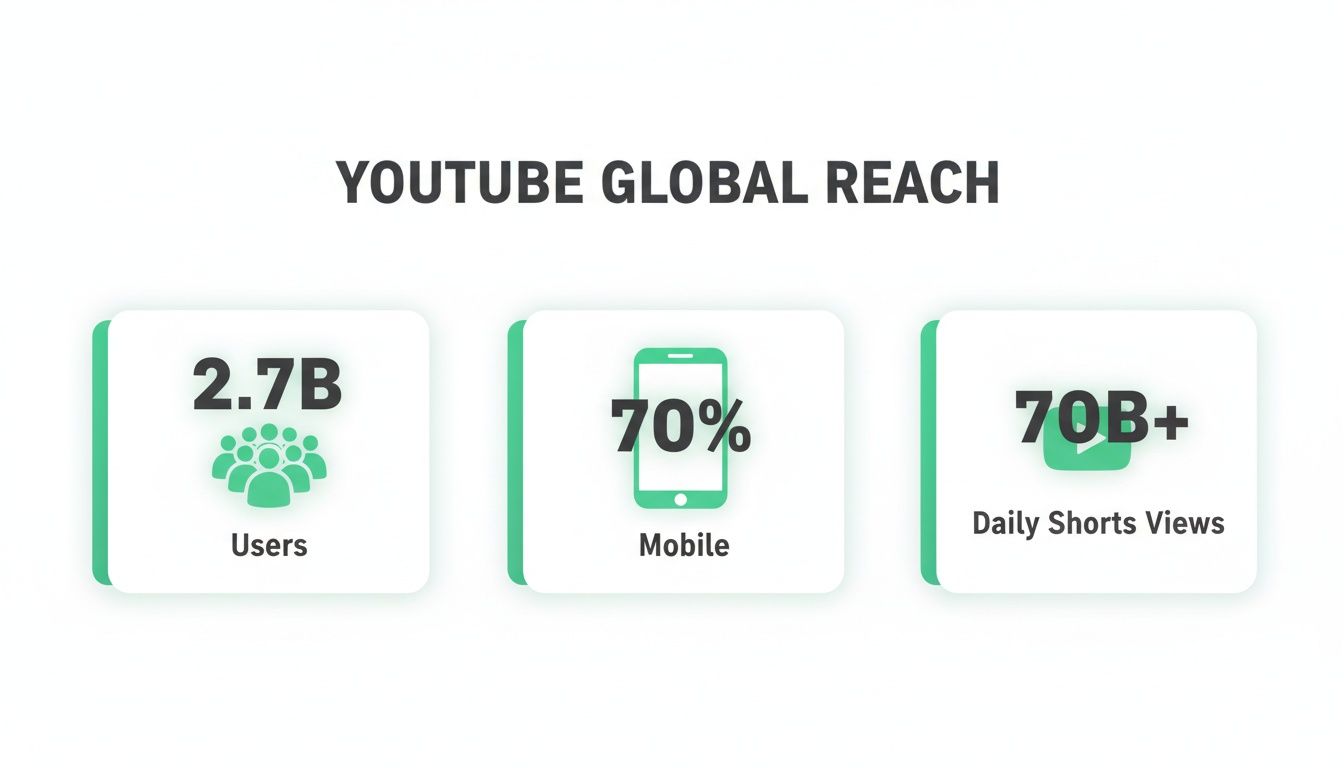
This is precisely why a strong hook is non-negotiable. You're competing against billions of videos for viewers who can leave with a simple swipe.
Crafting an Unskippable Opening
To really nail the hook, you have to think more like a movie trailer director. Show the most exciting, intriguing, or valuable part first to make people desperately want to see the rest.
Here are a few proven ways to do it.
Proven Hook Techniques for Better Viewer Retention
To keep viewers from dropping off in those crucial first seconds, you need a strategy. The right hook can make all the difference between a video that flops and one that gets pushed by the algorithm.
| Hook Technique | What It Is | Why It Works |
|---|---|---|
| The Cold Open | Dropping the viewer right into the most exciting or high-stakes moment of the video. No intro, no branding—just action. | It creates an immediate information gap. Viewers see the peak of the action and are instantly curious about how you got there. |
| The Provocative Question | Asking a direct question that speaks to a viewer's pain point, desire, or curiosity. | This forces the viewer to self-reflect and makes them feel understood. They stick around to find the answer. |
| The Pattern Interrupt | Using an unexpected sound, visual effect, or statement to jolt the viewer out of their passive scrolling state. | It breaks the monotony of the feed and commands attention, forcing the brain to focus on what just happened. |
Each of these techniques serves the same core purpose: to make a promise to the viewer that sticking around will be worth their time.
The goal of your first 15 seconds isn't just to introduce the topic—it's to sell the entire viewing experience. Promise a specific outcome, create a mystery, or present a conflict that viewers feel compelled to see resolved.
A killer hook doesn't work in isolation. It's part of a powerful trio with your title and thumbnail. A great thumbnail earns the click, and a great hook secures the watch time. We go deep into this in our guide on YouTube thumbnail best practices.
If you really want to master this, learning how to create video hooks that stop scrolling is one of the most valuable skills you can develop as a creator. Get the opening right, and you've set the stage for a massive increase in watch time.
Mastering Video Pacing to Keep Viewers Engaged
 Getting that initial hook right is one thing, but keeping your audience watching is where the real work for a watch time increase begins. Pacing isn't just about making your video fast; it’s the rhythm and flow that makes the content feel totally effortless to watch.
If your pacing is off, the video feels slow, clunky, and gives viewers every reason to click away.
Think of your video as a story with a distinct beat. Every single shot, sound effect, and transition adds to this rhythm. Mess it up, and even a one-second pause can feel like an eternity, causing a nosedive in your retention graph.
The Art of Dynamic Editing
Fantastic pacing is almost always achieved in the edit. This is your chance to transform raw, sometimes rambling, footage into a polished final cut. It’s where you trim the fat and crank up the energy.
Strategic editing keeps the viewer's brain constantly engaged, leaving absolutely no room for boredom to creep in. It's about much more than just clipping out mistakes; you're crafting an experience.
Here are a few core techniques I rely on:
- Strategic Jump Cuts: Use these to slice out unnecessary pauses or to move quickly between similar points. A well-placed jump cut can inject a shot of energy and keep the pace brisk.
- Dynamic B-Roll: Cut away from your main talking head shot (your A-roll) to show relevant visuals, animations, or screen recordings. Not only does this illustrate what you're saying, but it gives the viewer a crucial visual break.
- Purposeful Sound Design: Never, ever underestimate the power of audio. Subtle sound effects, background music that complements the mood, and crystal-clear audio all contribute to a professional, seamless experience.
Part of this also comes down to refining your on-camera performance, which includes using techniques for removing filler words that kill momentum and bore your audience to tears.
Eliminating Dead Air in Your Edits
"Dead air" is the silent enemy of watch time. It’s any moment in your video where nothing meaningful is happening, giving your viewer's attention the perfect opportunity to wander.
Hunting down and removing dead air is one of the quickest ways to improve your video's flow. Watch your edit with an impatient eye. Ask yourself: does this shot, sentence, or pause actually serve a purpose? If not, it has to go.
Here's a great rule of thumb: edit with impatience. If a section of your video feels slow to you—the person who made it—it will feel ten times slower to your audience. Cut ruthlessly.
Let's say a tutorial creator has a three-second clip of a software loading screen. Instead of just showing that, they could use a quick cut or a graphic overlay to bridge the gap. It's a tiny change, but it keeps the energy up and respects the viewer’s time—a critical piece of earning a sustainable watch time increase.
Your goal is to make every single second count.
Figuring Out What Your Audience Retention Analytics Are Really Telling You
Your YouTube Analytics dashboard is a goldmine. It holds the keys to sustainably boosting your watch time, but only if you know how to read the story it’s telling. Forget vanity metrics like view counts for a second. The real secrets are buried deep inside your Audience Retention report.
This report is your diagnostic tool. It shows you, second by second, exactly when people are clicking away. It’s a roadmap pointing to your video’s strongest moments and, more importantly, its weakest links. Learning to read these graphs is an absolute game-changer for any creator who's serious about growth.
How to Read an Audience Retention Graph
When you pull up the report, you'll see a graph that charts the percentage of viewers still watching over time. A perfectly flat line would be the dream—that means everyone watched from start to finish. In reality, you'll always see a downward slope. The magic is in understanding the shape of that slope.
If you want to go deeper into the numbers that matter, check out our complete guide on YouTube Analytics explained. It'll help you master every metric.
A gradual, steady decline is usually a sign of a pacing issue. Your content might be solid, but there are probably slow sections or moments of "dead air" that are causing people to slowly lose interest. This tells you the video’s overall structure needs to be tightened up.
On the flip side, a sharp, sudden drop-off is a massive red flag pointing to a specific problem. At that exact moment, you said or did something that made a huge chunk of your audience leave. Maybe it was a confusing statement, a jarring transition, or a promise from your intro that you didn't deliver on.
Think of your retention graph as a detective's clue board. Every big dip is a clue telling you where your video "lost the case" with your audience. Your job is to go back, investigate those moments, and learn from them for your next upload.
Turning Those Insights Into Actionable Changes
The real work begins when you start using this data to make smarter decisions. Don't just stare at the graph and get bummed out about the drop-offs. Use them as a roadmap for what to fix next time.
Let's walk through a real-world scenario. A creator makes a "Top 5 Gadgets" video and notices a massive retention dip right at the 3-minute mark, just after they finish talking about gadget #3.
- The Problem: They re-watch the video and realize they spent two full minutes on gadget #3 but only 30 seconds each on the first two. Viewers felt the pacing was way off and got bored.
- The Solution: For the next listicle video, they make a conscious effort to give each point roughly the same amount of screen time. They even use a timer during the edit to keep the pace consistent and snappy.
But it's not all about the dips. Sometimes you'll see a spike or a "bump" in the graph. This is incredibly valuable because it shows a moment that viewers actually re-watched.
- The Signal: This "rewatch bump" is a blinking neon sign pointing to a piece of highly valuable, interesting, or just plain entertaining content.
- The Strategy: Figure out what made that moment so special. Was it a critical piece of information they needed to hear again? A really clever joke? A stunning visual? Whatever it was, double down on that in your future videos.
By systematically analyzing these patterns, you stop guessing what your audience wants and start knowing what keeps them glued to the screen. This data-driven approach is the most reliable way to get a meaningful watch time increase across your entire channel.
Turn Single Views Into Binge-Worthy Sessions
Getting someone to click on your video is one thing. Getting them to stay for a second, a third, and then lose track of time is where the real growth happens. A smart video structure can be the difference between a single, fleeting view and a multi-hour session that skyrockets your watch time.
It’s not just about the content inside your video, but how you package it and where you lead viewers next.
This all starts with making each video as easy to watch as possible. For longer content like deep-dive tutorials or detailed reviews, people are often hunting for a specific piece of information. If they can’t find it in a few seconds, they're gone.
This is where chapters and timestamps become your secret weapon. By breaking your video into logical, clearly labeled sections, you hand control over to the viewer. It might sound counterintuitive, but letting them skip to the parts they need actually encourages them to stay on your video instead of clicking away to find another one. If you want to get this right, we've got a whole guide on how chapter markers can boost viewer retention.
Build Binge-Watching Loops
Beyond fine-tuning a single video, the real magic happens when you build a seamless path from one video to the next. This is the art of the binge-watching loop, and it's how you turn a curious viewer into a dedicated fan.
Your best tools for this are playlists and a well-defined series. When you group related content, you’re doing the thinking for your audience. Instead of them wondering what to watch next, you serve it up on a silver platter.
- Topical Playlists: Group all your videos about a specific subject. For a cooking channel, this could be something like "30-Minute Weeknight Dinners" or "Advanced Baking Techniques."
- Sequential Series: Create multi-part content that builds on itself. Think of a "Learn Guitar in 30 Days" series, where each video is the next logical lesson.
When a viewer finishes one video, YouTube’s autoplay is far more likely to serve up the next one in your playlist, effectively locking them into your channel's ecosystem.
Don't Forget the Living Room Screen
The way people watch YouTube is changing. It's not just on a phone during a commute anymore; it’s becoming the new primetime television. This is a huge shift—streaming has officially eclipsed traditional broadcast and cable.
In fact, by May 2025, YouTube's slice of the total TV viewing pie hit a massive 12.5%, and it was the fourth month in a row that number had climbed.
This "lean-back" living room experience is a golden opportunity. When someone is settled on their couch, they're primed for a binge session. This makes your playlists and series structure more critical than ever for driving up your watch time.
To capitalize on this, you need to start thinking like a TV network. Structure your content into "seasons" or logical arcs. A well-organized playlist feels like a curated channel, making it effortless for viewers to just keep watching, episode after episode, right from their biggest screen.
Crafting End Screens That Keep People Watching
Those final 20 seconds of your video? That’s some of the most valuable real estate you have on YouTube. It’s your last, best chance to guide a viewer to another one of your videos, turning a single view into a much longer, more valuable viewing session. A powerful end screen isn't just about asking for likes; it's about creating a frictionless path that keeps people on your channel.
Too many creators treat this part as an afterthought. They slap on a generic template with a subscribe button and whatever "latest video" YouTube decides to show. This is a massive missed opportunity for a direct watch time increase. You have to be strategic here and use the end screen to solve the viewer's next problem.
Think about the journey they just went on with you. If they just finished your video on "How to Edit Photos in Lightroom," what's their next logical question? They're probably wondering about advanced color grading or the best export settings. Your end screen needs to anticipate that.
Designing a High-Converting End Screen
The secret to an effective end screen is simple: relevance. Don't just throw up your most recent upload and hope for the best. Instead, manually select the video or playlist that serves as the most logical next step for your viewer. It's a small action, but it shows you understand their needs and can drastically increase your click-through rate.
Here’s how to structure it for maximum impact:
- Suggest a Hyper-Relevant Video: Hand-pick a video that directly follows up on the topic they just watched. Frame it as the "next step" in their learning process.
- Promote a Curated Playlist: If you have a whole series on the topic, link to the full playlist. This is your most powerful tool for kicking off a binge-watching session.
- Include a Subscribe Button: Always have a subscribe element, but don't let it be the main event. Position it right alongside your content recommendations.
Let's say a creator just wrapped up a review of a new camera. Their end screen could feature one video pointing to a tutorial on "Best Camera Settings for Beginners" and another leading to a playlist called "Complete Cinematography Guides." This gives the viewer a choice, but both options keep them watching your content.
Your call to action (CTA) really matters here. Instead of a generic "Watch more," try something like, "If you liked this, you'll love my deep-dive on [specific topic]." It feels more personal and compelling, making a click far more likely.
Ultimately, a great end screen is just an extension of the value you delivered in the video. By thoughtfully guiding your audience, you not only improve their experience but also send strong, positive signals to the algorithm, fueling a long-term watch time increase.
To help you get started, here's a quick checklist summarizing the most impactful strategies from this guide.
Watch Time Increase Strategy Checklist
This table breaks down the key actions you can take today to see an immediate impact on your YouTube watch time.
| Strategy | Key Action | KPI to Track |
|---|---|---|
| Craft Irresistible Hooks | State the video's core value or a bold claim within the first 15 seconds. | Audience Retention (First 30s) |
| Master Video Pacing | Use jump cuts, B-roll, and sound design to maintain energy and visual interest. | Average View Duration |
| Use Chapters & TimeSkip | Add chapters with keyword-rich titles to improve navigation and SEO. | Clicks on Chapters |
| Leverage Playlists | Create series-based playlists and promote them in your end screens and descriptions. | Session Watch Time |
| Analyze Your Data | Review Audience Retention graphs to identify and fix viewer drop-off points. | Audience Retention Curve |
| Strategic End Screens | Manually select a hyper-relevant video or playlist as the next logical step for the viewer. | End Screen Click-Through Rate |
By implementing even a few of these strategies consistently, you'll be well on your way to building a channel that not only attracts viewers but keeps them watching.
Common Questions About Increasing YouTube Watch Time
Jumping into YouTube analytics can feel like trying to solve a puzzle, especially when you’re laser-focused on a big goal like boosting your watch time. Let's tackle some of the most common questions that trip creators up, so you can move forward with your strategy.
Honestly, a lot of creators get stuck on the same things. Clearing these up can make all the difference.
Does a Longer Video Automatically Mean More Watch Time?
Not really, and definitely not in the way most people assume. It’s a classic trap. While a longer video can rack up more minutes, the algorithm is far more interested in your Audience Retention percentage. This number tells YouTube if people are actually sticking around to watch.
Think about it this way: a 10-minute video with a strong 70% retention (where the average viewer watches for 7 minutes) sends a much better signal to YouTube than a 20-minute video with a weak 25% retention (only 5 minutes watched).
The real secret is to make your video exactly as long as it needs to be to deliver on its promise—and not a single second longer. Your goal should be a high average view duration, not just a long video.
Adding fluff just to pad the runtime is a surefire way to kill your retention, which in turn hurts your overall watch time.
How Fast Will I See Results After I Make These Changes?
This isn’t an overnight fix, and how quickly you see a change really depends on what you've tweaked. If you're trying out a new hook or editing style on a single new video, you can check its Audience Retention graph within a day or two to see how it’s landing with viewers.
But for a noticeable jump in your channel's overall 28-day watch time, you’ll need to be patient. The algorithm needs to see a pattern. It has to collect enough data across several of your improved videos before it starts pushing your content to a wider audience.
Consistency is everything. Once you start applying these strategies to a few new uploads over several weeks, you should begin to see that satisfying upward trend in your channel’s analytics.
Are YouTube Shorts Actually a Good Way to Increase Watch Time?
They absolutely are, but you have to understand their specific job in your channel’s ecosystem. It's true that the watch hours from Shorts don't count toward the YouTube Partner Program's monetization requirements, but that’s not their main purpose. Think of them as your channel's ultimate discovery tool.
Shorts are the top of your funnel. They have the potential to go viral and introduce your channel to a massive new audience that would have never found your long-form content otherwise.
Here’s how to think about their role:
- Discovery: Use Shorts to grab attention and attract new subscribers with quick, punchy content.
- Funneling: Your job is to then guide that new audience from your Shorts over to your longer, more in-depth videos.
- Retention: This is where the magic happens. Your long-form content is where you build authority and accumulate the meaningful watch time the algorithm loves.
By using Shorts to bring people in and then delivering incredible value with your longer videos, you create a powerful, sustainable system for growth and a serious watch time increase.
Ready to make your videos more discoverable and boost viewer retention automatically? TimeSkip generates SEO-optimized chapters for your YouTube videos in seconds. Install the Chrome extension and get two free video generations to see the difference for yourself at https://timeskip.io.
