

The last 30 seconds of your YouTube video aren't just filler—they're a golden opportunity. Think of outro music for youtube as the soundtrack to your final handshake with the viewer. It's the audio cue that wraps everything up and guides them on what to do next, creating a powerful brand signature that sticks.
Why Your Video's Final Seconds Actually Matter Most
Ever finished a great TV show episode and had the closing theme song stuck in your head for hours? That’s no accident. That music is engineered to create a sense of completion and brand recognition, making you remember the experience long after the credits roll.
Your YouTube outro music does the exact same thing. It turns a simple "goodbye" into a memorable brand moment. This final audio touch doesn't just fill silence; it reinforces your channel's unique personality and nudges your audience toward their next action.
The Strategic Role of Outro Music
The right outro track is a seriously powerful tool for keeping viewers around and growing your channel. It works hand-in-hand with YouTube’s end screens—those clickable elements that pop up in the final 5-20 seconds of a video—to create a call-to-action that actually works.
Instead of an abrupt ending that has viewers scrambling for the back button, a well-chosen track creates a smooth transition. It gives your audience a pleasant audio backdrop while they decide whether to watch another one of your videos, subscribe, or check out your website. This small detail can make a huge difference to two critical metrics:
- Viewer Engagement: It keeps people’s eyes on the screen, making them way more likely to interact with your end screen elements.
- Session Watch Time: It encourages viewers to click on another one of your videos, which tells the YouTube algorithm your content is valuable and worth promoting.
Boosting Your Key Metrics
And the data backs this up. Videos with engaging outros see viewers stick around 15-20% longer on average. Since YouTube started pushing its own music features, some creators have seen up to 50% higher engagement on music-infused outros compared to a simple fade-to-black.
The real goal of an effective outro isn't just to end the video; it's to start the viewer's next journey inside your content ecosystem. It’s your last, best chance to turn a one-time viewer into a loyal subscriber.
By mastering your video's send-off, you directly influence how the algorithm sees your channel. Better metrics lead to more visibility, and it all starts with those crucial final seconds. For a deeper dive into this, check out our guide on improving your YouTube audience retention.
Finding the Perfect Sound for Your Brand Identity
Choosing your outro music is way more than just picking a song you like—it’s a massive branding decision. Think of it like a movie’s final scene. The right audio cue locks in the entire experience and leaves a feeling that sticks with the audience long after the credits roll. Your outro music for youtube is your channel’s sonic signature.
This signature is built on a few key characteristics that have to work in harmony. Once you start seeing your outro music through this lens, you stop just ending your video and start crafting a memorable brand experience. Your audio choices should be just as deliberate as your visual ones. In fact, the two are deeply connected, and you can learn more about how to elevate your digital presence by transforming your visual identity.
The Five Pillars of Effective Outro Music
To land on that perfect track, you'll want to judge your options against five core elements. Each one plays a critical role in making your outro feel professional, cohesive, and effective at nudging your viewers toward that next click.
-
Duration: Your music needs to sync up perfectly with your end screen, which usually runs for 5-20 seconds. A track around 25-30 seconds long is the sweet spot. This gives you enough runway to start the music just before the end screen pops up and then fade it out smoothly without an awkward, sudden stop.
-
Tempo: The speed of the music, measured in BPM (beats per minute), should match your video’s energy. A high-octane gaming montage needs a fast, upbeat track to keep the hype going. On the flip side, a calm, meditative video calls for something slower and more reflective to ease the viewer out.
-
Mood: This one’s huge. The emotional tone of the music sets the final vibe. Does it feel uplifting, mysterious, funny, or inspiring? The mood should be a direct reflection of your channel's personality and the exact feeling you want to leave your audience with.
-
Volume: Your outro music is the supporting actor, not the star. It should complement any final voiceover or on-screen text, not blast over it. It needs to be mixed properly so it sits comfortably in the background, creating atmosphere without being a distraction.
-
Transition: The track has to have a clean beginning and a natural-sounding end. This allows for a smooth fade-in and fade-out. Abrupt cuts feel jarring and amateurish, and they can completely shatter the seamless experience you’ve worked so hard to build.
Your outro music is the final piece of your brand's story in every video. It’s the consistent audio thread that ties all of your content together, making your channel instantly recognizable even with just a few notes.
Matching Sound to Your Niche
Nailing down your unique brand is the first step to picking the right outro music. The principles of branding are universal, and if you want to go deeper, it’s worth learning about crafting a strong brand identity as a musician, as the concepts apply directly here, too.
A tech review channel might go for a modern, electronic track to sound innovative and forward-thinking. Meanwhile, a DIY crafting channel could lean into a folksy, acoustic tune to create a warm and approachable feeling. By consciously aligning these audio choices with your brand, you create a powerful and consistent experience that builds real loyalty over time.
To make this even clearer, here's a breakdown of how different channel types can approach their outro music.
Outro Music Characteristics by YouTube Channel Niche
| Channel Niche | Ideal Tempo (BPM) | Recommended Mood | Example Music Genre |
|---|---|---|---|
| Gaming | 120-150 BPM | Energetic, Epic, Tense | Electronic, Chiptune, Rock |
| Tech Reviews | 100-120 BPM | Modern, Sleek, Innovative | Lofi Hip-Hop, Corporate, Synthwave |
| Vlogging | 90-115 BPM | Upbeat, Positive, Relatable | Indie Pop, Acoustic Folk, Chillhop |
| Educational | 80-100 BPM | Focused, Inspiring, Calm | Ambient, Classical, Minimalist |
| Comedy/Skit | 110-130 BPM | Quirky, Playful, Funny | Funk, Jazz, Ukulele |
| Beauty/Fashion | 95-120 BPM | Chic, Confident, Trendy | Pop, R&B, House |
| DIY/Crafting | 85-110 BPM | Warm, Cozy, Creative | Acoustic, Folk, Soft Indie |
| Fitness | 125-140 BPM | Motivational, High-Energy | Hip-Hop, EDM, Pop Rock |
Choosing the right sound based on your niche isn't a rigid rule, but it's a fantastic starting point. It helps ensure the music feels like a natural extension of your content, not a random track tacked on at the end. The goal is to create a signature sound that tells your audience, "This is me," without you having to say a word.
How to Navigate YouTube Music Licensing and Copyright
Picking the wrong song for your outro can do a lot more than just kill the mood. It can get your video demonetized, taken down, or even land your channel a dreaded copyright strike. Let's be real, music licensing feels like a minefield, but getting the basics down is the only way to protect all your hard work.
Think of it like a rental agreement for your audio. You absolutely need to know the terms before you move in.
A single copyright claim can stop a video's momentum cold. And the consequences aren't just a slap on the wrist; they range from losing ad revenue on a video that's going viral to racking up strikes that put your entire channel on the line.
Understanding Your Licensing Options
To legally use outro music for youtube, you've got a few main paths to choose from. Each one comes with its own set of rules and freedoms, so it’s super important to know the difference before you hit that export button.
- Royalty-Free Music: This is probably the one you've heard of most. "Royalty-free" doesn't mean it's free to use. It just means you pay a one-time fee or a subscription to use the track without having to pay ongoing royalties to the artist for every view you get.
- Creative Commons (CC): This is a type of public license that allows you to use music for free, but almost always with specific strings attached. Some CC licenses require you to credit the artist (Attribution), while others might say you can't use it for commercial purposes (NonCommercial) or change the track at all (NoDerivatives). You've got to read the fine print on the specific CC license.
- Public Domain: When a song's copyright finally expires, it enters the public domain, meaning it basically belongs to everyone. But here's a big catch: while the original sheet music for a classical piece might be public domain, a specific orchestra's recording of it is a totally separate copyrighted work.
This little flowchart can help you visualize how your video's vibe can point you toward the right music.
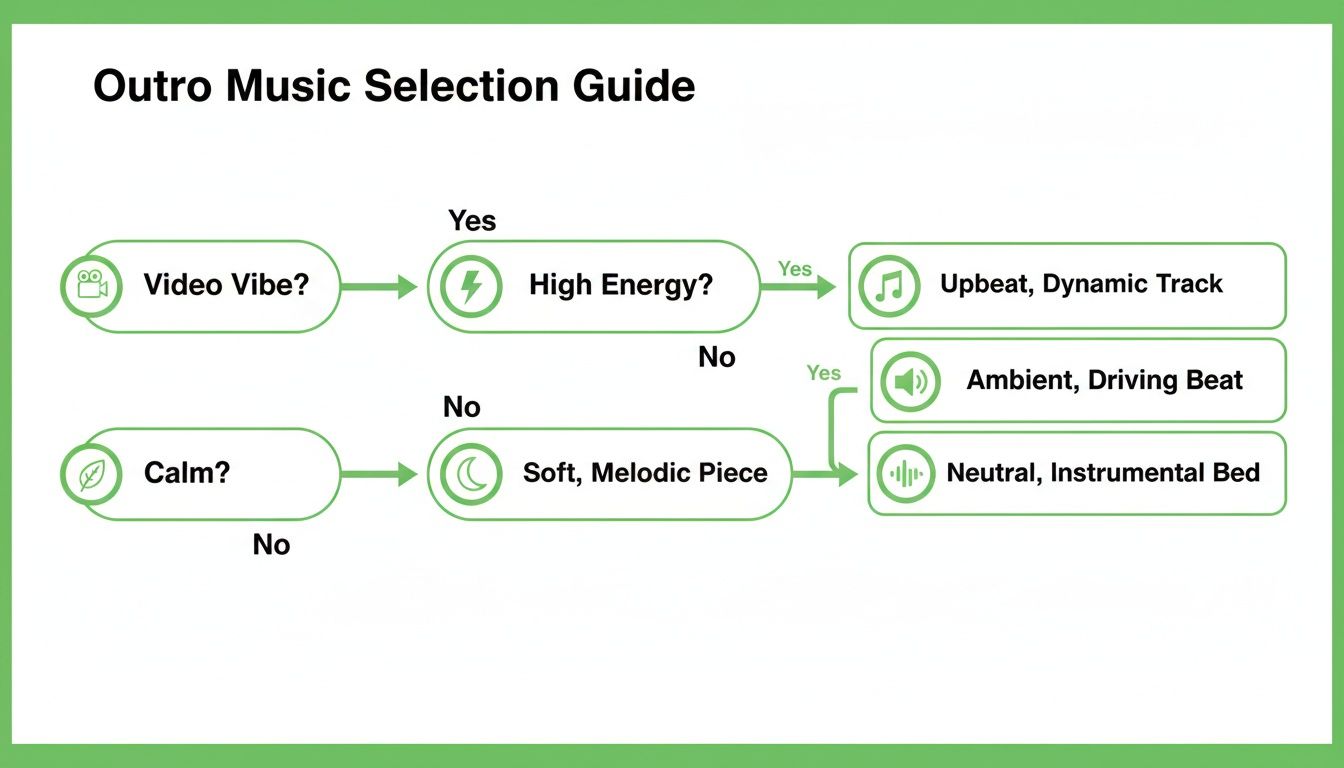
As you can see, just figuring out if you want to leave your viewer feeling pumped up or chilled out is the perfect first step to narrowing down your options.
The Safest Bet: The YouTube Audio Library
Want complete peace of mind? Your best starting point is YouTube's own Audio Library. It’s a huge collection of music and sound effects that are already pre-cleared for you to use in any video you monetize on the platform.
The YouTube Audio Library removes all the guesswork. Every single track is guaranteed safe to use on YouTube, which lets you focus on being creative instead of playing amateur copyright lawyer.
Sure, the selection might not be as massive as some of the premium subscription services out there, but it's a 100% risk-free way to find solid tracks without spending a dime. It's the perfect resource for creators who just want to stay safe without getting tangled up in legal jargon.
It's still smart to understand the bigger picture of how creative works are protected. Learning a bit about issues like intellectual property violation will help you stay informed for the long haul. At the end of the day, taking a few extra minutes to source your music legally is an investment in your channel's future.
Where to Find High-Quality Outro Music
Alright, you know the rules of the road. Now comes the fun part: finding that perfect track to wrap up your videos. Sourcing legal, high-quality outro music for YouTube can feel like a huge task, but there are fantastic options out there for every budget.
The absolute most important thing is choosing a platform that keeps your channel safe from the dreaded copyright claim. Thankfully, a whole ecosystem of music services has popped up just for creators, making it easier than ever to find a track that fits your channel's vibe.
The Best Free and Paid Music Platforms
If you're on a tight budget or just starting out, the YouTube Audio Library is your safest bet. It’s a collection of music and sound effects that YouTube has already pre-cleared for monetization, so there's zero risk of copyright strikes. While the selection can sometimes feel a bit generic, it's a completely reliable and cost-free starting point.
When you're ready to invest in a more polished and unique sound, subscription-based royalty-free platforms are where the magic happens. These services offer massive, professionally curated libraries that can seriously elevate your content.
Here’s a quick rundown of the platforms I’ve found most creators turning to:
Comparison of Top Music Sourcing Platforms
Picking the right music library can feel overwhelming with all the choices out there. Each one has its own strengths, pricing models, and licensing quirks. This table breaks down some of the most popular options to help you see which one might be the best fit for your channel's needs and budget.
| Platform | Pricing Model | Key Feature | Best For |
|---|---|---|---|
| YouTube Audio Library | Free | Pre-cleared by YouTube | Beginners and creators on a zero budget |
| Epidemic Sound | Subscription | Massive catalog with great filters (mood, BPM) | Creators who need a wide variety of high-quality tracks |
| Artlist | Subscription | Universal license that covers everything | Filmmakers and creators wanting cinematic-quality music |
| Soundstripe | Subscription/Per-Track | Radio-quality music and flexible plans | Creators who need both music and sound effects |
These platforms represent a major step up in quality and selection, helping your channel stand out from the crowd. Paying attention to what’s trending can give you a leg up, too. YouTube Music's 2023 recap, for instance, showed that over 70% of users found new music genres through video content. Some creators who’ve aligned their outros with these trending sounds have even reported a 15% boost in viewing duration. You can discover more about YouTube Music's annual stats to get a feel for what’s currently resonating with viewers.
Commissioning Custom Outro Music
If you're aiming for a sound that is truly one-of-a-kind, nothing beats commissioning a custom track. This is the ultimate way to create a sonic signature that is completely exclusive to your channel.
A custom outro isn't just a song; it's your channel's audible logo. It creates an immediate and powerful association with your content that no stock track can replicate.
Platforms like Fiverr or Upwork are great places to find talented freelance composers who can create a custom piece of music perfectly tailored to your brand. It’s definitely the most expensive route, but the investment can pay off big time by building an unforgettable brand identity that grows right alongside your channel.
How to Implement Outro Music Like a Professional
Picking the perfect track is only half the battle. The real magic happens in the execution. Getting your outro music just right is what separates polished, professional content from an amateur upload. It’s about making your audio an essential part of your video’s structure, not just some song you slapped on at the end.
The single most important element here is timing. You want your music to line up perfectly with YouTube’s end screen, which can run for a maximum of 20 seconds. To make that transition feel seamless, start your outro music about 3-5 seconds before your end screen elements actually pop up. This gives your viewer’s brain a beat to shift gears before you hit them with your final calls-to-action.
Mastering Your Audio Levels and Fades
Once you’ve nailed the timing, it's time to focus on the audio mix. Your outro music should support your final message, not completely overpower it. If you’re signing off with something like, "Thanks for watching, don't forget to subscribe," the music needs to sit comfortably in the background.
A good rule of thumb is to drop the music’s volume by -12 to -18 decibels whenever you have dialogue over it.
And please, a clean fade-out is non-negotiable. An abrupt stop feels jarring and just screams unprofessional. Luckily, most editing software makes this incredibly easy.
- Linear Fade: This is your standard, steady decrease in volume. Simple, clean, and effective.
- Exponential Fade (S-Curve): A more natural-sounding fade that starts slow, speeds up in the middle, then eases out gently.
Using the right video production software is key to getting these details perfect. It truly can make all the difference in the final product.
Think of your outro music like the closing credits of a movie. The score doesn't just cut off; it gracefully fades, signaling a gentle and satisfying end to the experience. Your YouTube video deserves that same level of polish.
Integrating Music with Video Chapters
Here’s a pro-level technique: align your outro music with your final video chapter. Creating a specific chapter called "Final Thoughts" or "Next Steps" that kicks in exactly when your outro music starts can seriously upgrade the viewer experience.
For longer videos, pairing optimized timestamps with a memorable outro can dramatically lift visibility. Some research suggests that for videos up to four hours long, this combo can boost visibility by as much as 220%. Online educators who use chapter tools to sync their final timestamps with a strong musical ending often see up to a 25% higher discovery rate from better search performance. You can read more about YouTube’s evolving use of data to see how metrics like these are becoming more important.
This final, clearly marked segment gives viewers a strong signal that the video is wrapping up, making them way more receptive to whatever you show them on the end screen.
Common Questions About YouTube Outro Music
As you start dialing in your channel's sound, it's natural for questions to pop up. Let's tackle some of the most common ones we hear from creators, so you can move forward with confidence.
How Long Should My YouTube Outro Music Be?
The sweet spot for outro music is right around 20 to 30 seconds. This length is perfect because it syncs up beautifully with YouTube's end screen feature, which has a maximum duration of 20 seconds.
Having that extra bit of music gives you a buffer. You can start the track a moment before the end screen visuals appear and let it fade out gently, creating a seamless, professional-grade finish instead of an abrupt stop.
Can I Use a Popular Song for My YouTube Outro?
Tread very, very carefully here. Using a well-known commercial song is a huge gamble unless you've gone through the process of securing a specific—and usually very expensive—license. If you don't have explicit permission, you’re almost guaranteed to get hit with a Content ID claim.
A claim can lead to your video being demonetized, the audio getting muted, or even a strike against your channel. The safest bet is always to stick with royalty-free music libraries or browse the official YouTube Audio Library. It's just not worth the risk.
The safest assumption for any creator is this: if you didn't create it or explicitly license it, you can't use it. Sticking to pre-cleared sources removes all the risk and guesswork.
Should My Outro Music Have Lyrics?
For most channels, instrumental music is the way to go. Lyrics have a tendency to pull your viewer's focus away from what you want them to do next—like clicking another video or hitting the subscribe button.
An instrumental track is fantastic for setting a mood without fighting for your audience's attention. If you find a song with vocals that you just have to use, make sure they're minimal and mixed well into the background.
Does Outro Music Really Help with SEO?
It does, but in an indirect way. Think of it like this: great outro music for youtube makes for a better, more polished viewing experience. When people enjoy your content right to the very end, they're more likely to stick around longer.
If that positive experience leads them to click on another one of your videos, you're sending powerful signals to the YouTube algorithm that your content is engaging. Over time, these positive user signals can absolutely help boost your visibility in search results and recommendations.
Ready to boost your video SEO even further? TimeSkip automates the creation of SEO-optimized YouTube chapters in seconds, helping your content rank higher and retain viewers longer. Try TimeSkip for free today and see the difference.
