

A solid script for a YouTube video is your strategic blueprint for success. It's what turns a rambling, off-the-cuff monologue into a polished, engaging experience that actually holds a viewer's attention.
Think of it this way: a script eliminates those awkward pauses, keeps your content tightly focused, and ultimately delivers real value from the very first second.
Why Your Script Is the Secret to YouTube Growth
Ever wonder why some videos just work while others fall flat? More often than not, the answer lies in the script. Stop thinking of it as a chore and start seeing it for what it is: the foundation of your video's success.
A well-crafted script is hands-down the most effective tool for boosting the metrics YouTube’s algorithm cares about most—watch time and viewer retention.
This isn't just about cutting out the "ums" and "ahs." It's about intentionally structuring your message to keep someone watching. With a script, you can meticulously plan a powerful hook, build a logical narrative that flows seamlessly, and deliver a call to action that actually converts.
Boost Viewer Retention and Watch Time
The real goal of scripting is to create a viewing experience so smooth that people simply keep watching. Higher retention is a massive signal to YouTube that your content is valuable, which can lead to a serious boost in search results and recommended videos.
For a deeper dive into the core principles of scripting, check out an in-depth guide on how to write a script for YouTube videos that gets views and really hooks your audience.
The difference between winging it and planning it out is stark, as you can see in the data.
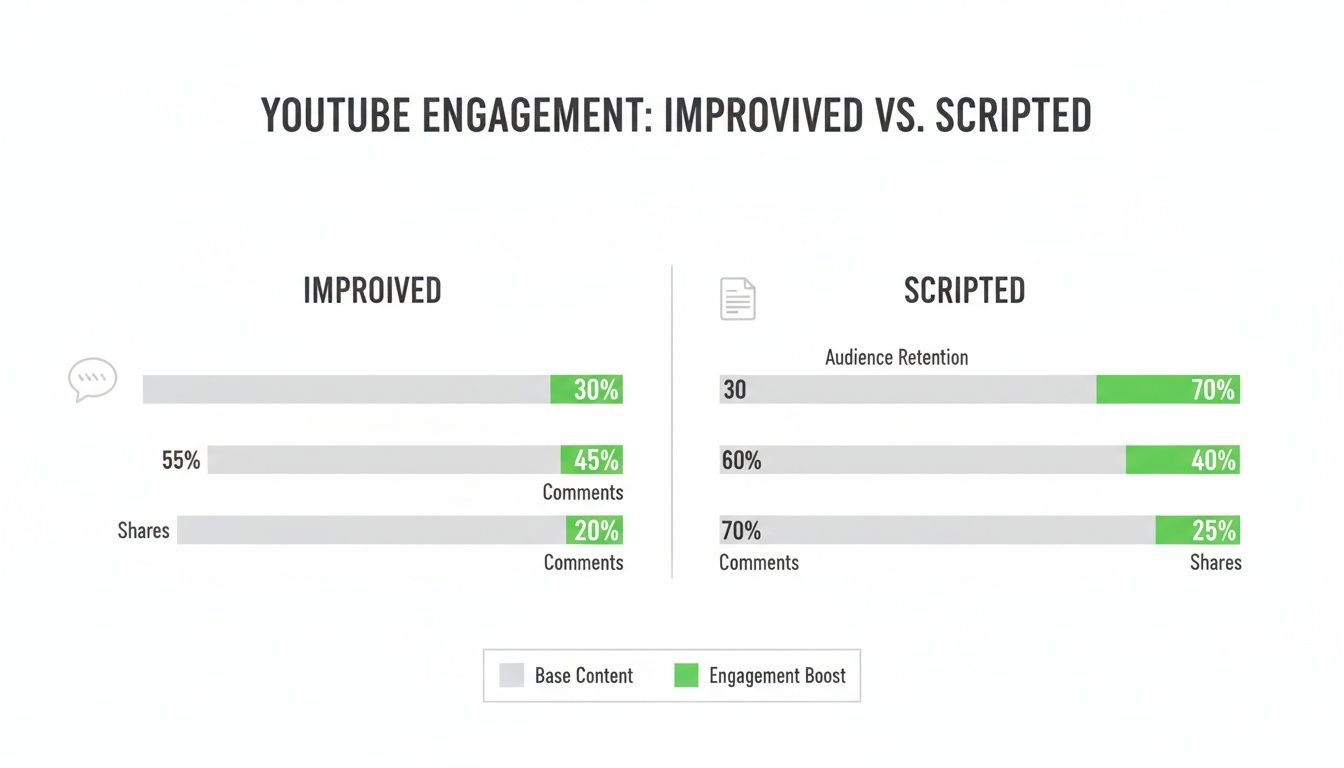
As the numbers show, a structured script consistently drives better performance across the board, from grabbing initial attention to driving that final click.
The Real Impact of Scripting on Your YouTube Metrics
See how a strategic script transforms key performance indicators and directly contributes to your channel's growth.
| Metric | Improvised Video | Script-Driven Video |
|---|---|---|
| Viewer Retention | Erratic drops, viewers leave quickly | Smooth curve, higher average retention |
| Average Watch Time | Significantly lower due to tangents | Higher, as content is focused and paced |
| Subscriber Conversion | Inconsistent or weak CTA | Clear, well-timed, and effective CTA |
| Comment Engagement | General, unfocused comments | Specific comments on planned points |
| Video Clarity | Confusing, rambling structure | Clear, logical, and easy to follow |
The bottom line? A script isn't just about what you say; it's about how you strategically guide your audience from point A to point B, which is reflected directly in your channel's analytics.
Capitalize on an Already Engaged Audience
Here’s an interesting tidbit: YouTube's bounce rate is a surprisingly low 31.5%—the lowest among major websites. What does that mean for you? It means viewers who land on your video are already primed and willing to stay.
A great script capitalizes on this built-in interest by guiding them logically through your content. This is absolutely essential for maximizing your YouTube watch time and turning a casual viewer into a dedicated subscriber.
The Pre-Writing Ritual Top Creators Swear By
Before you even think about typing "SCENE 1," let's talk about what the best creators do before they write a single word of their script for a YouTube video. Trust me on this one. Jumping straight into scripting without a plan is like trying to build a house without a blueprint—you'll end up with a confusing mess that doesn't connect with anyone.
This initial prep work is what separates targeted, powerful content from the videos that just add to the noise.
Getting this right is a cornerstone of any solid content creation workflow. It ensures every video you make has a clear purpose right from the get-go.
Nail Down Your One Big Idea
Every truly great video can be boiled down to a single core concept. What is the one powerful takeaway you want rattling around in your viewer's head long after they've clicked away? If you can't say it in one simple sentence, your idea is too complicated.
For instance, "a video about photography" is way too vague. A killer "One Big Idea" would be: "You can take professional-looking portraits using only your smartphone and the light from a single window." See the difference? That clarity becomes your North Star for every line you write.
Key Takeaway: A laser-focused video with one clear message will always crush a video that tries to cover too much ground. When it comes to keeping viewers hooked, less is definitely more.
Get Inside Your Audience’s Head
Who are you actually talking to? The most magnetic scripts feel like a conversation with a friend, and that's because the creator genuinely understands their audience—their slang, their struggles, and what gets them excited. You have to put on your detective hat.
- Become a Reddit lurker: Find subreddits in your niche and just listen. How do they phrase their questions? What are the inside jokes? What problems pop up again and again?
- Read your own comments: Your comment section is an absolute goldmine. Pay attention to the specific words people use to describe their wins and their pain points.
- Spy on your competition (ethically!): Check out the top comments on popular videos in your space. What are people loving? What questions are still left unanswered that you could tackle?
Doing this research helps you write a script that speaks to your audience, not at them. It's how you build a real connection.
Set a Crystal-Clear Goal for Your Video
Alright, time for the most important question of all: "Why am I even making this video?" Every piece of content needs a specific, measurable goal that serves both you and your viewer. A well-defined goal will dictate the entire script's structure, tone, and that all-important call to action.
Your goal could be anything, really. For example:
- To Drive Affiliate Sales: A tech review script would need to hammer home a product's benefits, tackle common objections head-on, and finish with a super clear call to buy.
- To Build Community: A vlog script might focus more on personal stories and relatable moments, ending with a call to action that sparks conversation in the comments.
- To Generate Leads: A tutorial video could solve a nagging problem for your viewer and then point them to a free downloadable guide in exchange for their email.
When you know your destination from the start, you can make sure every single part of your script is working to get you there.
Using the AIDA Framework to Structure Your Script
If you're staring at a blank page and wondering how to actually build your video, let's borrow a trick from the marketing world. It’s a classic framework called AIDA, which stands for Attention, Interest, Desire, and Action. This isn't just some stuffy acronym; it's a proven psychological map for taking a viewer from a curious click to a genuine fan.
Think of it as the natural flow of a good conversation. You grab their attention, pique their interest, show them why they should care, and then give them a clear next step. When you build your script for a YouTube video this way, you create something that doesn't just get watched—it gets results.
Get Their Attention in the First 15 Seconds
You have a tiny window to stop the scroll. This is the Attention phase, and your hook needs to land a punch. This is no time for a slow, meandering intro or the classic "Hey guys, welcome back to my channel." Get right to the good stuff.
Jump straight into the core promise or the most exciting part of your video.
- Ask a provocative question: "What if I told you that you've been cleaning your coffee maker all wrong?"
- Show off the final result immediately: Open with a stunning shot of the finished DIY project or the epic final boss fight in a game review.
- Hit them with a surprising fact: "This tiny gadget under $50 completely replaced my entire camera bag."
The goal here is to create an immediate sense of curiosity or an "information gap" that the viewer just has to fill. We all know attention spans are short, so a killer opening is non-negotiable.
Expert Tip: Your hook needs to answer the viewer's silent question: "What's in it for me?" Make the benefit to them crystal clear from the very first second.
Build Genuine Interest and Desire
Okay, you've got them. Now it's time to build Interest. This is where you dig into the problem you're solving or build up the story you're telling. If you’re making a tutorial, lean into the common frustrations. For example, "You’ve probably tried a dozen different ways to get crispy sweet potato fries, only to end up with a soggy, disappointing mess." See? Relatable.
From there, you smoothly transition into creating Desire. This is the fun part. You don't just present the solution; you make them want it. You show them the transformation.
Instead of just saying "this software is really efficient," you show a screen recording of a task that usually takes an hour being done in thirty seconds. You're taking the viewer from "Yeah, I have that problem" to "Okay, I absolutely need that solution."
Drive One Clear Action
Finally, every great script guides the viewer toward Action. This is your Call-to-Action (CTA), and it needs to feel like a natural next step, not a desperate plea. Please, ditch the generic "like and subscribe" outro that everyone tunes out.
Instead, tie your CTA directly to the value you just provided.
- If you reviewed a product: "If you want to check out this microphone for yourself, I’ve dropped the link I used right in the description for you."
- If you taught a new skill: "Now that you've got the basics down, your next step is to watch my video on advanced techniques, which I'll link right here."
- If you shared a personal story: "I'd love to hear if you've gone through something similar. Let me know your story down in the comments."
A well-crafted CTA doesn't feel like a sales pitch. It feels like you're genuinely helping them on their journey, which is what building a community is all about.
Adapting Your Scripting Style for Any Video Format
A detailed, word-for-word script for a YouTube tutorial is going to look completely different from the loose bullet points you’d jot down for a vlog. This is one of those things that seems obvious, but so many creators get it wrong. The secret to truly engaging content is matching your writing style to the video’s format.
If you try to force a rigid script onto a travel vlog, it’ll kill the spontaneous, authentic vibe you're going for. On the flip side, a vague outline for a technical tutorial will just leave your viewers confused and frustrated.
Not all video formats are created equal, and their scripts shouldn't be, either. You can see this reflected in average video lengths alone—gaming videos often hover around 24.7 minutes, while music videos are closer to 6.8 minutes. That’s a huge range, and mastering the scripting nuances for each is what separates the good creators from the great ones.

Crafting Scripts for How-To and Tutorial Videos
When you're making a tutorial, clarity is king. There's zero room for confusion. Your script needs to be a precise, step-by-step roadmap that anticipates your viewer's questions and answers them before they even have to ask.
The best way I've found to do this is with a simple two-column script. One column is for what you’ll say (dialogue), and the other is for what the viewer will see (visuals).
- Dialogue Column: Write out your spoken lines clearly and concisely. Ditch the jargon and stick to simple, direct language.
- Visuals Column: This is where you note exactly what needs to be on screen to match your words. Think things like: “[B-ROLL: Close-up of unscrewing the back panel]” or “[SCREEN RECORDING: Highlight the ‘Export’ button in the top menu].”
This dual-column approach forces your spoken instructions and on-screen actions to sync up perfectly, creating a smooth, easy-to-follow learning experience.
The Art of the "Unscripted" Vlog Script
Vlogging is all about authenticity. It’s personal. A fully scripted, memorized monologue will feel stiff and totally unnatural, breaking that connection you’re trying to build with your audience. For vlogs, you need to think in terms of story beats, not a word-for-word manuscript.
A bullet-point outline is your best friend here. Just structure your vlog around a basic story arc: a beginning (where are you, what's the plan?), a middle (the main event or challenge), and an end (the resolution or what you learned).
Pro Tip: Your vlog outline is a safety net, not a cage. Use it to guide the story and make sure you hit your key points, but always leave room for those spontaneous moments and genuine reactions. That's where the real magic happens.
Structuring a Killer Product Review
A great product review builds trust by being balanced, thorough, and honest. People are watching to get a real assessment, not a sales pitch. Following a proven formula for your script is the best way to make sure you cover all the essential bases.
Here’s a flow that works every time:
- The Hook: Kick things off with the core problem the product claims to solve.
- Unboxing & First Impressions: Capture that initial "wow" factor or any immediate red flags. This is pure, unfiltered reaction.
- Features Deep Dive: Walk through the key features one by one. Explain what they do and, more importantly, who they're for.
- Pros and Cons: This is non-negotiable for credibility. Be brutally honest about what you love and what you think falls short.
- The Verdict: Wrap it up with a clear, final recommendation. Who should buy this? Is it actually worth the money?
This structure keeps your review comprehensive and makes it incredibly easy for viewers to follow along. And as video creation evolves, new scripting methods are always popping up. For instance, knowing the ins and outs of Sora 2 prompting is becoming crucial for directing AI-generated videos, which is a whole new frontier for creators.
Weaving SEO into Your Script for Better Discovery
A brilliant script deserves an audience. But let’s be real—in the crowded world of YouTube, great content alone isn’t enough to get you found. This is where the magic happens: you need to intentionally blend your creative writing with smart search engine optimization. Your script for a YouTube video is more than just words; it’s a discovery tool waiting to be activated.
Think of it like this: YouTube is the world’s second-largest search engine. When you strategically work your primary keyword and a few related phrases into your dialogue, you’re basically handing the algorithm a cheat sheet to understand and rank your video. This isn’t about awkwardly stuffing keywords where they don’t belong. It’s about natural, seamless integration.
When you say your target keyword in your hook, mention it again while explaining a key concept, and then wrap up with it in your conclusion, you're sending powerful signals. YouTube's transcription AI is always listening, and it uses your spoken words to figure out what your content is about and who it should be shown to.
Scripting with Chapters in Mind from the Start
Here’s one of the most powerful and criminally underutilized SEO strategies, and it starts right in your script: plan your video chapters from the beginning. Instead of slapping timestamps on as an afterthought, structure your entire script around them.
This means you need to start thinking in distinct, logical sections before you even hit record.
By breaking your script down into clear segments, you’re creating a roadmap not just for yourself, but for your viewers and for search engines. Each one of those segments can become a YouTube Chapter.
Key Insight: Chapters do more than just improve the viewing experience. They allow Google to index different parts of your video, enabling your content to appear as rich results for highly specific, long-tail search queries.
This proactive approach makes creating timestamps a breeze. Once your video is edited, you just look at your script's subheadings, find where each section starts in the final cut, and you’re done. You can get a much deeper explanation of these concepts in our complete guide to what is video SEO.
Turning Your Script into a Viewer and SEO Magnet
This kind of structured scripting does more than just help with your rankings; it dramatically improves the experience for the person watching. According to research from Wyzowl, video chapters improve engagement by showing people exactly what your video covers, which makes them way more likely to stick around and share it.
Here’s a simple way to structure your script for chapters:
- Introduction (0:00): State your main topic and drop your primary keyword early.
- Key Point One (e.g., 1:15): A subheading in your script becomes the chapter title.
- Key Point Two (e.g., 3:40): Another clear, descriptive chapter title based on your script.
- Conclusion (e.g., 6:20): Summarize the main points and hit them with your call to action.
With this method, your script transforms from a simple dialogue guide into a powerful tool for maximizing your video's reach, keeping viewers happy, and building a channel that actually gets discovered.
Your Questions on YouTube Scripting Answered

Even after mapping out the perfect video, a few nagging questions always seem to pop up right when you sit down to write. It happens to everyone. Let's clear up some of the most common hurdles creators run into.
Think of this as your quick-reference guide for the next time you're stuck, designed to get you back to writing your script for a YouTube video with confidence.
Should I Write a Full Script or Just Bullet Points?
Honestly, there's no single right answer here—it really boils down to your video's style and what makes you feel comfortable on camera.
A full, word-for-word script is a lifesaver for technical tutorials or detailed product reviews. When every specific detail is crucial, scripting it all out ensures you don't miss a thing.
On the other hand, for a casual vlog or a personality-driven commentary video, detailed bullet points can help you sound more spontaneous and less robotic. A lot of top creators I know actually use a hybrid approach: they'll fully script their hook and call to action, but use bullet points to guide the main body of the video. It's the best of both worlds.
How Long Should My Script for a YouTube Video Be?
Instead of getting hung up on a target video length or word count, your real focus should be on delivering value. Your script should be precisely as long as it needs to be to explain your topic well, without any fluff that might make viewers click away.
That said, a good rule of thumb can be helpful for planning. The average person speaks at about 150 words per minute.
So, a script that's around 1,500 words will usually land you a video in the 10-minute ballpark. Use this as a rough guide, but always let the quality of your content—not the clock—make the final call.
How Can I Make My Script Reading Sound Natural?
This is the big one for a lot of people. The secret is to write for the ear, not for the eye. Use the kind of language you'd use when talking to a friend. Throw in contractions like "you're" and "it's," and don't be afraid of using slang if it fits your brand.
But the most important thing you can do? Read your script out loud a few times before you even think about hitting record. You'll immediately catch clunky phrases and sentences that are too long to say in a single breath.
A couple of simple formatting tricks in your document can also make a huge difference:
- Use bold text to remind yourself which words to emphasize.
- Add extra line breaks to signal where you should take a natural pause.
Your script is a safety net, not a cage. Let it guide you, but don't let it box in your personality.
What Are the Best Tools for Script Writing?
You absolutely don't need fancy, expensive software to write a killer script for a YouTube video. In my experience, the simplest tools are usually the most effective.
For most creators, Google Docs or Microsoft Word are more than enough. They have great collaboration features, they're easy to format, and you can access them from anywhere. If you find yourself needing more structure for complex projects, a screenwriting tool like Celtx can help organize scenes and dialogue.
At the end of the day, the best tool is the one you actually enjoy using. The substance of your script matters way more than the software you use to write it.
Stop wasting time on manual timestamps. TimeSkip generates SEO-optimized YouTube chapters in seconds, boosting your video's discovery and retention. Get started for free at https://timeskip.io.
