

The best keywords for YouTube videos describe the exact topic, audience, and outcome of the video in language viewers actually search. Start with YouTube autocomplete, confirm that the current results match your format, and use one primary phrase naturally in the title and description. Add close variations only where they improve clarity.
Quick Answer: How to Find YouTube Video Keywords
- Write the broad topic a viewer would search.
- Collect specific phrases from YouTube autocomplete.
- Open the results and check whether videos like yours rank.
- Prefer a specific phrase your channel can answer completely.
- Use it in the title, early description, spoken introduction, and relevant chapter titles without repeating it mechanically.
| Weak keyword | Stronger video keyword | Why it is clearer |
|---|---|---|
| workout | 15-minute beginner HIIT workout | Adds format, audience, and duration |
| camera review | Sony A7 IV low-light video test | Names the product and test intent |
| Excel tips | Excel XLOOKUP tutorial for beginners | Names the feature and audience |
Need ideas for a specific upload? Use the free YouTube keyword generator as a starting list, then validate the phrases against the live YouTube results.
Why YouTube Keyword Research Is Your Secret Weapon

Keyword research connects a video idea with the questions and problems viewers express in search. It is most useful before production, when the phrasing can still shape the topic, examples, title, and structure.
Connecting With What Your Audience Actually Wants
The keywords for YouTube videos you choose are a direct line into your audience's head. They represent their questions, their problems, and their curiosities. When your video title, topic, and description match those phrases, you're not just "doing SEO"—you're showing up with the answer they were looking for at the exact moment they asked.
A title like "My New Workout Routine" is vague. "15-Minute HIIT Workout for Beginners at Home" tells both the viewer and YouTube what the video delivers without promising a guaranteed result.
The point isn't to game the system. It's to give YouTube clear, honest signals that help it match your amazing content with the people who are actively searching for it.
Building a Content Strategy That Lasts
Good keyword research isn't just about one video going viral; it lays the groundwork for your entire channel's future. When you uncover a whole ecosystem of core topics and related long-tail keywords, you can map out a content plan that consistently serves your audience.
This process helps you:
- Validate Your Ideas: Find out if people are actually looking for a topic before you spend hours filming.
- Review the Competition: See which formats and answers already satisfy the query.
- Build Topic Depth: Plan related videos that answer adjacent questions for the same audience.
At the end of the day, finding keywords for YouTube videos is a research step, not a guarantee. The video still needs to answer the query and hold the attention of the viewers who click.
Finding Your Core Video Topics and Keywords

Alright, this is where we roll up our sleeves and start the actual hunt for your golden keywords for YouTube videos. The journey begins with what we call seed keywords. These are the broad, foundational terms—usually just one or two words—that define your entire niche and kickstart your research.
Think of them as the main categories for your channel's content library. If you run a gaming channel, your seed keyword might be "Minecraft." For a cooking channel, maybe it's "vegan recipes" or "baking for beginners."
You won't necessarily rank for these big, competitive terms right away. That's not the point. Instead, they are the key that unlocks a treasure trove of more specific, long-tail keywords that will bring highly engaged viewers to your videos.
Start by Brainstorming Your Foundational Keywords
Before you open a single tool, just think. Put yourself in the shoes of your ideal viewer. What problem are you solving for them? What are they trying to learn or achieve?
Let's say you run a channel that teaches people how to play the guitar. Your initial list of seed keywords might look something like this:
- Guitar lessons
- Beginner guitar
- Acoustic guitar
- Learn guitar
This simple list is your launchpad. From here, you can uncover dozens of specific video ideas that people are actively searching for, forming the backbone of your content strategy.
Your best keyword ideas often come from putting yourself in your audience's shoes. Think like a beginner searching for help, not like an expert creating content.
Use YouTube Autocomplete for Real-Time Insights
One useful research source is the YouTube search bar itself.
Start typing one of your seed keywords, like "beginner guitar," and just pause. Watch what YouTube suggests. This autocomplete feature is a direct window into the minds of your audience, showing you the exact phrases they're using to find content right now.
You’ll likely see suggestions pop up such as:
- "beginner guitar lessons for adults"
- "beginner guitar songs easy"
- "beginner guitar chords"
Each suggestion is a potential topic to validate against the actual results. Autocomplete reflects query patterns, but it does not reveal exact search volume or guarantee that a new video can rank. You can go deeper with this guide to YouTube video keywords.
Ethically Spy on Your Competition
Competing videos show which formats already satisfy a query. Study their titles, descriptions, freshness, and level of detail without copying their wording or structure.
Look for patterns. What phrases or topics do they revisit in their biggest hits? This gives you incredible insight into what's already working. For instance, if a top gaming creator has multiple viral videos with "Minecraft survival guide" in the title, that's a huge signal of a high-demand topic.
Mastering this requires understanding the fundamentals, so it's worth exploring general strategies for choosing the best keywords for SEO, as many of the core principles translate directly to YouTube.
Analyzing Keywords That Actually Drive Views
Once you have a list of potential keywords for YouTube videos, compare demand, competition, and fit. A high-volume phrase is not useful when its results show a different format or viewer intent.
A lot of creators fall into the trap of using traditional keyword tools built for Google search. Here’s the problem with that: YouTube isn't Google. People behave differently, and the metrics that matter are not the same. Simply looking at search volume is a one-way ticket to creating videos nobody watches.
What you really need is a data-backed way to validate your ideas and get a true sense of viewer demand. A keyword might look great on paper with tons of searches, but if the first page of results is dominated by mega-channels like MKBHD or MrBeast, a smaller channel has almost zero chance of ranking. It's about playing smarter, not harder.
Calculating Real Viewer Demand
Instead of just looking at search volume, I've found a much better metric: "median monthly view velocity." It sounds technical, but the idea is simple. It measures what people are actually watching right now, not just what they're typing into the search bar.
This approach gives you a much clearer picture of a topic's true potential. You can uncover high-demand topics that your competitors have completely overlooked and sidestep those oversaturated keywords where there's just no room to grow.
Public view counts and publish dates can help estimate whether a topic is still attracting attention. Treat view velocity as a directional comparison, because public data does not reveal each video's traffic sources or exact query volume.
Short-Tail vs. Long-Tail: The Big Picture
As you dig into your keyword analysis, you'll constantly be weighing the trade-offs between broad, "short-tail" terms and super-specific, "long-tail" phrases. They serve very different purposes.
This breakdown shows you exactly what I mean:
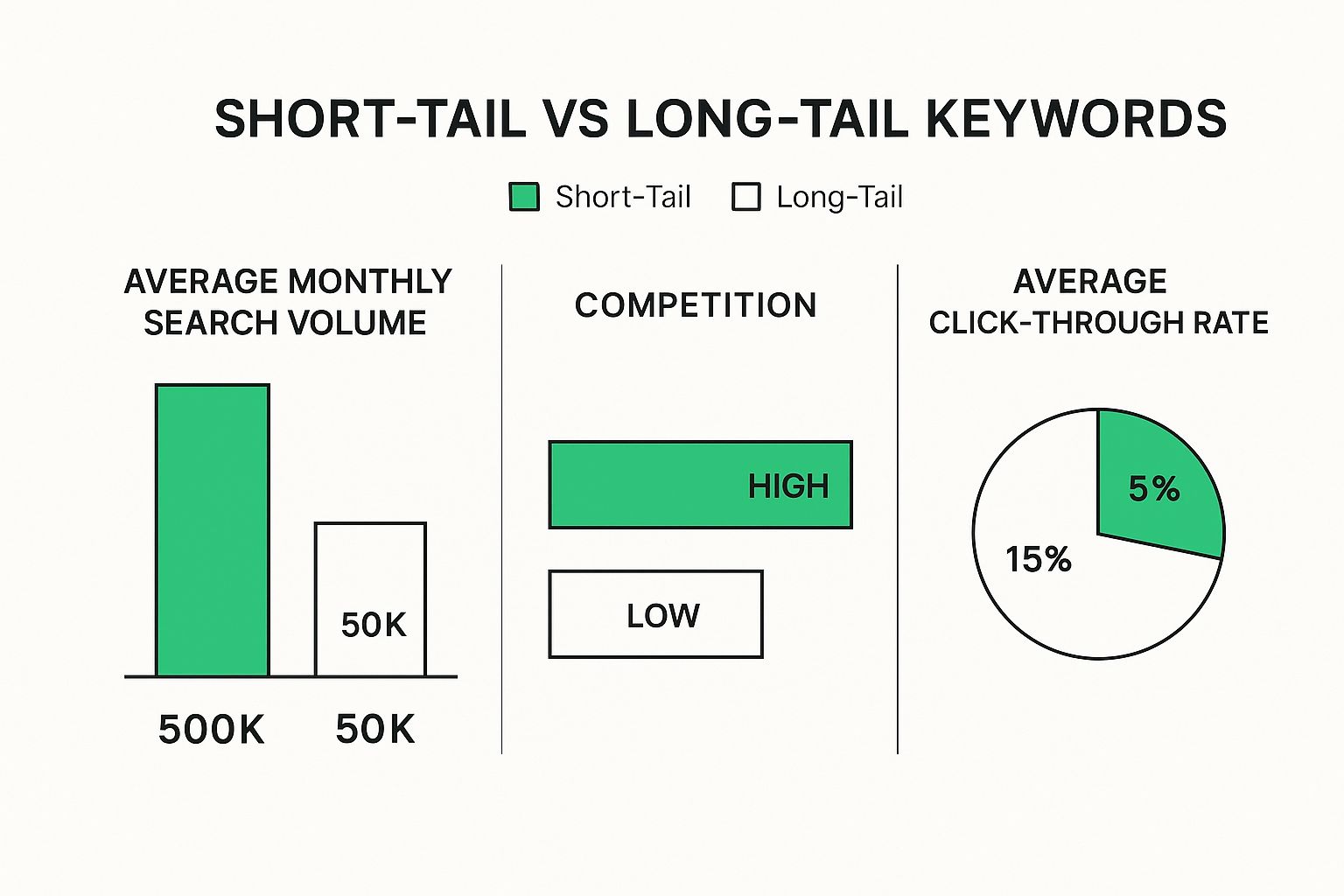
The takeaway is pretty clear. Short-tail keywords promise massive volume, but they bring fierce competition and generally lower engagement. Long-tail keywords, on the other hand, attract a smaller but highly motivated audience that is far more likely to click, watch, and subscribe.
Your goal is to find a relevant phrase that matches the video you can make now. A specific long-tail keyword is often easier to satisfy than a broad term, but relevance still matters more than length.
Comparing Popular YouTube Keyword Research Tools
To do this kind of deep-dive analysis, you're going to need the right software. There are a ton of tools out there, each with its own strengths—some are great for spying on competitors, while others excel at digging up those hidden long-tail gems. We've actually put together a full guide on the best YouTube keyword research tools if you want a complete comparison.
But to give you a quick overview, here’s a look at some of the most popular options and what they do best.
| Tool Name | Key Feature | Best For | Pricing Model |
|---|---|---|---|
| TimeSkip.io | Generates keywords from video transcripts | Creators focused on long-tail optimization and video chapters | Freemium |
| TubeBuddy | Browser extension with on-page SEO analysis | All-in-one channel management and daily optimization | Freemium |
| VidIQ | Competitor analysis and trend alerts | Data-driven creators who want to track competitor strategy | Freemium |
| Ahrefs | Massive keyword database and search volume data | SEO professionals and agencies managing multiple channels | Paid Subscription |
Ultimately, the "best" tool is the one that fits your workflow. I recommend trying the free versions of a couple to see which one clicks for you.
At the end of the day, picking the right keywords comes down to a simple gut check based on three questions:
- Relevance: Does this keyword perfectly describe what my video is about?
- Competition: Looking at the top results, can I realistically create a better video and compete?
- Demand: Are enough people actually interested in this topic to make it worth my time?
Answering those honestly will put you on the path to finding keywords that deliver real, lasting channel growth.
Using Long-Tail Keywords to Reach Untapped Audiences
When your channel is new or you're trying to carve out a space in a crowded niche, specificity is your secret weapon. You could try to compete for a massive term like "home workout," but you'll be up against channels with millions of subscribers. The smarter move? Go after the phrases those giants are ignoring.
This is where long-tail keywords come into play.
https://www.youtube.com/embed/YxDKNXIGcU8
Think of them as full, conversational search queries. Instead of someone just typing "van life," they're searching for something like "budget van build ideas for solo female travelers." The search volume is lower, sure, but the person typing that knows exactly what they want. That clarity of intent means they're far more likely to click on your video and, more importantly, watch it.
Why Long-Tail Keywords Are a Game-Changer
Let's be real: trying to rank for broad terms when you're starting out is an uphill battle. The YouTube algorithm already sees the big, established creators as the go-to authorities on those topics.
But those big channels often overlook the hyper-specific needs of smaller audience segments. That's your opening.
Here's why you should be focusing on them:
- More Specific Competition: A phrase like "no equipment HIIT workout for small apartments" narrows the set of videos that fully match the request.
- Clearer Viewer Need: A specific query tells you what the viewer expects, which makes it easier to design the title, opening, and examples around that need.
- Faster Authority Building: When you consistently create videos that solve these very specific problems, you start to look like a genuine expert. You become the go-to resource for that corner of your niche.
Focusing on long-tail keywords isn't about thinking smaller; it's about being smarter. You're targeting viewers who are far more likely to become loyal subscribers because you're the one who directly solves their unique problems.
How to Uncover Your Own Long-Tail Gems
The good news is you don't need a bunch of expensive tools to start finding these phrases. You can use the same methods we've already talked about, just with a more focused approach.
Start with one of your main "seed" keywords and begin tacking on modifiers—words that answer the classic questions: Who, What, Where, When, and Why.
For instance, try adding terms like:
- Who: "for beginners," "for seniors," "for busy moms"
- What: "with no equipment," "on a budget," "using Canva"
- Where: "at home," "in a small apartment," "for garage gyms"
- Why: "to build muscle," "to lose weight," "to save time"
Suddenly, a huge topic like "vegan recipes" can be broken down into an entire series of targeted videos. It becomes "easy vegan recipes for college students," which leads to "high-protein vegan meal prep for athletes," and then "30-minute vegan dinners for families." Each one is a specific video idea for a specific audience.
If you want to go a bit deeper on this, check out this great explanation of what long-tail keywords are and how they boost SEO.
Placing Keywords for Maximum SEO Impact

Finding the right keywords for YouTube videos is a huge win, but your work isn't done yet. Now comes the real art and science: knowing exactly where to place them for the biggest impact.
Just having a list of great terms is like having amazing ingredients but no recipe. It's the strategic placement that tells the YouTube algorithm precisely what your video is about and, more importantly, who it's for. Think of your video's metadata—the title, description, tags—as a series of signposts. When all those signs point in the same direction, YouTube can confidently serve your video to the right audience.
Crafting a Keyword-Driven Title and Description
Your video title is, without a doubt, the single most important piece of SEO real estate you own. Your primary keyword needs to be in there, and the closer to the front, the better. But it can't just be a string of keywords; it has to be compelling enough for a real person to actually click.
For instance, a title like "My Van Build" is pretty forgettable. A properly optimized title, on the other hand, might be "Budget Van Build Ideas for Solo Travelers | Full DIY Tour." See the difference? It nails the target keyword while immediately sparking curiosity.
Next up is your description. The first two or three sentences are absolutely critical because that’s what shows up in search results and right below your video. You need to naturally include your primary keyword here, along with 2-3 of your most important secondary keywords. Don’t just stuff them in; write a short, engaging summary that tells people what they're about to see. This is a foundational piece of effective YouTube SEO optimization.
Key Takeaway: Your title grabs the initial attention, and the first few lines of your description confirm to both the viewer and the algorithm that your video will deliver on that promise.
Optimizing Beyond the Basics
While your title and description carry most of the weight, several other spots give the algorithm powerful context clues. So many creators overlook these, but getting them right can give you a serious competitive edge.
-
Spoken Keywords: This is a big one. YouTube automatically transcribes your videos. If you can naturally say your primary and secondary keywords out loud in your script—especially within the first minute—you're sending a massive signal that your video is exactly what your metadata claims it is.
-
Video Tags: Tags aren't as powerful as they used to be, but they still have a job to do. I always make my primary keyword the very first tag. After that, I add my secondary keywords and a mix of relevant long-tail variations. This helps YouTube understand nuance and can get your video to pop up in the "suggested" sidebar next to similar content.
-
Chapter Timestamps: Here's a seriously underrated trick. When you create chapters for your video, use your secondary keywords as the chapter titles. For example, a segment about lighting could be titled "(04:30) Best Ring Light for Small Spaces." You’re essentially creating keyword-rich micro-topics within your main video.
-
Closed Captions (CC): Never trust the auto-generated captions completely. Go in and edit them to make sure your spoken keywords are transcribed correctly. Fixing any errors ensures the algorithm is analyzing a perfect script, reinforcing your video's topic from every possible angle.
Answering Your YouTube Keyword Questions
Let's be honest, even when you think you've got YouTube keywords figured out, a few questions always seem to pop up. I get asked these all the time, and they're the same things that tripped me up when I was starting out. So, let's cut through the noise and get some straight answers.
This is your go-to FAQ for the nagging little details that can make or break your video's performance.
How Many Keywords Should I Actually Use?
It's easy to get carried away and just stuff every possible keyword into your description, but that's a classic rookie mistake. The YouTube algorithm is smarter than that.
Your best bet is to focus on one primary keyword. This is your North Star. It should be front and center in your title and mentioned right at the beginning of your description. Then, back that up with 3-5 related secondary keywords worked in naturally. Think of them as your supporting cast. They add context and help you show up for a wider range of searches without looking spammy.
Are Video Tags Still a Thing?
Yes, but their role has changed. Don't waste hours agonizing over them. YouTube has been very clear that your title, thumbnail, and description carry way more weight for discovery.
Think of tags as a final confirmation signal for the algorithm. They help clear up any ambiguity about your topic. Is your video about "bass" the fish or "bass" the instrument? Tags help sort that out. I always add my primary keyword first, then my secondary ones, and a few common variations. It's a cleanup job, not the main event.
My Takeaway: Tags aren't going to make a bad video rank, but they can help a good video be understood more clearly by the algorithm. They're the finishing touch, not the foundation.
Should I Say My Keywords in the Video?
One hundred percent, yes. This is a huge opportunity that so many creators miss. YouTube doesn't just read your metadata; it listens to your video by automatically transcribing it.
When you say your main keywords out loud, especially early in the video, it sends a massive signal of relevance. You're proving to YouTube that your video is exactly what you claim it is in your title. This alignment between your metadata and your actual spoken content is incredibly powerful and can give you a serious edge.
Need a faster chapter draft for an existing upload? Try TimeSkip's YouTube chapter generator, then review every label against the actual section content.
